Real-time server availability for saved connections

Hello, I would like to ask a possibly noob question but I was not able to find the answer neither online nor on this forum. Is it possible to see the availability status (aka. server running) in the list of the connections I created in the Remote Desktop Manager Free Navigation panel? This is how it looks now:
I would like it to look more like a Teamviewer window (so the computers with server running are for instance highlighted or distinguished in any other way):
We are using the UltraVNC client. Is there an option to turn this kind of feature on?
Any help appreciated! Thanks!
All Comments (8)
Hello,
We do have an option to check if your Servers are available, but it is only available in the Enterprise version of Remote Desktop Manager. (File - Background Services - Is Online)
Although I'm not 100% sure it works for VNC.
Best Regards,
Etienne Lord
Thank you! I will download a trial and give it a try!
This is the settings I tried to apply:
I also found this right in the session entry properties:
the problem is there is no visual indication whatsoever whether the computer is actually online or not. Where is the information about online availability displayed after turning the "Check is online" option on? Or is it some other function which I should turn on? Which one is it specifically? Or should I change the settings? How exactly?
Hello,
The options would be in File - Background services - Is Online.
Note that with the latest version, there are reported issues with that feature that causes slowness.
Best Regards,
Etienne Lord
Hello,
I'm new with RDM.
But it look like that this function wont work in the latest version 2023.3.36.0 64-bit.
The settings are already set and if I hit the "Refresh" button one of my entries are colored red.
Maybe the color red will tell me that the machine is offline, but this is not right, because this machine is still running.
On the other side the machines which are powerd off wont colored red.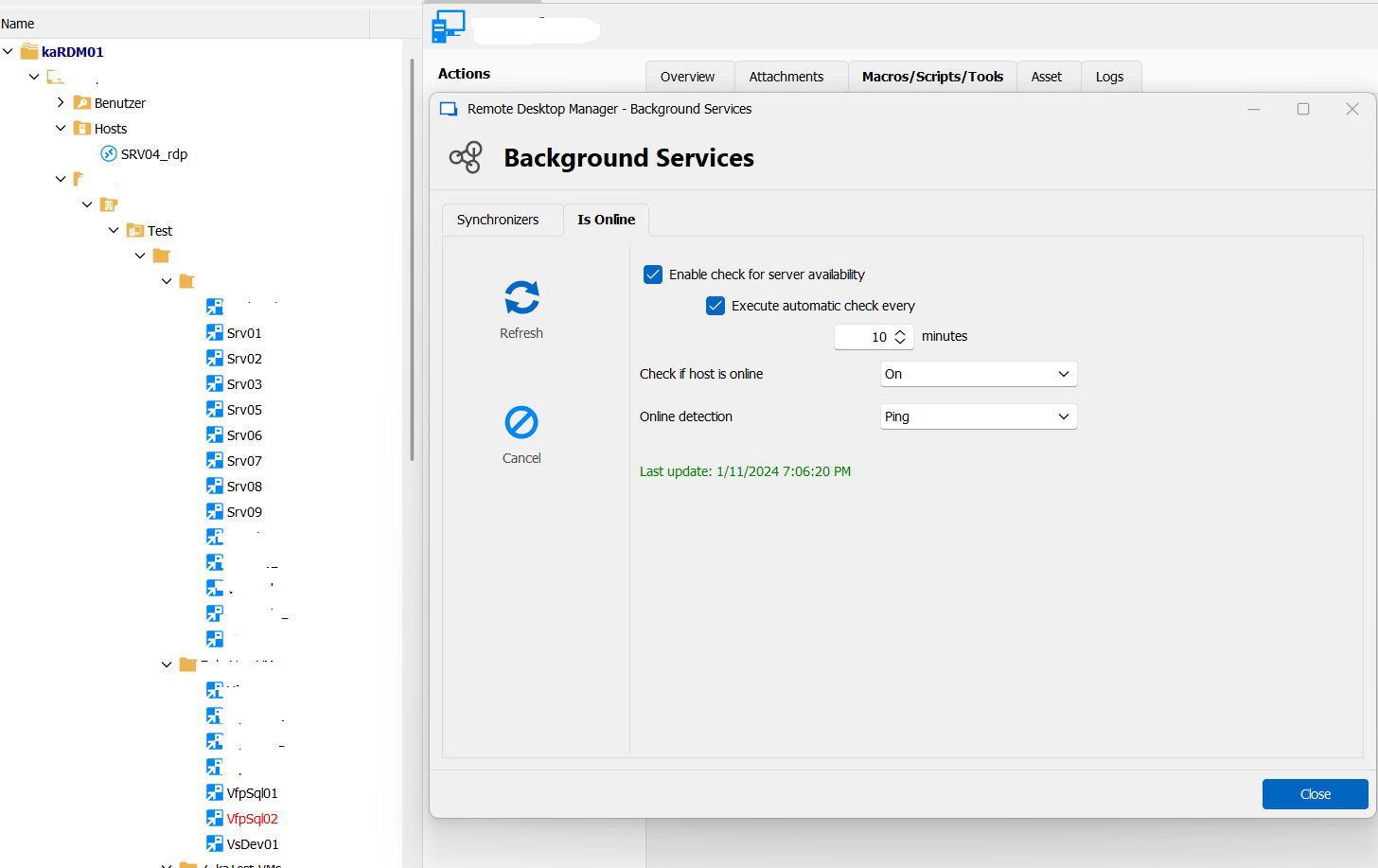
Is there any informations about this feature? What's the trick?
Regards
Toni
RDM.png
Hello Toni,
Thank you for your reply,
We have the following knowledge base article regarding this:
https://docs.devolutions.net/rdm/windows/commands/file/background-services/#is-online
As mentioned in the article, the Server is pinged to determine if they are available. Server will be displayed in "red" in the tree view if not available. Perhaps a different detection method may work better in your case?
Let me know,
Best regards,
Samuel Dery
Hi Samuel,
I'am sorry. All works fine.
I was confused because I searched for an "Online"-icon.
Toni
Hello Toni,
Thank you for your reply,
No problem, I'm glad we got this cleared up!
Best regards,
Samuel Dery