RDM connect when available RDP feature
0 vote

Would it be possible to configure or extend the length of time RDM attempts to re-connect before timing out?
All Comments (25)
Hello,
Do you want this per session or as a global setting?
Regards
David Hervieux
Per session would be ideal. Thank you.
edit: on second though, maybe that would add too much unnecessary complexity. I wanted to simply extend it to a 5-10 minute period or so to account for when a server is updating after a reboot. Global could address this sufficiently without complicating it too much.
Perfect,
I will log this.
Regards
David Hervieux
Hi,
In the currently released version of RDM, there is a setting called "Connect when available delay". (File->Options->General)
You can set the duration of the delay to your liking.
Hope it helps!
Regard,
That was fast. Does this option delay the initial attempt to re-connect, or does it repeatedly try up to the defined length of time?
Hi,
It delays the initial attempt.
Do not mistake this setting with the "Delay the initial connection" that is just above it.
"Delay the initial connection" -> Delays initial connection to RDM (on opening)
"Connect when available delay" -> Sets the amount of time before trying to reconnect.
If you have any other questions, do not hesitate,
What I'm looking for, and I'm not sure if this is what you meant, is like so - an opened tab which has lost its connection (via reboot, etc). Once looking at the below image, I select 'Connect When Available'. This will make the session attempt to re-connect for a finite time. Is it possible to extend that time? A use case is windows patches that take a very long time, or similarly, a rebooting physical VM host.
Hello Martin,
I just wanted to make sure I understand your issue properly. What you are saying is that the "Waiting for host" stops working after a certain time and because of this you aren't connected to your session once it becomes available?
Regards
Michaël Beaudin
'Connect When Available / Waiting for host...' times out after a period of time; not sure how long or why. I'm just trying to stop, or extend that time.
Hello Martin,
I believe this is more of a bug than an intended behavior. We will create a new ticket for this issue and investigate what the problem could be.
Regards,
Michaël Beaudin
Hi,
Connect when available work with pinging, if you are unable to ping the machine from your computer that might be why connect when available doesn't work properly.
Windows Firewall often block echo request and time them out, which would result in the behavior you are experiencing.
My windows 10 machine presently cannot receive ping echo request due to the firewall, when I turned off my firewall it went through and connected right away.
If you need the right procedure to fix the firewall of the machine to allow ping request, I'll be able to give it to you later today, I have to go through the IT department because the article I am finding aren't applicable to my scenario and I don't want to give you false informations.
Regards,
Alexandre Roy
If the 'connect when available' only works when the machine responds to ping, then what is the difference between that button and the button that says 'connect' only?
I don't think its clear what I'm asking for. I'm asking for the 'connect when available' button to continue pinging the machine for an extended period of time. What would be the point of it requiring a echo reply if it's already online? The purpose of this request is to connect machines after they are offline for extended periods, such as for patching or similar.
@martin,
It is working as you say, in that last post.
Although just to make sure, do you only have 1 line saying waiting for host when you use "connect when available", because I am getting multiple.
Because for us, it keeps pinging until we receive a full echo request then it attempts to connect. I just wanna make sure there's no bug here.
It should be saying waiting for host over and over until that machine is online and on the network.
Regards,
Alexandre Roy
For as long as I've been using this feature it always timed out after maybe a minute. It will say 'waiting...' then eventually time out. I never played that close attention to it because I thought that was by design, and it was kind of useless for me as particular servers can take a half hour or more to reboot if big patches are going through, hardware changes to the VM hosts, etc. If that's a bug, that would make more sense. Effectively, the button was exactly the same as the other button that just said 'connect'. It only attempted to connect for a slightly longer period of time if it was offline, but again - this was only for a short duration. My request to extend this time was born from that.
The feature should be trying indefinitly until It's available. It is not time limited. Ill post a gif of what it should look like in a normal scenario below.
If it just get stuck on the first line then there's an issue.
There shouldn't be any timeout.
Regards,
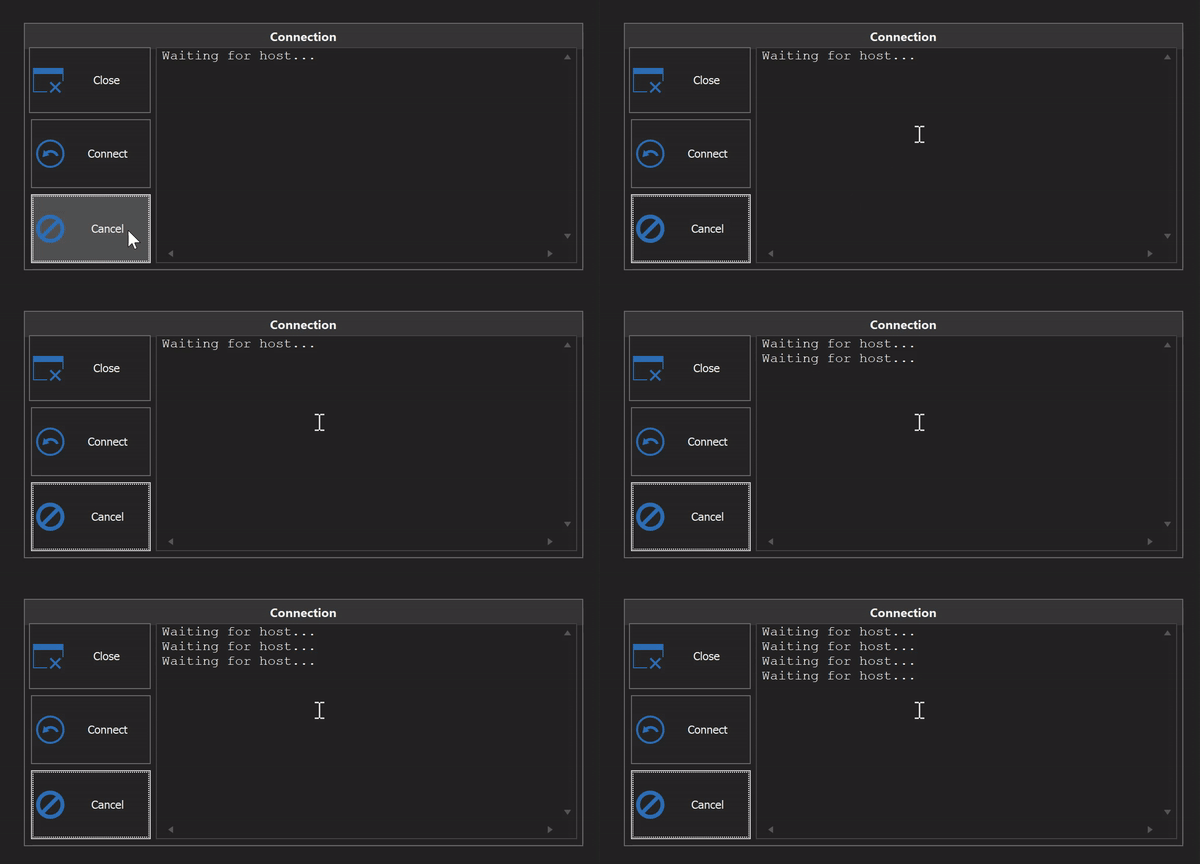
Alexandre Roy
Connect when available1.gif
I got video of it! It's a long one, but it shows the 'connect when available' feature repeatedly timing out and being restarted by me. I've sent it via the FileDrop!
I think I figured out what it is.
There is a bug with Symantec Endpoint Protection where the system service doesn't always start up after a reboot, and must be manually started. When Symantec is down, and since it overrides system policies, RDP connections are totally blocked by default. I access the server with remote management tools, flip the service on, then I can RDP in.
I believe that RDM pings the machine, gets a reply, attempts to connect, then is getting denied and terminating the connection.
Edit: Confirmed. When rebooting a server after patching it, and the server is applying the updates immediately prior to the reboot while still being online, selecting 'connect when available' has the same results.
Hello Martin,
Thank you for taking the time to look into this issue. This makes a lot of sense with how the code of this specific feature works. We indeed stop pinging once we try to connect once.
We will investigate this issue and let you know if we come up with a way to work around the problem.
Regards,
Michaël Beaudin
I'm certain to have seen this before, during the windows update the machine does ping but the RDP service wont work. Probably why you are getting this scenario. Im sure I can reproduce it if I have one of my VM's needing an update.
thanks for this info.
regards,
Alexandre Roy
Hello Martin,
Could you please try to change to "Port Scan" the "Online detection" property of an entry which fails to "Connect when available". This feature changes the way we detect if your machine is online and might work in your scenario.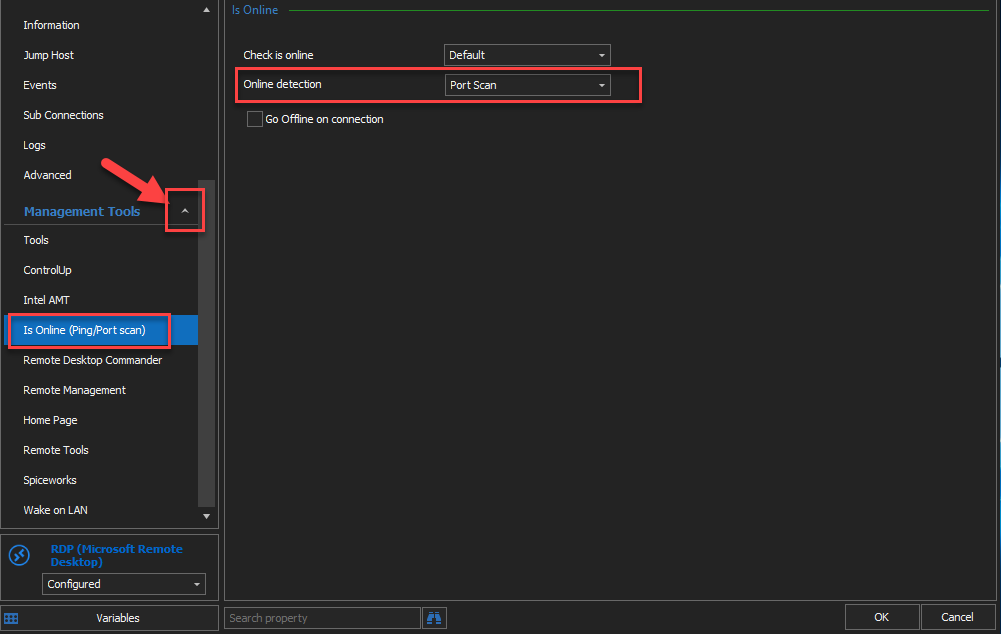
Please let us know if this change fixes the issue for your setup.
Regards,
Michaël Beaudin
OnlineDetection.png
Hello Martin,
Just wanted to get an update on this issue to make sure everything works well for you. Did changing the online detection mode get you anywhere or do you still have the same issue?
Regards,
Michaël Beaudin
Hi,
Can you add button "Continuous Ping" to this dialog, under "Connect When Available" button?
This would be very useful for checking client availability.
Thanks RDM Team!
Hello,
Could you describe what you would like to achieve exactly? The "Connect when available" feature does a ping or portscan (depending on your configuration) until it detects a response and then connects, so I would like to understand how adding "continuous ping" would change the behavior.
Regards,
Hubert Mireault
It would be useful as server can be pingable long before the system is up for RDP.
So with ContPing you can track when server (network) goes down and when gets up again. Soon or later the RDP will come back ;)
Hello,
Did you try out changing the "online detection" from ping to port scan?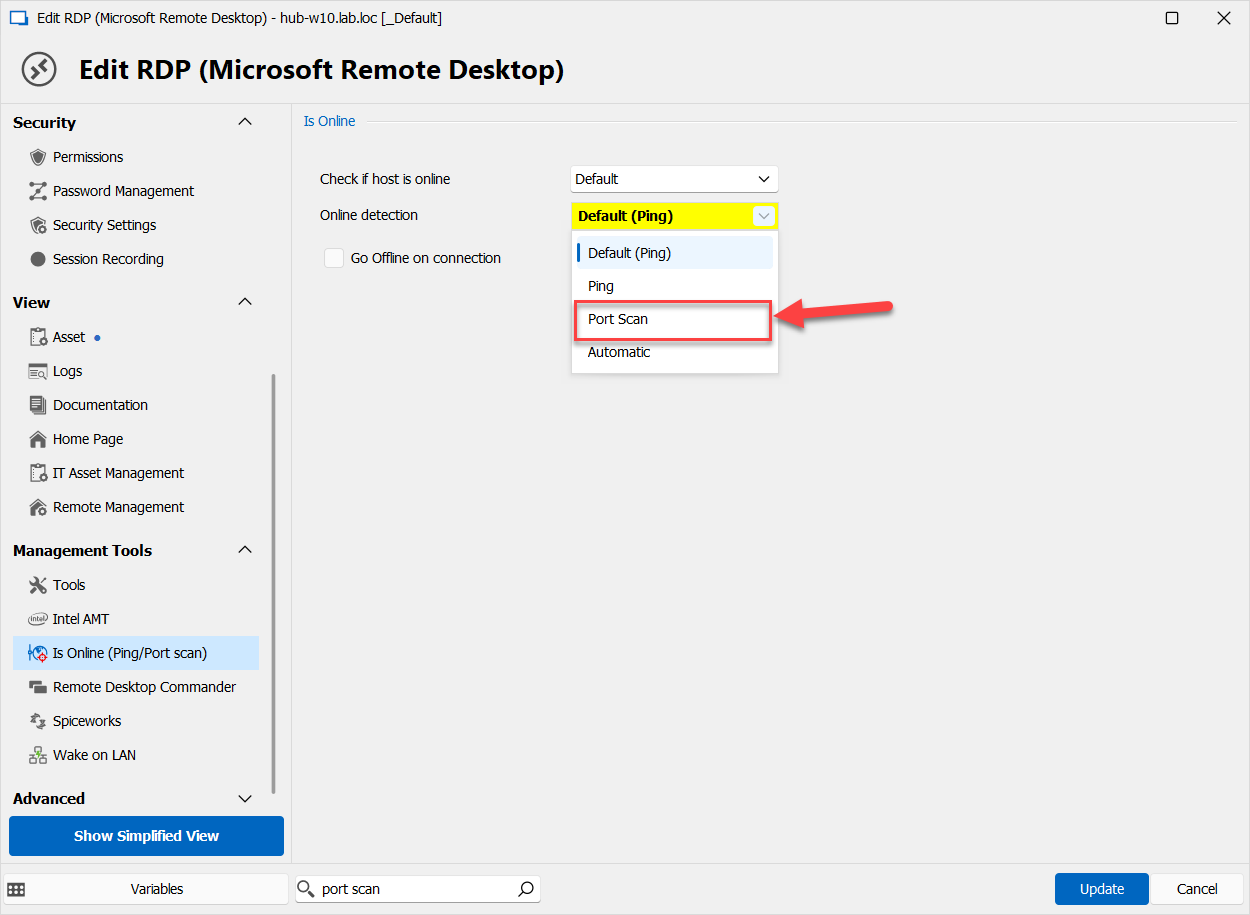
In the case of RDP, the port becoming available should coincide with when the RDP is reachable. Changing this setting will make the "connect when available" feature use a port scan instead of a ping.
Regards,
Hubert Mireault
2aebf821-ce8e-4b67-9ad4-cd5a6895d880.png