RDP connection problem with signature:s and signscope:s

Ls,
I received a rdp file from a client and when i import it to RDM 2020.1.4.0 64bit or 2019.2.24.0 64bit i get the prompt for credentials and after that nothing happends.
When i double click the file i've got from the client outside RDM i can login on the machine.
When i open the rdp file in notepad++ you see below there config, i'v deleted the signature, and connection adresses.
redirectclipboard:i:1
redirectprinters:i:0
redirectcomports:i:0
redirectsmartcards:i:0
devicestoredirect:s:*
drivestoredirect:s:
session bpp:i:32
prompt for credentials on client:i:1
server port:i:3389
allow font smoothing:i:1
promptcredentialonce:i:1
videoplaybackmode:i:1
audiocapturemode:i:1
gatewayusagemethod:i:2
gatewayprofileusagemethod:i:1
gatewaycredentialssource:i:0
full address:s:
gatewayhostname:s:
workspace id:s:
use redirection server name:i:1
loadbalanceinfo:s:tsv://MS Terminal Services Plugin.1.XXX
use multimon:i:1
alternate full address:s:
signscope:s:Full Address,Alternate Full Address,Use Redirection Server Name,Server Port,GatewayHostname,GatewayUsageMethod,GatewayProfileUsageMethod,GatewayCredentialsSource,PromptCredentialOnce,RedirectPrinters,RedirectCOMPorts,RedirectSmartCards,RedirectClipboard,DevicesToRedirect,DrivesToRedirect,LoadBalanceInfo
signature:s:
Can you give me a help on how i can get this work in RDM
All Comments (11)
Hello,
Could you post a screenshot of the prompt that you are receving?
Is it asking you the password to authenticate on the remote computer or on the RD Gateway?
Best regards,
Jeff Dagenais
It is asking for the password of the RD Gateway.
When i fill that in the connection disappears from my screen
Hello,
How is the gateway configured inside the RDP session? Is it possible to send us a screenshot of your Connection tab in the properties of your RDP session?
Best regards,
Jeff Dagenais
I can send you the rdp file in a email or private message.
Hello,
Thank you for the rdp file.
Could you try a test for me please? If you go in the Connection tab and uncheck the Use same RD Gateway credentials as remote computer option, press the credentials button and enter the RD Gateway credentials in that area. Is it still asking you for the credentials?
Best regards,
Jeff Dagenais
It is still asking for the credentials.
If i start the rdpfile i send you than i can logon with no problems
Hello,
Could you post a screenshot of the window that you are receiving?
Best regards,
Jeff Dagenais
Hi Jeff,
See the screenshot, when if i fill in the credentials the connection disapears
Annotation 2020-02-12 105036.jpg
Hi,
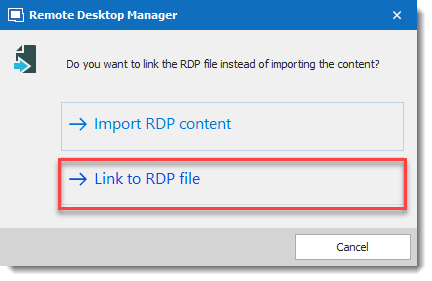
I was able to reproduce the issue, I open a ticket with the engineering department. The current workaround is to import the RDP with the "Link to RDP file" option enabled. However, does this mean that the RDP file needs to be accessible for everybody? It could be through a UNC path.
We will inform you when the fix will be available.
Best regards,
David Grandolfo
Link-RDP-File.png
David,
can you give me an update
We are still investiguating the issue, we have to implement a similar infrastructure if possible to test it.
We keep you in touch.
Regards,
David Grandolfo