how to utilise custom proxy?

Hi there,
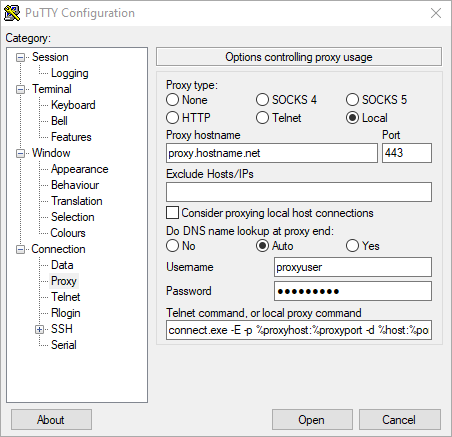
I'm just wondering which session would replicate what I use in Putty here:
where the telnet command in the screenshot is:
connect.exe -E -p %proxyhost:%proxyport -d %host:%port -P %user:%pass
I've tried adding these details into a number of sessions available within RDM but am not having much luck getting a SSH connection to connect over it.
Any advice would be greatly appreciated!
Cheers
putty_hl7DHqfNl4.png
All Comments (3)
Hello Steven,
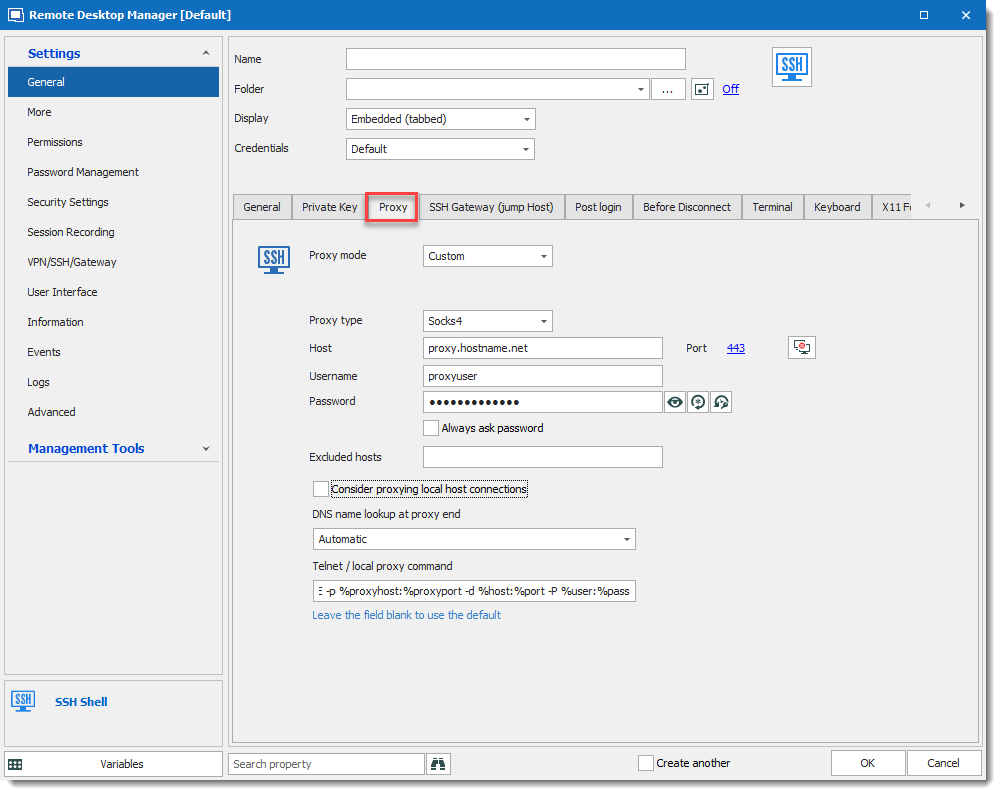
I don't know the Local proxy type, that said, we have a similar proxy integration in our SSH Shell entry. Are you trying to open an SSH connection with this proxy connection?
If so, please look at the SSH Shell entry and click the Proxy tab.
Let me know if this meets your needs.
Regards,
David Grandolfo
Proxy.png
Thanks David,
Yes that's the session entry i was playing with to no avail.
The custom proxy i am using is called "proxytunnel" and is designed to allow SSH over HTTPS.
this is the string i use in putty to connect (minus the actual addresses/passwords):
if i copy/paste this string into a command line window i get this prompt:
Hello,
I'm afraid that I don't know this Proxytunnel tools, but could you test to set the Proxy Type to HTTP.
If it doesn't work, please record verbose and logs of a failed connection and send it to me.
Regards,
David Grandolfo