Cannot Connect to a DAMEWARE Remote Connect with other crendetials
Cannot Connect to a DAMEWARE Remote Connect with other crendetials

Hi,
I have no problem creating an entry with dameware and just enter the IP and no username/password and it connects with my own in windows login.
When i try to create a new entry and login with a local workgroup username password on a windows 10 machine i stuck in authenticating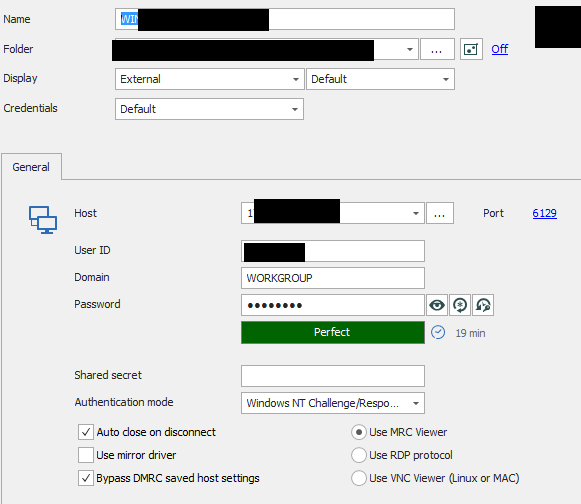
Any ideas ?
Many Thanks,
Vassilis
2019.2.16.0
Dameware: 7.5.6.0

RDM for Windows 11
Purchased Enterprise Edition v2026.x
2020-02-02_00004.png
2020-02-02_00003.png
2020-02-02_00002.png
All Comments (7)
Hello Vassilis,
I'm not sure if Workgroup has to be entered in the domain field or just let empty. When using the same configuration RDM will launch DWRCC.exe with the command line :
Could you try with the command line if it works?
Best regards,
David Grandolfo
Thanks for the reply David.
First of all i upgraded DAMEWARE to 10.0.0.372, works ok with RDM like before.
Tried the following commands from CMD, all of them are still sticking on "authenticating"
DWRCC.exe -c: -h: -m:192.192.192.192 -u:Username -p:Password1 -d:WORKGROUP -x: -a:1
DWRCC.exe -c: -h: -m:192.192.192.192 -u:WORKGROUP\Username -p:Password1 -x: -a:1
DWRCC.exe -c: -h: -m:192.192.192.192 -u:Username -p:Password1 -x: -a:1
DWRCC.exe -c: -h: -m:192.192.192.192 -u:.\Username -p:Password1 -x: -a:1
Needless to say if i run manually dameware, click on connect and enter local credentials with domain : WORKGROUP it connects in a second
RDM for Windows 11
Purchased Enterprise Edition v2026.x
Hi,
You could probably look in the DWRCC switches if one supports Workgroup. That said, I found this Solarwinds help topic: https://documentation.solarwinds.com/en/success_center/dameware/Content/CLI_functionality.htm
And I think the Workgroup will be in the -d switch.
If the command doesn't work, RDM will not be able to support it.
With the new version of Dameware does any command-line works?
Regards,
David Grandolfo
I played with the options but nothing.
The link with the CMD lines is good so i opened a ticket to them how and why the command line does not work.
Let's see what the reply will be.
RDM for Windows 11
Purchased Enterprise Edition v2026.x
Hi,
Perfect, please let us know if we can improve our integration.
Regards,
David Grandolfo
The official answer from support is:
Which is weird as i have a license.
Anyway i will reinstall and stuff of dameware.
Thanks for the support.
RDM for Windows 11
Purchased Enterprise Edition v2026.x
Weird but it's good to know.
Thank you for giving us feedback it's very important and useful for the community.
Regards,
David Grandolfo