RDM Datasource list disappear

Since the latest update of RMD version 2019.2.24.0 64bit i have the issue that my datasource list disappears randomly. This happens either with or without a vpn to a customer. I have the server also in my host file and never had this issue. Also when i use offline mode it also disappears. Any have a solution for this or is there someone familiar with the bug?
remote-desktop-manager.png
All Comments (11)
Hello,
Do they not appear when you open RDM or do they disappear randomly as you are using Remote Desktop Manager? If you refresh your cache (CTRL + F5) do they come back?
Best Regards,
Etienne Lord
Hi When we start RM everything looks normall but it randomly will disappeear after we do a couple of refresh they come back again.
Hello,
Would you be able to send a recording of the issue? I sent you a link via private message that you can use to send in your video.
Best Regards,
Etienne Lord
Hi,
I have uploaded a short video of it. After refresh then it appears as you can see.
Hello,
Could you send us your Help - Application Logs report? We will have a look at that.
Best Regards,
Etienne Lord
Hi,
I have enclosed the application log file its till 30 days back i hope this is enough?
kind regards,
Lars
message.txt
Hello,
If you restart your SQL Server service, does it still happen?
Best Regards,
Etienne Lord
Hi,
We have restarted the sql server and no difference is happening. Still have the same effects at RDM.
I also include 2 other log files of colleagues that have the same issue
RemoteDesktopManager6404-03-2020-tdl.log
RemoteDesktopManager642-3-2020.log
Hello,
Thank you for the logs, we will look into it :)
Best Regards,
Etienne Lord
Hello,
I believe this happens because of some security changes that were made with RDM, you can refer to this blog post : https://blog.devolutions.net/2019/09/remote-desktop-manager-security-upgrade-application-lock
Best Regards,
Etienne Lord
Hello,
My guess is that the behavior comes from an option that is checked under Administration - System Settings - Applications 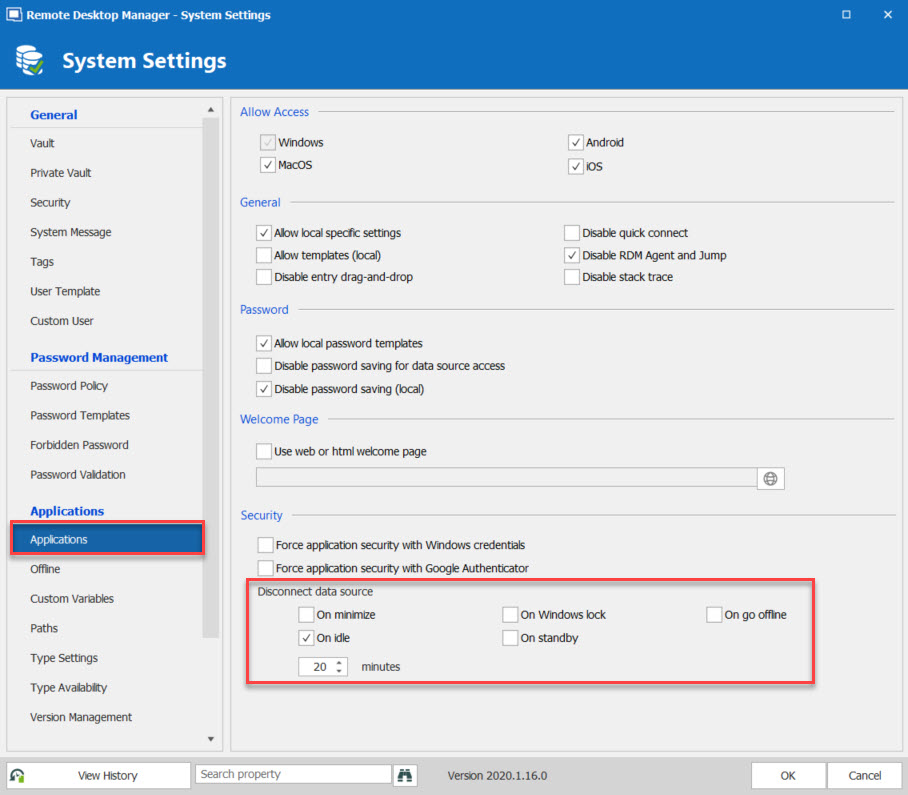
These options will disconnect the DataSource after a certain action, in that case, after 20 minutes of inactivity.
As mentioned in the Blog post I sent above, these options will work when "Always ask for password" is checked in your Datasource configuration. So if you have one of there checked, you will be disconnected and will need to refresh your Remote Desktop Manager (CTRL + F5) in order to reconnect it.
Best Regards,
Etienne Lord
disconnect.jpg