SSH not workingy anymore (no common host key)

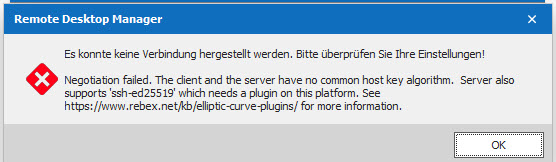
We can't connect to any fortigate Firewall anymore. We get a message that there is no common host algorithm and need to install a plugin.
Whad do we need to do, change something with the algorithm or install something?
Version. 2019.2.24
All Comments (12)
Hello,
Are you able to authenticate with an application like Putty as example?
Best regards,
Jeff Dagenais
Hi
Yes it works without problems in putty.
It also worked in RDM before. It must be since an update.
Best regards.
Patrick
Hello,
Could you go in the Properties of your SSH Shell entry under the "Advanced" tab, check the following options:
1. Check "Verbose"
2. Check "Enable Logging"
3. Use the ellipsis to select a path to create your log
4. Make sure that your "Log Mode" is set to "Event"
Once this configuration has been made, try to launch your SSH Shell entry once more and send us the log which will be created.
Please submit the error log by ticket at ticket@devolutions.net
That said, during the time that we troubleshoot this issue with you, we probably have a temporary workaround that would allow you to continue to work.
To use this workaround, please go under File -> Options -> Terminal -> Under the Advanced section, check Use Legacy Terminal.
It is important to note that using this workaround will prevent you from using the new features that will soon be available with the SSH Shell entry type.
Best regards,
David Grandolfo
Hello David
I have about 3 different places with an Advanced tab under Properties, but I don't find these options anywhere. Do you have a screenshot?
I tried the workaround and enabled the legacy mode, but I get the same error message, so I can't use it at the moment.
Best regards.
Patrick