RDM tab loses focus and activates another tab I'm connected to
RDM tab loses focus and activates another tab I'm connected to

This has been driving me absolutely bonkers! I'll be connected and typing some commands in one tab (a Windows server) and all of a sudden it switches to another tab I'm connected to and I'll be typing the rest of the commands there (the wrong server!). This is so dangerous, especially if you're working on identical windows versions and have the same command prompt window open on both servers.
How can I stop this? I hope this isn't a feature and if it is it should certainly NOT be by default.
All Comments (11)
Hello,
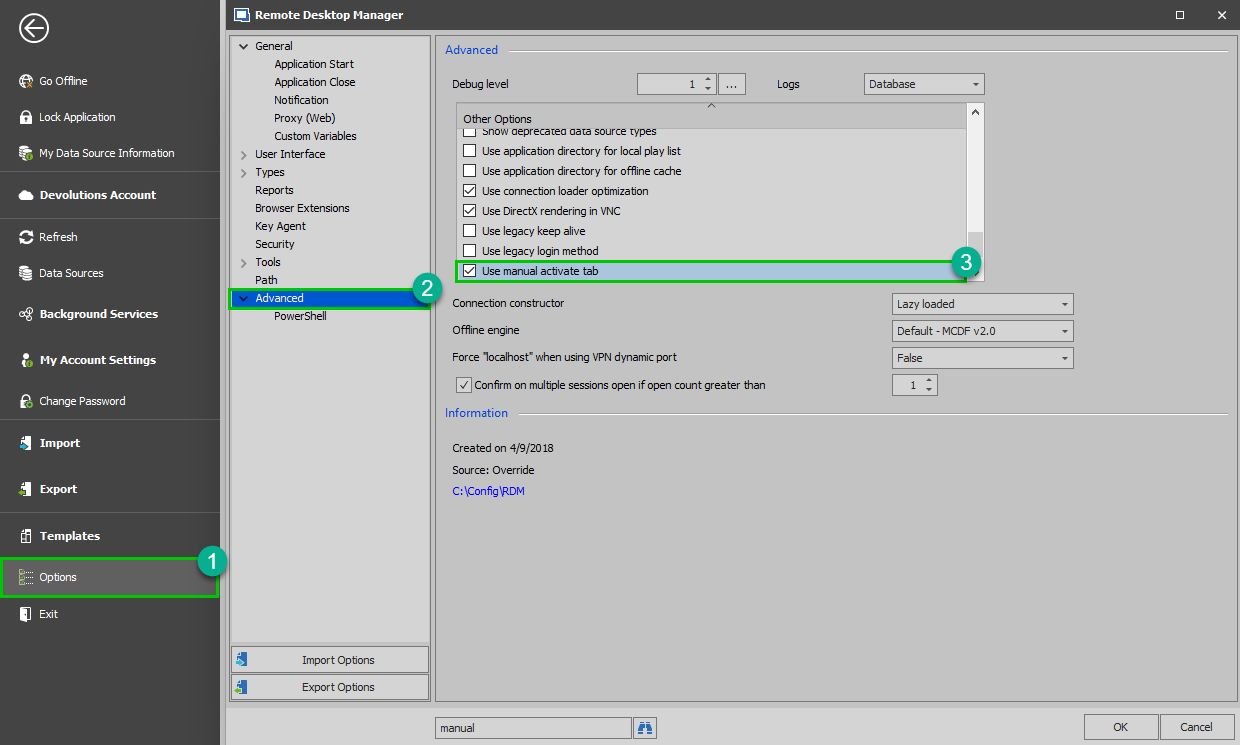
Would it be possible for you to go under File -> Options -> Advanced -> Other Options and check "Use manual activate tab"? Doing so should prevent the focus from moving to another tab:
Best regards,
James Lafleur
ManualActivateTab.png
Thanks. I won't know if it actually works for a day or so because it's totally random. But assuming this solves my problem, I would certainly advise having this option unchecked by default in future updates. I often have lots of tabs open and I don't always stare at the tab I'm working on. If it automatically switches focus to another tab and I don't notice before typing some bat or ps1 command I could get myself in a lot of trouble.
I came in this morning, started connecting to a server and boom it changed focus to another tab. Needless to say that option didn't work.
What else can I try?
Hello,
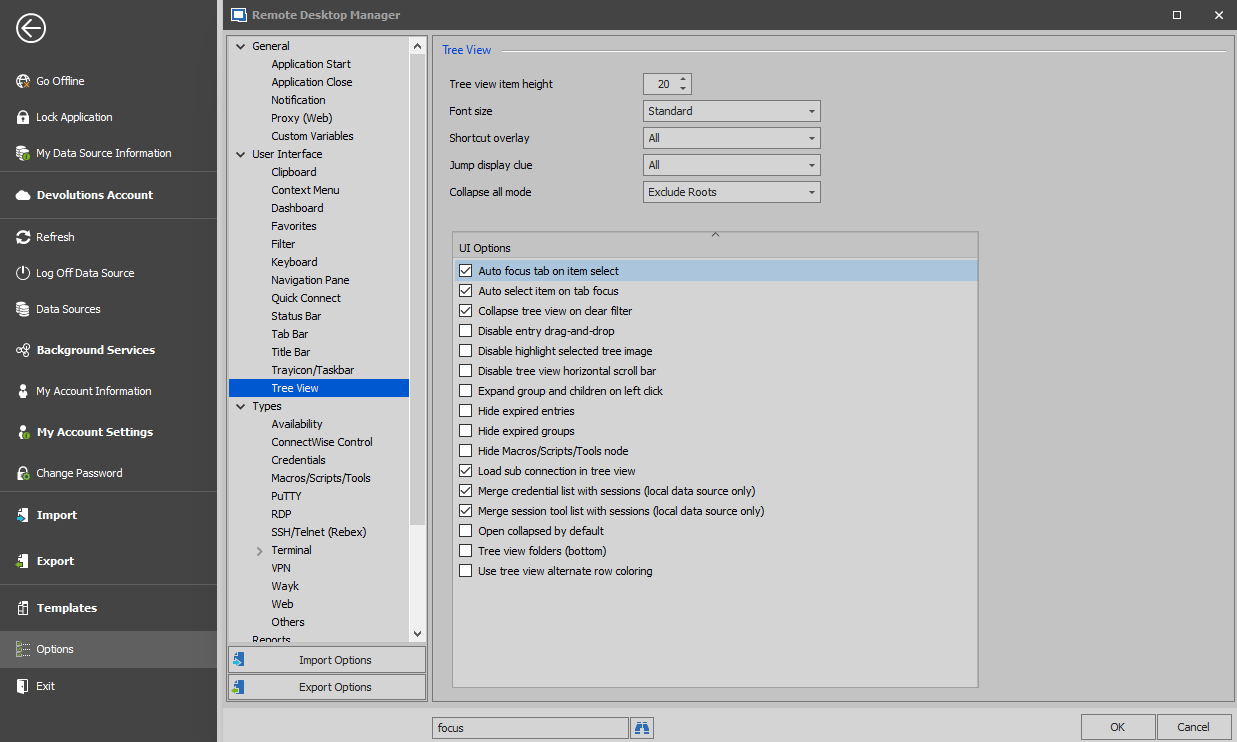
In that case, I suspect that the focus changes from one tab to another because you must be selecting another entry from your Navigation Pane, in doing so, the focus is moved to that tab if the session is already opened. This behavior is caused by the option called "Auto focus tab on item select".
For this reason, I would recommend unchecking this option as well. It is located under File -> Options -> User Interface -> Tree View:
Best regards,
James Lafleur
AutoFocuTab.png
That would make sense if the session was already opened except that it wasn't. I connected successfully and started navigating some menus in that rdp session before it kicked me out into another tab (the session I was working in did not disconnect or close). So I had to click back to it to continue doing what I started.
In any case I've unchecked the option you suggested anyway and I'll write again if the issue persists. Thanks for your help so far.
Unfortunately it's still a problem. It looks like now it changes focus to a tab that's connecting or reconnecting. Is there another option I need to check or uncheck to prevent this?
Hello,
Unfortunately, at this time, I cannot think of another option that could affect this behavior. That being said, would it be possible for you to record this behavior and send it to us? If so, please send an email to ticket@devolutions.net , I will then be able to provide you a secure link to provide us this recording.
Best regards,
James Lafleur
Hmm, that would mean I'd have to record private data wouldn't it? Also, the file could be huge since it can take hours or days before it switches me to another tab.
Besides, if I record my session wouldn't it just record the tab I'm in or does it record all sessions even after switch tabs?
Hello,
The recording I requested would have been of your Desktop, not only the tab you are working on. That said, I understand that this might not be an option for you since the issue is not reproducible and can occur at random times.
That being said, are you the only one to experience this issue? Also, which version of RDM and what type of Data Source are you currently using? Is it the Free or the Enterprise Edition?
Best regards,
James Lafleur
I'm the only one that uses it so yes it's just me. It's the free version. If I remember correctly this happens to me both when I use it at home especially at work since I use it there many times throughout the day.
I'm just using the default local data source. In fact all settings should be default since all I've done is add targets where I rdp to.
Hello,
Thank you for your quick reply and thank you for this information!
That being said, have you been able to record this behavior? Since you are using the default configuration of RDM, I doubt that this issue could caused by your current configuration. If you have access to a video of this issue, I could open a ticket on your behalf in our ticketing system in order for us to further troubleshoot this issue.
Best regards,
James Lafleur