Store credential for RDP based on file name?

I have an interesting situation where we have a VM in Azure that doesn't have a fixed IP. Each day it starts and won't have the same IP as yesterday. I get the .RDP fle each morning with today's address in it. It does have the same credentials though. Is there a way to create an entry that reads an .rdp file each time it's launched, uses the host in it, that I can tie a credential to?
All Comments (20)
Hello,
Do you want to launch it in Embedded(tabbed) or External mode? Furthermore, are you the only one who uses this session?
Best Regards,
Etienne Lord
Generally I launch in tabbed mode, but that's just because that's how it works now. Yes I'm the only one.
Hello,
There is a way to link a .RDP by doing an Import - Import Sessions - RDP configuration, after you specify your .RDP, you'll be able to use the Link option :
But after checking this option, we noticed that there is a bug with the Credentials where they are not sent, a ticket with the engineering department has been open for that issue.
Best Regards,
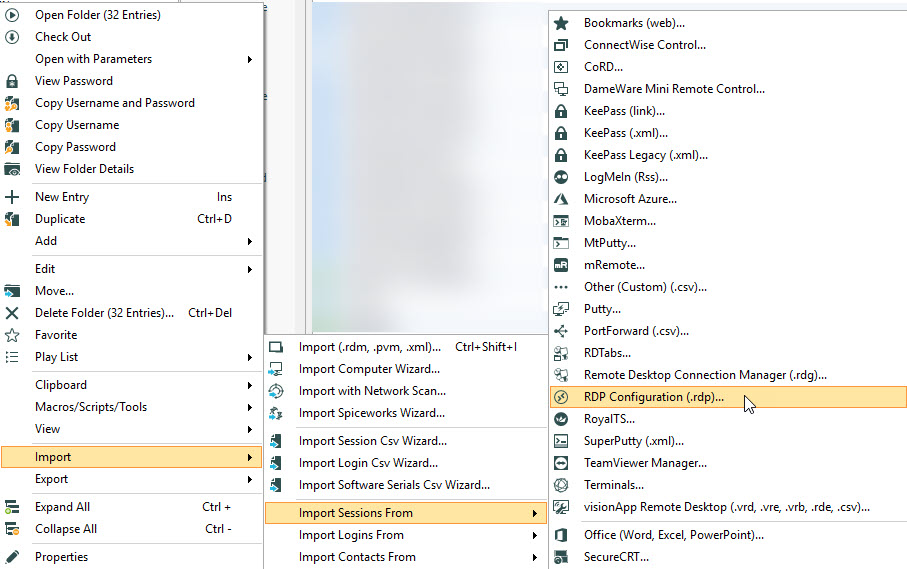
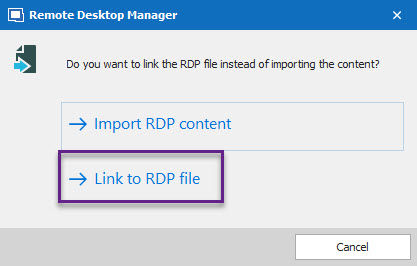
Etienne Lord
link.jpg
import.jpg
I tried the linking just to see if it works, but I'm not sure it's working. Once I linked, I don't see an option to open a connection. Did I do something wrong?
https://imgur.com/a/XgVrzYb
Hello,
Would you be able to send a recording of our process to import the RDP file, I will try to recreate the issue.
I will send you a link via private message to send in the recording.
Best Regards,
Etienne Lord
Yes I can do that. Thanks
I sent the video over yesterday via the link you PMed me.
Hello,
Thank you, we will have a look :)
Best Regards,
Etienne Lord
Quite weird that it is not creating a RDP session, we will investigate on that!
Where exactly did the .RDP file came from?
Best Regards,
Etienne Lord
It's downloaded from Azure, when you click "Connect" on an Azure VM.
Hello,
Would you be able to send us a .rdp sample (you can change the information of the RDP) from your Azure? We will do some test. Simply use the same link that I sent you earlier.
Best Regards,
Etienne Lord
Done.
Hello,
Thank you, we will have a look :)
Best Regards,
Etienne Lord
Hello,
The import seems to create an RDP session as expected but we might have found a work around. Instead of importing the session, could you try to create an RDP entry, set the option to RDP file link (See below) and then manually fetch the .RDP file? Let me know if that works :)
Best Regards,
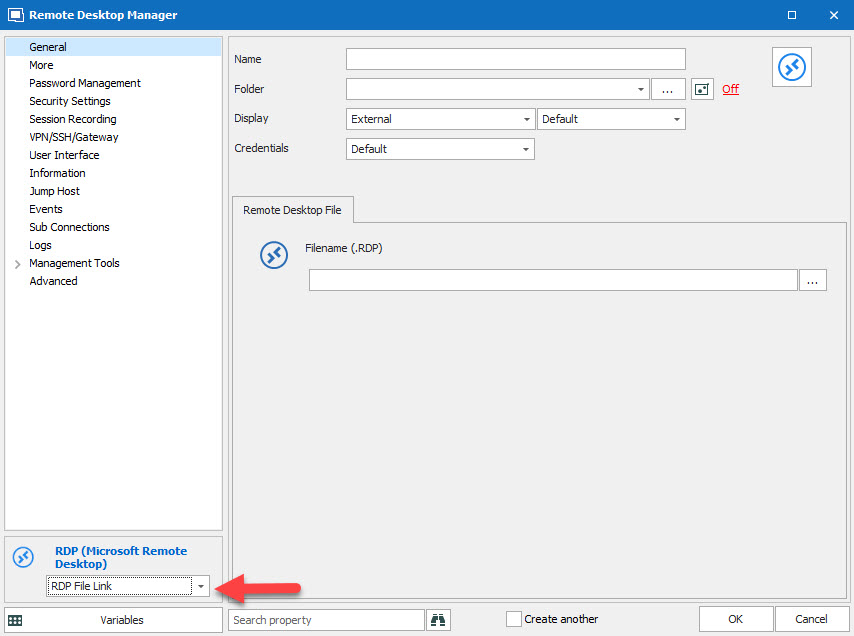
Etienne Lord
rdp.jpg
I've done this. I'll let you know if it works. However, I can't seem to change the display to "imbedded (tabbed)"
Only external is listed. I want to open it as a tab. Thanks
Hello,
The session will indeed only open in External mode since it is linked to an .RDP that opens up with MSTSC.
Best Regards,
Etienne Lord
Interesting. Thanks. Is there a way around this? I do have .RDP mapped to devolutions.
Hello,
I do not believe so, but I will have a look.
Best Regards,
Etienne Lord
Hello,
Sadly, after some investigation, we can only launch it in embedded mode.
Best Regards,
Etienne Lord
Hello,
With the next version of DPS, you will be able to make a "Link to RDP File" and edit the properties :)
Best Regards,
Etienne Lord