Why RDM Free dosn't work for ssh tmux hotkey?

Hi!
Windows10, latest RDMF
Why RDM Free dosn't work for ssh tmux hotkey?
In old version (Setup.RemoteDesktopManagerFree.2019.1.41.0) work well
All Comments (14)
Hello,
As a workaround, could you go in File -> Options -> Types -> Terminal and check the option Use Legacy Terminal.
Let us know if that help.
Best regards,
Jeff Dagenais
Hello,
Could you also describe which tmux hotkey you are trying in the SSH Shell session?
Best regards,
David Grandolfo
I see, tmux work, but work only with keyboard calculator block.
hotkey Ctrl+b Shift+' work well But Ctrl+B+ Left,Right Arrow work only with keyboard calculator block.
It's very uncomfortable :(
Hi,
I tried the same feature on our tmux server and it works fine. Probably our Tmux is not configured as yours.
That said, could you try to enable the Disable application keypad mode under the Terminal tab?
Best regards,
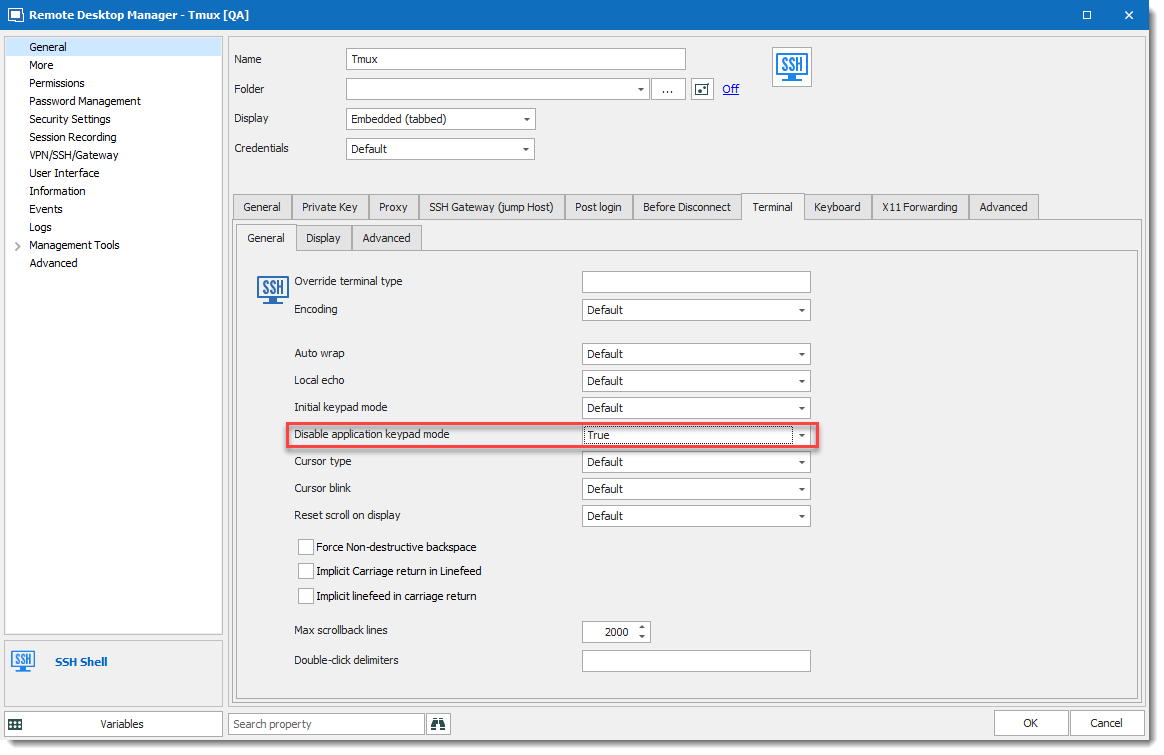
David Grandolfo
tmux.png
Unfortunately, it doesn't work. Ctrl+b+Up,Down,Left,Right = change tmux border line position. I use Debian and Ubuntu OS, mostly.
Does it work well with Putty?
Also, could you share your tmux.conf file, so we can test it on our server?
I can provide you a secure share link.
Regards,
David Grandolfo
Yes! If I use putty directly, tmux work well. I use default tmux configuration. I have too much linux OS to use custom tmux config.
I can provide you a secure share link.
You mean an online session? For support!
This problem is only on the workstation with full keyboard. On my laptop (without full keyboard) is'nt problem. I use Latvian (Standart) and English (United States) Keyboard Languages. Maybe it helps.
Hello,
The secure link is for a copy of your tmux configuration. That said, I opened a ticket with the engineering department regarding the keyboard information which is useful.
Best regards,
David Grandolfo
Hi,
We performed many tests and it seems that in the latest beta version of RDM Free we are not able to reproduce anymore the issue.
Could you:
David Grandolfo
I have a similar issue where I've configured a hotkey of Alt + Left or Alt + Right is meant to switch between panes. Same like the OP, it does work if I turn num locks off and use the arrow keys on the num pad. I am using a full keyboard with UK English.
Interestingly my hotkey for Shift + Left or Shift + Right which is meant to change between tmux windows works fine
I have also tested on the beta version 2020.1.10.0 and have the same issue.
Remote server is Ubuntu 18.04. Local workstation is Windows 10
My tmux config is here https://raw.githubusercontent.com/mahomedh/tmux_config/master/.tmux.conf
Here are some screenshots of my settings
https://snipboard.io/mpGyhw.jpg
https://snipboard.io/43VZ9W.jpg
https://snipboard.io/d9KQIi.jpg
https://snipboard.io/ALJ1ym.jpg
Generally anything not screenshoted above has a Default setting
I am happy to share my full RDM settings if you want to provide the secure link
Hi! I today updated to version 2020.1.10.0.64-bit. At the moment, I see such a situation. Ubuntu 18.04 LTS.
Ctrl+b shift+" work well for horizontal split. Jump from one area to other will was well Ctrl + b and Up|Down|Left|Right (from keyboard standart direction for arrows).
I seem be good! Thanks a lot.
@antikurjers, Thanks for the update.
@mahomed, we thing that RDM or another program in the OS probably cath the shortcut send to RDM / the SSH session. Could you look at the keyboard shortcut under File -- Options -- User Interface -- Keyboard if any shortcut could cath the hotkey you are trying to use.
If not, could you try to enable the legacy mode under File -- Options -- Type -- SSH and Enable Legacy terminal.
Regards,
David Grandolfo
Well! That's a bit embarrassing!! Turns out I had an autohotkey shortcut that was interfering with the Alt + Left/Right and once I removed those, that shortcut key works correctly now. Thanks for your help with this issue
That’s a good news, I mean at least their is no issue.
Thanks for the update
David Grandolfo