duo - azure sql - 2fa

OS : win10 1909
rdm : 2019.2.22 x64
I have some problem with enabling 2FA DUO for Azure SQL data source.
I had enabled this before but I had some problem last month so I disabled 2FA and now I have time to play with.
Problem is that I enable DUO 2FA but I never get DUO windows to select authenticatio (push, sms, phone).
I even tried to create new connection and even cleared all 2FA from RemoteDesktopManager.cfg
When I saved connection I get this.
https://www.screencast.com/t/uK6h4crFzdyd
Not sure what else to check, can you help?
Maybe I miss some option.
https://help.remotedesktopmanager.com/datasources_2factorauthenticationduo.htm
https://help.remotedesktopmanager.com/index.html?troubleshooting_2-factor.htm
Regards,
Darko Bazulj
https://triton-grupa.hr
All Comments (7)
Hello,
When you configure the DUO 2FA on the datasource via the File -> DataSources menu, is it working well?
Which authentication method are you using to authenticate on SQL Azure?
Best regards,
Jeff Dagenais
https://www.screencast.com/t/SjsGuRPBD3
it is working but I don't get duo box to select push/sms/phone option to autohorize.
I made screen shoot how it looks.
Regards,
Darko Bazulj
https://triton-grupa.hr
Hello,
Thank you for the screenshot.
At this step of the configuration, no push is sent. You would need to click on OK and then, press Save on the 2FA configuration window. Then, you will be prompted to complete the configuration and get the push eventually.
Best regards,
Jeff Dagenais
that is the problem because after clicking OK, save ... then I close rdm and start again but I never get DUO pop up window so I can click push/sms/phone option.
I also tried to create new data source and I have filled all data but without success.
Same situation I have on second computer and I'm not sure what else to check.
Regards,
Darko Bazulj
https://triton-grupa.hr
Hello,
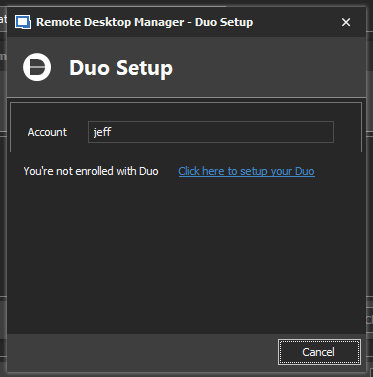
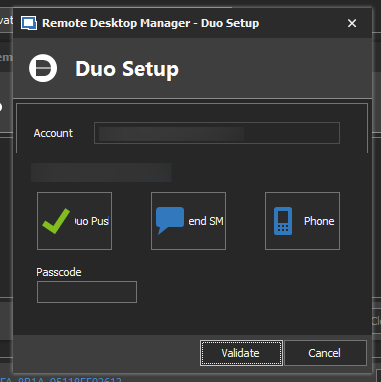
I've done a few tests and it seems that RDM/DUO react differently depending of the username that you enter in the DUO username field.
If the account doesn't exist, you should see the following
If I use my DUO login, which is my email address, I see this when pressing Save:
Best regards,
Jeff Dagenais
2020-01-06_13-52-00.png
2020-01-06_13-50-16.png
Hi Jeff,
problem fixed.
Our IP was put under "Authorized Networks" on DUO portal.
This is why I stopped receiving DUO popup window.
Thank you for help.
Regards,
Darko Bazulj
https://triton-grupa.hr
Hello,
Thank you for your feedback.
Glad that is now working!
Best regards,
Jeff Dagenais