External RDP Password Autofill Issues

Hello,
I'm currently having issues with password Autofill on my Mac when attempting to use Open (External). It opens the Microsoft RDP Session however it always prompts for the password. When I choose internal it connects every time. I'm currently running macOS Catalina, Microsoft Remote Desktop version 10 and the latest version of Remote Desktop Manager. Is this a known issue?
https://youtu.be/dMITTJwePwg
Thank you!
All Comments (25)
Hello,
This is indeed a known issue/situation. Microsoft doesn’t offer us a way to send the password to the RDP session. This is why its required to enter it manually.
As of now, theres nothing we can do. If someday Microsoft offer us to integrate this kind of feature, we will consider it for sure.
Best regards,
Jeff Dagenais
Hello,
Can you check if RDM is enabled in the 'Accessibility' section in 'Security & Privacy'?
Antoine Mauger
Screen Shot 2020-01-06 at 7.51.00 AM.png
Is there any update to this issue? Would rather have a standard window, rather than an embedded or undocked display.
What tool could I use to substitute the MS RDP Client? - Suggestions?
Thanks
Hi mikebuck,
Are you talking about the MRDP autofill when launched from RDM? If so, it should already work. So long as the application has the Accessibilty (Preferences -> Security & Privacy -> Privacy -> Accessibility) and the Automation (Preferences -> Security & Privacy -> Privacy -> Automation) rights.
Best regards,
Xavier Fortin
Hi Xavier,
I'm still encountering this issue with latest remote desktop manager for Mac. I've checked the rights in Security & Privacy and they are both checked (MacOS BigSur version).
Thanks,
Marius
Hi Marius,
This is hard to identify the issue. On my side, it works fine. Are you using the latest version of RDM and the latest version of Microsoft Remote Desktop?
You could try to uncheck and check again the option in the Security & Privacy tab.
Also, in the RDM Preferences, is the Types -> RDP -> External -> "Disable password auto fill" checkbox left unchecked?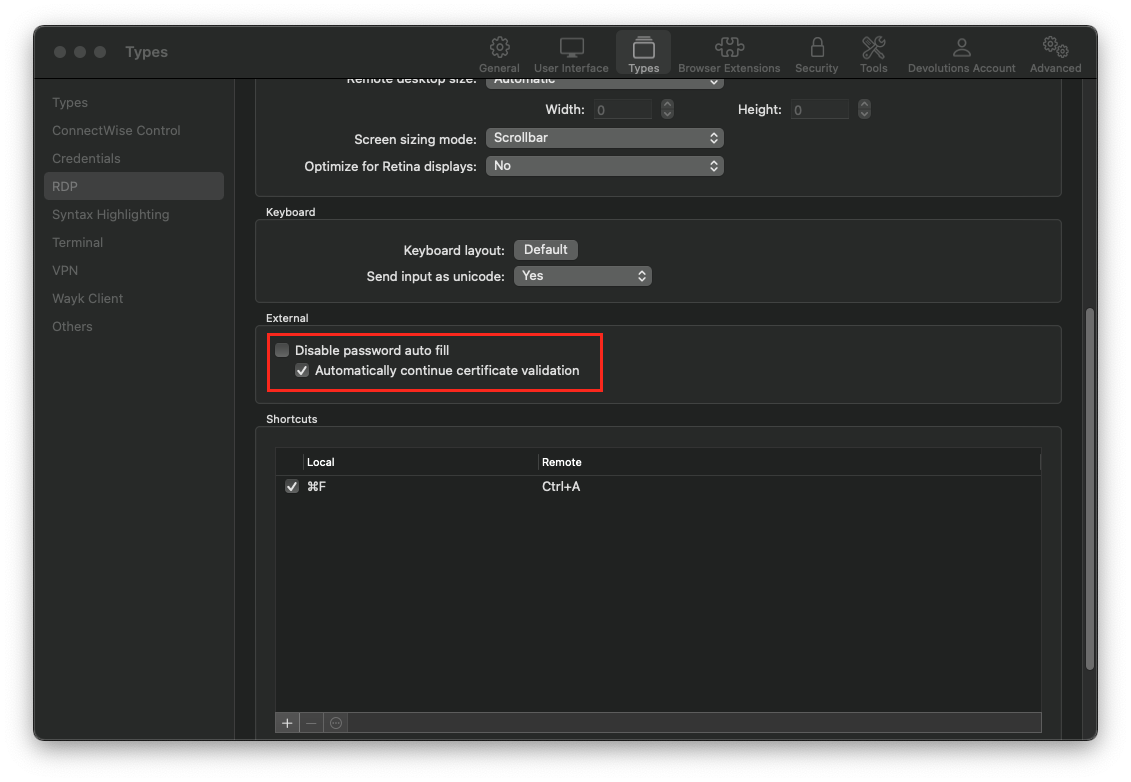
Best regards,
Xavier Fortin
DisablePasswordAutofill.png
Hi Xavier,
I see. Yes, I've tried unchecking and checking again the option in the Security & Privacy tab.
Types -> RDP -> External -> "Disable password auto fill" checkbox is unchecked.
Any debugging that can be enabled to investigate further?
Thanks,
Marius
Hi Marius,
We use an AppleScript to autofill the password when we launch an external RDP sessions. If an error occurs, we show the error in RDM, like this: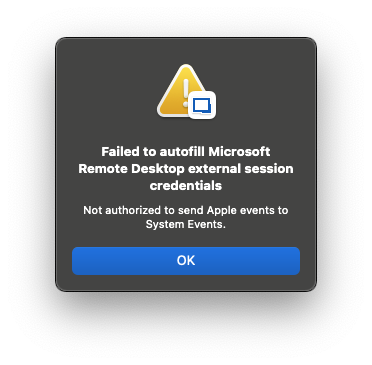
If you have no such error when launching your session, it's probably failing silently somewhere, but there's not many way we can get information on this. Debugging interaction with external application (especially with AppleScript) is really inconvenient. I could send you the script so you can try it manually on your side.
Just to be sure, Microsoft Remote Desktop does launch? It just does not autofill?
Best regards,
Xavier Fortin
ScriptError.png
Hi Xavier,
My apologies, forgot to mention that indeed I do receive that "Failed to autofill" popup window message.
Microsoft Remote Desktop does launch, username gets filled, but not the password. Within RDM, password is stored as linked (Vault).
Let me know if any further info is required.
Thanks,
Marius
Hi Marius,
And is the message the same? Is it "Not authorized to send Apple events to System Events"?
Best regards,
Xavier Fortin
Hi Xavier,
A bit different:
Marius
Hi Marius,
The image does not seem to have properly been linked. Could you try posting it again?
Best regards,
Xavier Fortin
Hi Xavier,
Done. 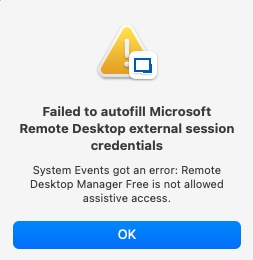
image-1.jpg
The error is pretty explicit, "Remote Desktop Manager Free is not allowed assistive access". If Remote Desktop Manager Free is checked under the System Preferences -> Security & Privacy -> Privacy -> Accessibility, this means that your OS for a reason or another still does not allow RDM Free to do actions that requires assistive access.
The macOS permissions system is very capricious and sometimes breaks. Another thing you could try is clearing the privacy settings. This will most likely force you to accept (or refuse) a whole bunch of security prompt throughout your apps. To do so, you can run the following command in the Terminal:
tccutil reset All
Best regards,
Xavier Fortin
Thanks Xavier,
Yes, indeed, it's explicite, but given the fact that required permissions have been already granted ...
Any way to reset it only for RDM and not globally for all apps ?
Marius
Yes, it's supposed to be possible with this:
tccutil reset AppName
But I haven't found the proper label for RDM. I've tried with "Remote Desktop Manager", RemoteDesktopManager, com.devolutions.RemoteDesktopManager and nothing seems to work. I'll see if I can't find a bit more documentation.
Best regards,
Xavier Fortin
Ah, nevermind. "All" represents the services, not the application. You can do this:
tccutil reset All com.devolutions.RemoteDesktopManager.Free
And it should clear all privacy settings of Remote Desktop Manager Free.
Best regards,
Xavier Fortin
Xavier,
Interesting, I've cleared it out and:
I've been prompted only for the Accessibility entry.
No prompt for Automation entry and the entry from Automation is gone now.
Same error.
Marius
I was prompted for both, the prompt for assistive access is informational though, the application must still be manually checked under the Accessibility tab. I've attached a video showing the process on my side.
The second prompt will never happened if Accessibility has not been granted.
Best regards,
Xavier Fortin
AccessibilityAndAutomation.mp4
Oh, and I'd suggest clearing the private settings of RDM Free while it is closed.
Xavier Fortin
Got it. Re-done the clearing process.
Followed the video to the letter.
What happens is that I never get the informational prompt for Automation, after granting the Accessibility one.
Marius
Sadly, there's not much else we can do on our side. This is more of a macOS issue at this point. It should show you for the automation permission. So far as I'm aware, there's no manual way to grant it. What version of macOS are you using?
You might want to contact Apple support for this. The OS should be in charge of showing those prompt.
Best regards,
Xavier Fortin
Hi Xavier,
Thanks. It is the latest v11.4 , big sur.
Marius
Hi Xavier,
Started to work.
Ran: sudo tccutil reset AppleEvents
That cleaned every permission granted under Automation.
It didn't immediately work afterwards. However, later today "Microsoft Remote Desktop" crashed at some point.
Once I tried logging in externally, I was prompted to allow RDM in Automation. Then it autofilled properly.
I suspect it was something having to do with Microsoft Remote Desktop at this point, which prevented RDM to prompt for access to Automation.
Thanks for your assistance on this one.
Marius
Hi Marius,
I'm glad you got it to work in the end!
Please, do not hesitate if you encounter any other issues.
Best regards,
Xavier Fortin