Automatic reconnect behavior for RDP sessions

Hi there - Just to preface, I really love the software. I'm coming from mremoteNG and this is such a better product.
Anyway, i'm not sure if this isn't a feature, or I just can't find it in the settings. I tend to have to connect to a lot of servers (20+) and reboot them a few times for updates every month.
Is there a way to configure RDM to keep attempting to reconnect after a disconnect / server being rebooted, without user interaction, and automatically reconnect when it comes back up? Currently, I have to keep clicking Connect When Available manually and if the server comes back up within the 15 seconds or so that it checks, it reconnects. If not, it reverts back to the "Close / Connect / Connect when available" screen.
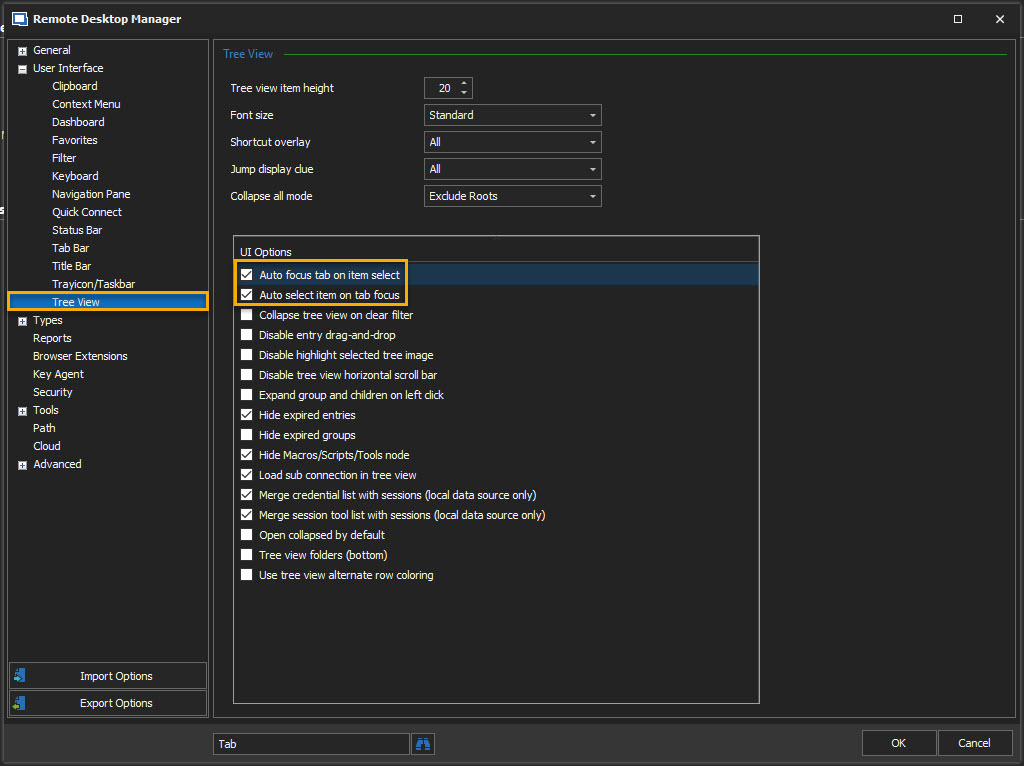
Additionally, is there a way to have it not automatically switch to the tab of the connection that reconnected?
Ideally, i'd like to have it try indefinitely and reconnect silently in the background.
Thank you!!
All Comments (1)
Hello,
As for your first option (reconnect) I do not believe we have any options to automate the process.
For the focus issue, could you try unchecking these options in File - Options - User Interface- Tree View :
Best Regards,
Etienne Lord
focus.jpg