Getting 'The user has not been assigned a valid serial number' on SQL Azure datasource
Getting 'The user has not been assigned a valid serial number' on SQL Azure datasource

After entering the new key (Valid through Jan 1st 2023) in the System Settings -> Serial Number on a SQL Azure datasource, users are getting 'The user has not been assigned a valid serial number'. Any ideas?
All Comments (21)
Hello,
What version of RDM are you running?
Best regards,
Jeff Dagenais
2019.2.16
Hello,
Using RDM 2019.2.16.0, you will now need to manage the license via the Administration -> License.
Adding the license in that area will allow you to manage the license for your users.
Best regards,
Jeff Dagenais
Thanks! That was it. As soon as I clicked the License button it migrated my license to the new place.
Any way to automatically assign licenses to new users?
Not yet, it is on our todo list.
Best regards,
Stéfane Lavergne
This has been added. It will be available soon (next release or so).
FYI only Site/Country/Global licenses allow for auto assign new users.
Best regards,
Stéfane Lavergne
:thumb:
Hi Stefane - I just wanted to follow up on this. We're currently on 2019.2.22, do you know if it should be working in this version? I hate giving away our key for users who are performing fresh installs, the old method worked very well for keeping that hidden! We have a site license, and all the options under the license admin can't be selected.
Thanks!
Tom
To echo what Tom is saying, I just updated to 2019.2.23 and I'm still not seeing the option. Do we have an ETA for when it will be reintroduced? This regression is causing issues with client deployment within our enterprise.
@Tom Mucha & @PacketDropper
I'm not understanding something with your workflow.
With version 2019.2.22 or grater if you configure your license to be "auto assign new users" then you created a new user it will have that license assigned, no need to assign after the fact. Now that user does a new install and configures RDM with that data source (or import the .rdd). This will automatically assign license and RDM will work properly.
If this is not the case then something in your workflow must differ from this. Can you please provide me screen shots and/or explanations of the steps you are doing and where things don't work as expected?
Best regards,
Stéfane Lavergne
Hang on, things might not have been merged into the latest releases over the holidays, let me get back to you both...
Stéfane Lavergne
Sounds good! Basically the check boxes can't be selected in my case to either auto-assign or assign to individuals. I verified it is a site license in case there is some checking going on. If you need any other info let me know!
Tom
My bad, I forgot to put in the request to get this merged into the latest release. I've put in the request now and this will be in the next release. (We will try to rush it out.)
Sorry for delay & best regards,
Stéfane Lavergne
Thanks for the followup - I'll keep an eye out for updates and followup if there are any issues!
Tom
So I have tested with v2019.2.24 (released this morning) and everything is working as expected.
I registered a new site/country/global license and set it to "Auto assign new users"
I then created a new user:
The user was automatically assigned a license.
Are you seeing any of these screens in RDM? What am I missing? What am I not understanding of the issue?
Best regards,
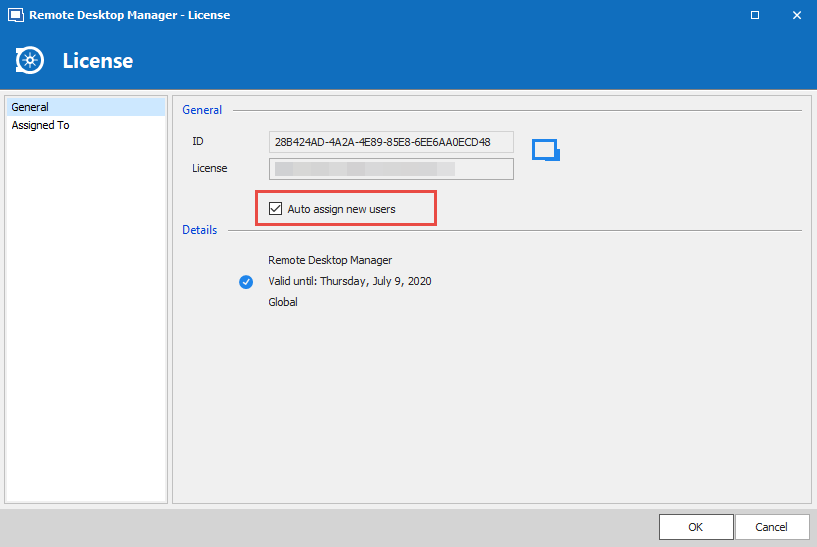
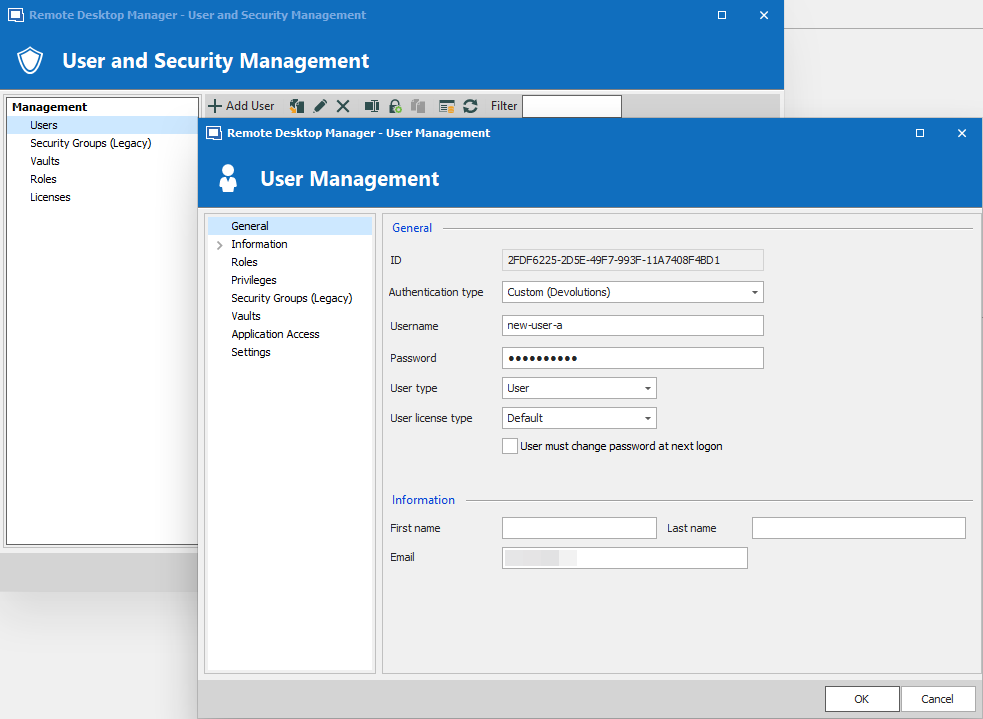
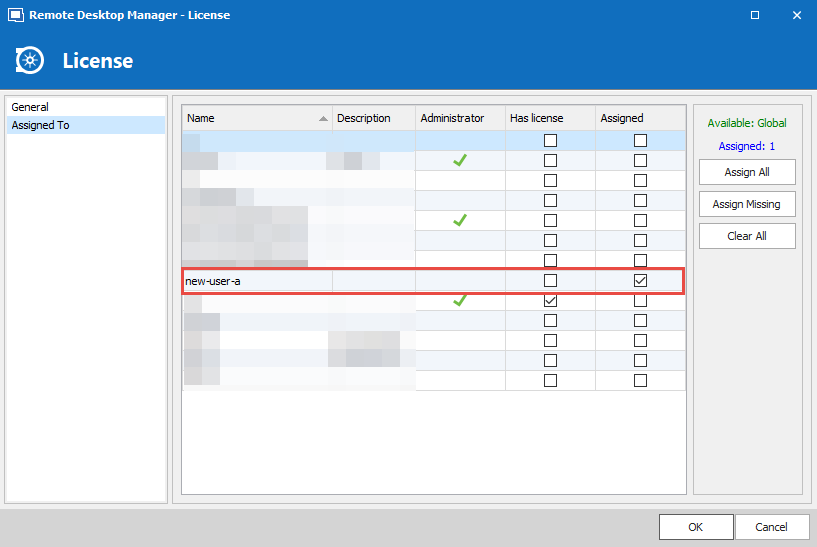
Stéfane Lavergne
2020-01-08_11-32-25.png
2020-01-08_11-31-48.png
2020-01-08_11-27-31.png
Thanks Stefane - I updated this morning. At first, I was unable to check any boxes still. I was not able to select auto-assign or assign to individuals. Re-reading your post, I saw you said you registered a new license. I deleted the license and then re-added it - boom - I was able to select everything I needed.
Not sure if removing and adding the license back would have fixed it in the old versions, but at this point everything is working for me.
Thank you!
Tom
Tom,
That is very odd, editing the serial should have allowed you to change the "auto assign" checkbox without having to recreate it.
At least you got unblocked with the work around. I will investigate further to see what might have caused the issue.
Thank you for the feed back.
Best regards,
Stéfane Lavergne
Hello,
nearly the same problem.
I can't add our license key to the DPS with the RDM function Administrations -> Licenses.
I'm getting the following error message:
Unable to save license
@heiko02
What version of RDM & DPS are you running? Is there anything in Help > Application Logs? The "Unable to save license" message box, does it have a detail button? If so can you please give us the text?
Best regards,
Stéfane Lavergne
RDM -> 2019.2.24.0
DPS -> 2019.2.12.0
No LOG entry / No Detail Button:
Odd, you should have something in the Administrator > Data Source Logs, since the error is occurring on the server side.
Could you please send me your serial (via private message) for validation?
Stéfane Lavergne