ssh sessions and same socks5 proxy configuration

Hi to all,
I've several ssh connections on RDM 2019.1.41.0 - 64 bit. In each of them is configured the same socks5 proxy (ip, port, user e password).
If I change something in socks5 proxy, i must reconfigure every ssh configuration.
My goal is to have a global sock5 proxy configuration and apply it to multiple ssh sessions and have the possibility to change socks configuration parameters one time for all connections.
I've found several similar configuration on the forum and faq using ssh tunnel, sock proxy configuration etc. but nothing works for me.
Can you help me to understand which is the correct configuration to have this ?
Thank you,
Regards
Fabio.
All Comments (5)
Hello,
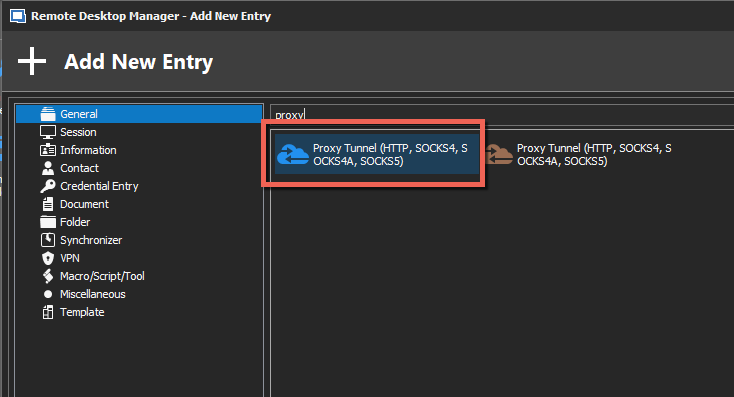
Could you try to create a Proxy Tunnel session first
Then, configure your SSH Shell session to use this proxy
Is it working as expected?
Best regards,

Jeff Dagenais
2019-11-13_14-09-03.png
2019-11-13_14-07-36.png
Hi Jeff, thanks for your support. In the tunnel configuration i've specified the remote ip of the ssh server that i reach with proxy configuration (above field in the same image). Ok, but in this way i need configure a tunnel for each ssh server. Am I wrong ?
i would like to have the same proxy configuration for each ssh connection, and in case of need to be able to change only proxy configuration.
Thank you,
Regards.
Fabio.
Hello,
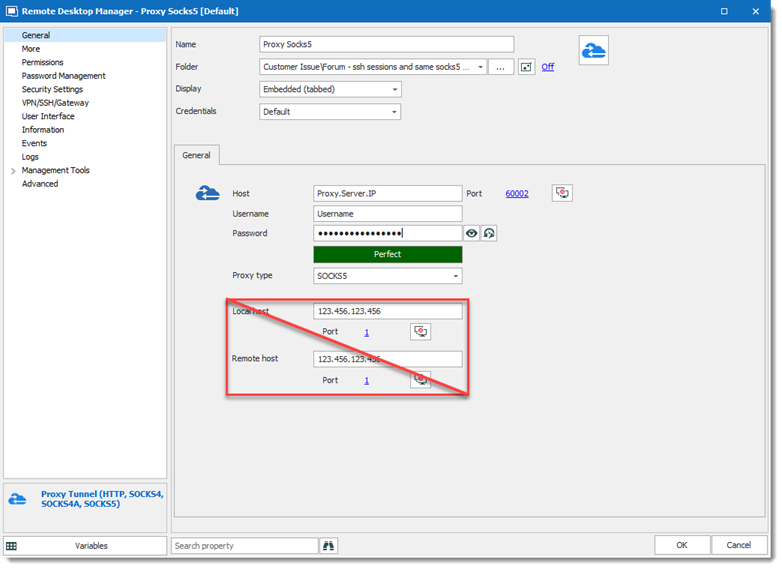
After verification with the engineering department, when using a Proxy Tunnel entry as a proxy for SSH Shell, the Localhost, and Remote host are ignored.
So you only need to fill the Host, Port, Username, Password and Proxy Type. The target machine will be the Host field in the SSH Shell entry.
Best regards,
David Grandolfo
Proxy_SSH.png
Hi David,
yes, with this configuration i was able to assign the same proxy conf to each ssh shell, thanks ! The fields Local host and Remote host cannot be left empty, so I inserted a fake ip for both.
Thanks for your help,
Regards
Fabio.
Hi,
You are welcome, we will look at how we can improve it.
Regards,
David Grandolfo