CTRL-C in ssh shell session via macro

Hi to all,
i'm trying to send {CTRL}C shortcut through macro script but nothing happens into ssh shell. I assume the combination is captured by RDM but not transferred to the session. Instead {CTRL}Z and {CTRL}\ both work as expected.
Can you help me ?
Thank you,
Regards.
Fabio.
All Comments (7)
Hello,
What version of RDM are you using?
How do you send the macro? Could you post some screenshots?
Best regards,
Jeff Dagenais
Hi Jeff,
i've 2019.1.14.0 64 bit version.
In attach you can find the screenshot of the macro for ctrl-c.
I send the macro with right click on the active session -> Macros / Scripts / Tools and then i choose the macro.
Thank you,
Regards.
Fabio.
rdm_macro.PNG
Hi,
If you are trying to press CTRL (keep ctrl down) and then press C, please try "^C" like this:
For information, if it works you can also find the command for SHIFT or ALT in the following help topic: https://help.remotedesktopmanager.com/settings_events_autotypingmacro.htm
Best regards,
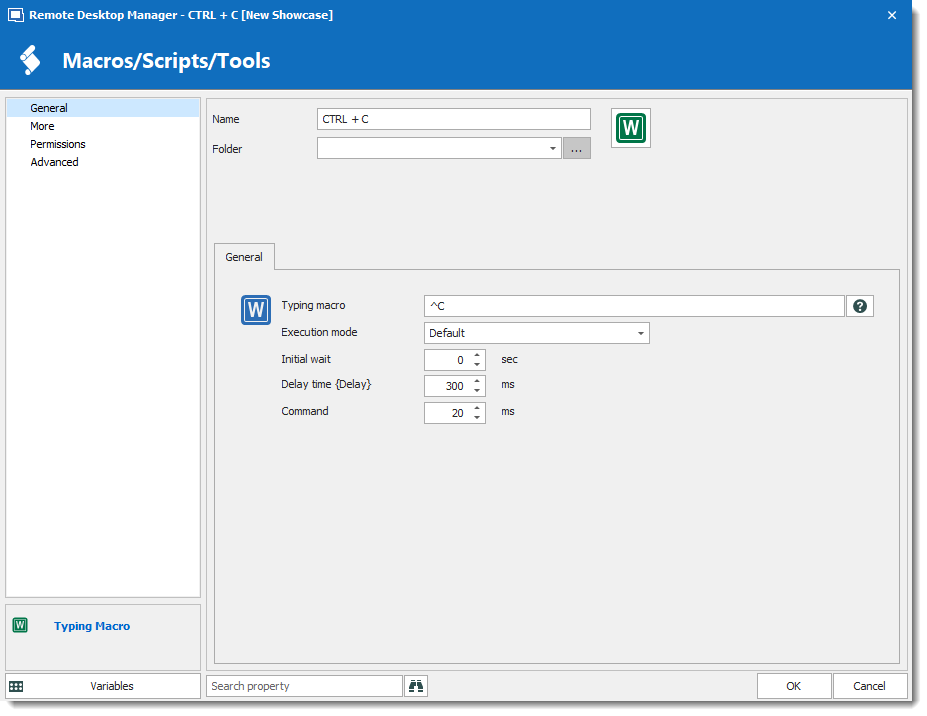
David Grandolfo
CTRL+C.png
Hi David,
with configuration suggested (already tested) nothing happens. The combination ^C is reported to screen of ssh session but not interpreded as ctrl-c.
Thank you,
Regards.
Fabio.
Hi,
After a chat with the engineering department, we found the issue. With our macro sequence command, we use CTRL+C. This has been implemented a long time ago and for many different types of the session not only SSH.
We understand today that CTRL,C is not the best option we could select.
That said, I opened a ticket to improve our sequence command.
We apologize for the inconvenience this may have caused.
Regards,
David Grandolfo
Hi David,
with the latest release 2019.2.18.0 the {CTRL}C combination in ssh session is now working as expected.
Thank you for your support,
Regards.
Fabio.
Hi,
I'm glad that it works fine, thanks for the test.
Best regards,
David Grandolfo