Connection to CheckPoint Gaia Interface not showing correctly
Connection to CheckPoint Gaia Interface not showing correctly

Hey guys,
we´re currently setting up our environment.
We added a Web-Connection to a CheckPoint Gaia Portal and it looks odd - is missing things and all in all not usable.
It´s a tabbed IE inside RDM.
When opening externaly everythin is fine.
There is some Java Script running on the site. Is this a problem?
Tried all the options available but no luck.
Best regards
Dan
2019-11-06 13_15_58-Window.png
All Comments (5)
Hello,
We use third party libraries for the integration of Firefox and Google Chrome in the Embedded (tabbed) display Mode. For Internet Explorer, we use the Microsoft ActiveX that is installed at the same time as the browser.
If none of the web browsers work in Embedded (tabbed) display Mode, you would need to launch the website using the External display mode and use our Devolutions Web Login to handle the credentials.
Devolutions Web Login can be downloaded here
https://devolutions.net/web-login
Best regards,
Jeff Dagenais
Hi Jeff,
thanks for the feedback.
We are forced to use the Mateso PWS integration and as such it´s not possible to forward the credentials into an external application if I am right.
That´s why we would need to run it tabbed.
So when both are using the same ActiveX it makes no sense that we see two results embedded <> externel.
The GUI is only working in IE / Edge. As we run RDM on a 2016 Terminal Server, we can only use IE. There is no Web Login Plugin evailable for IE.
Best regards
Dan
Hello,
I don't know if this will help, but could you edit your session and try to enable the Hide Script Errors option under the general tab?
Best regards,
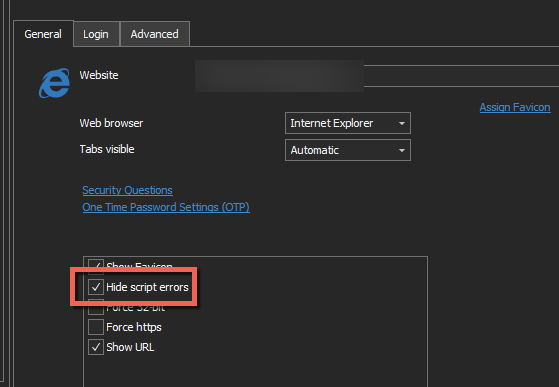
Jeff Dagenais
2019-11-06_12-45-56.png
Unfortunately this gives the same results.
Regards
Dan
Hello,
In that case, you would need to launch it in external mode with Edge maybe since your website is limited to Microsoft technology.
Best regards,
Jeff Dagenais