Macro from keyboard shortcut not working

Hi,
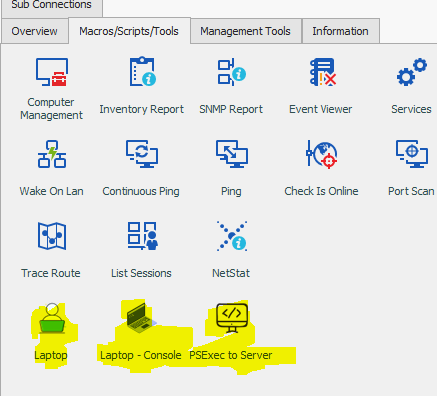
I have some macros as you can see that working perfectly from the "Macrp/Scripts/Tools" tab.These ase just opening the selected RDP with different resolution when i'm on my laptop.
I have now the keyboard shortcut for faster access
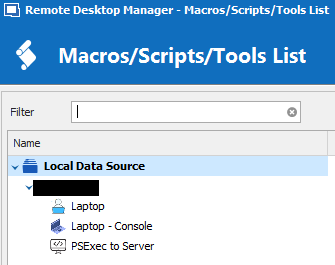
I get the pop-up
But when i double click, it closes the window and nothing happens, no RDP session opening with that setttings. Of course i have selected the entry before and then press the ctrl-m
What am i missing ?
Regards,
Vassilis

RDM for Windows 11
Purchased Enterprise Edition v2026.x
2019-10-27_00003.png
2019-10-27_00002.png
1.PNG
All Comments (33)
Hello Vassilis,
would it be possible to get one of your macros? I've test it with 2019.2.11 (latest beta) with the same keyboard shortcut, but here all works flawless
Thanks!
Regards,
Min
Thanks Min for the prompt reply.
I'm sending you via PM the macro .xml and the template.rdp that calls the template for the custom resolution on my entry.
Again this works on the tab "Macrp/Scripts/Tools" but not via the script window.You double click the macro shortcut and nothing happens
Regards,
Vassilis
RDM for Windows 11
Purchased Enterprise Edition v2026.x
Hello Vassilis,
while I'm trying your scenario here some suggestion what could also (maybe an easier) solution:
If you are on your laptop => select the session => right click => Open with Parameters => Open with Template => select the template
(its also possible to show the "Special Open Parameters in the action pane)
With Local Machine Specific settings (requires an Advanced Data Source) is it also possible to set parameters only for this specific machine (laptop) if youre open the session on another PC the standard setting will be used
Regards,
Min
Hello,
Sorry to jump in, but we would like to know if the suggestion proposed by Min could be a solution for you.
If not, please let us know.
Best regards,
Jeff Dagenais
Yes it may work, but i counted five more clicks.
Also it works if you just click on the macro tab and then click on the macro itself (three more clicks).
But that is not what we customers want. That is why we invest in software like this to make our hard admins job more efficient.
The point is to use all resources and make your job easier If i have to make 5 more clicks to open the laptop template instead of the support method of keyboard shortcut then we are not something we need.
So please let me know when this will be fixed, as it seams that this works on the beta version so maybe wait for an official release.
Kind Regards,
Vassilis
RDM for Windows 11
Purchased Enterprise Edition v2026.x
Hello,
I opened a ticket to our engineering department.
The ticket number is RDMW-3894.
Best regards,
Jeff Dagenais
Thanks Jeff. Looking forward for the updates on the ticket.
Regards,
Vassilis
RDM for Windows 11
Purchased Enterprise Edition v2026.x
Hi Min, i see you refer to 2.11 bet and i see that the 2019.2.12.0 is now available should i upgrade and solve the issue ?
Also is it stable ? i see a few posts with problems with the layout and most common with SSH logins.
Should i wait for a newer one ?
Please advice
RDM for Windows 11
Purchased Enterprise Edition v2026.x
Hello,
RDM 2019.2.12.0 is only available for the Free edition and the fix isn't implemented yet. We will inform you when the engineering department will have a fix for the issue.
For now, the ticket is still on the todo list.
Best regards,
David Grandolfo
Ah ok David, my mistake then.
Thank you for the clarification
RDM for Windows 11
Purchased Enterprise Edition v2026.x
Hi All,
Just seen
VERSION 2019.2.14.0 (October 31st 2019)
does this contains the fix ?
RDM for Windows 11
Purchased Enterprise Edition v2026.x
Hello,
RDM 2019.2.14.0 doesn't include the fix. We will inform you as soon as we have more news. That said, we are currently working on the PAM integration between RDM and the new version of DPS.
Incidentally, we cannot provide a timeline for its delivery.
Best regards,
David Grandolfo
the .16 is way better as i had some other issues before.
Just FYI,I suppose the fix is not included but now i cannot even bring the popup of macro/scripts with CTRL-M
RDM for Windows 11
Purchased Enterprise Edition v2026.x
Which Keyboard shortcut have you configured with CTRL+M under Files -- Options -- User Interface -- Keyboard?
David Grandolfo
Well i haven't changed anything but now the shortcut is working, but of course nothing happens if i double click from the pop-up (as per original post)

RDM for Windows 11
Purchased Enterprise Edition v2026.x
2019-10-27_00002.png
Is the 2019.2.16.0 fixes this issue ?
RDM for Windows 11
Purchased Enterprise Edition v2026.x
Hello,
This isn't available yet, the issue is still open. We're going to work on this soon.
Regards,
Hubert Mireault
Hello,
Regrettably, the support department cannot provide an exact release date as the full process (Build – Quality Assurance – Release) is out of our control.
Be sure we will update you as soon as the fix will be available.
P.S.: No it will not be in 2019.2.18.0, the fixe is always on our todo list.
Best regards,
David Grandolfo
Got it people.
I will not bother again :D
i will wait for the update here.
thanks
RDM for Windows 11
Purchased Enterprise Edition v2026.x
Merry XMAS to everyone !!!
Is the fix included in any of the latest ?
thank you !
RDM for Windows 11
Purchased Enterprise Edition v2026.x
Hello,
The fix is still in development, so it's not available yet.
Best regards and merry Xmas,
Gabriel Degrandpré
Hello,
This improvement will be included with version 2020.1.3.
Regards
Jonathan Del Signore
Thanks Jonathan for the heads up!
Looking forward!
Regards,
Vassilis
RDM for Windows 11
Purchased Enterprise Edition v2026.x
Hi,
I just got the email about a new version, VERSION 2020.1.10.0 (February 20th 2020), with list "Added the ability to execute macros by doubleclick from the Macro/scripts/tools list popup"
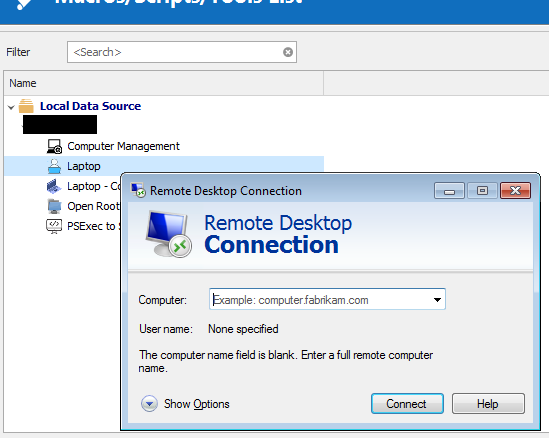
i installed it and try it, i know have a new behaviour, the MSTSC pop up just appears on double click!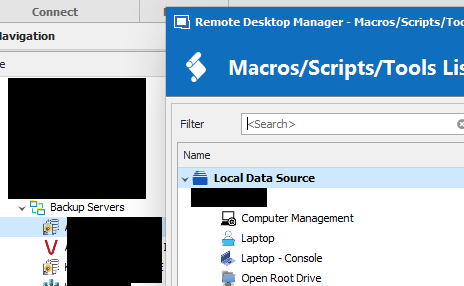
Of course from the macro tab on the right the macros execute perfectly.
Did i jump the gun too soon ?? :( should have you listen and actually wait for 1.3 ?
RDM for Windows 11
Purchased Enterprise Edition v2026.x
Clipboard-2.png
Clipboard-1.png
Hello,
I did a quick test on my side and the Double-click seem to be working properly.
Here is what I did, I opened the Macro/Script/Tools window like you did, had a Typing Macro that would type in an IP address to my VM. I double click on my Typing Macro and change the focus to MSTSC and the IP address is typed in as it should. I did change the Initial Wait to 2 seconds on my Typing macro.
Best Regards,
Etienne Lord
Hello,
I was notified by the engineering department that they did find a bug with your specific setup.
Best Regards,
Etienne Lord
Hi Etienne,
Yes your example was not exaclty what i was doing and the problem.As you can see from the thread and screenshost i have the macro that opens the select entry in small resolution (thus Laptop) and you can see that i have selected an entry and double click from the macro windows and i just got the mstsc window pop-up.
Anyway, i'm glad that your awesome team and support have identified the bug, so i will wait.
Thanks again.
Regards,
Vassilis
RDM for Windows 11
Purchased Enterprise Edition v2026.x
Hello,
These macros will now properly execute on the selected connection. It will be included in version 2020.1.11.0.
Regards
Jonathan Del Signore
Jonathan i can confirm that on 1.13 this woks!
I will stop complaining now :)
To minor minor things that take your time on them.
1) If you just select and press enter on the macro on the pop-up it just close the window, only if you double click it executes the macro
2) it will be aesthetic better if after executing the macro, the pop-up closes automatically.
again many thanks on your great support !!!
RDM for Windows 11
Purchased Enterprise Edition v2026.x
Hello,
We will add these on our todo list. For the second option we'll most likely add a checkbox to prevent it closing for those who don't want it to.
Regards
Jonathan Del Signore
Hello,
These last two modifications will be included in version 2020.1.20.0.
Regards
Jonathan Del Signore
Great News, Jonathan!
keep up the good work, this application has made me a better engineer :)
RDM for Windows 11
Purchased Enterprise Edition v2026.x
Jonathanm, just installed .20 and yes everything is there as you promised !!
You guys are awesome !!!
Happy easter and #staysafe #stayhome
RDM for Windows 11
Purchased Enterprise Edition v2026.x