Chrome integration
0 vote

I'd love to use RDM to manage my webpages and sessions. Problem is that it doesn't support this function even though Chrome does.
Currently you can have 2 sessions. Your main session and a session from Incognito.
The trick is to use diferent profiles. More on this here: https://www.anupams.net/switch-multiple-accounts-office-365/
Do you think this capability could be integrated into RDM Chrome aswell?
Feel free to ask me more questions if needed.
I'm also pretty sure that I managed to explain myself pretty clearly to your Helpdesk(Zendesk) operator Ethan so you can ask him for more info on this aswell.
Br,
Rein
All Comments (5)
Hello,
We use a third party application to be able to run Google Chrome in embedded mode. It's not the webpage that it's resized to fit inside the tab.
That being said, I would suggest opening the website in external mode and use our web-login to populate the credentials on your website.
https://devolutions.net/web-login
Best regards,
Jeff Dagenais
Hello,
I had a quick chat with our engineering department about this thread and you would need to have a separate entry to be able to accomplish this.
Best regards,
Jeff Dagenais
Hi Jeff
Thank your the reply.
I see you're referring to your DWL plugin. Unfortunately that doesn't exactly cover my need.
I already have a password management app so that part isn't the problem.
What I would like to do is have separate, independent, sessions as shown on the previously mentioned https://www.anupams.net/switch-multiple-accounts-office-365/ giving me access to multiple admin/user accounts at the same time. Currently I'm using Chrome profiles for this but I would very much like to see it in RDM as well as managing windows/accounts through RDM would be much more straightforward and it would give me some much needed taskbar space.
------------
Edit: What do you mean by separate entry? Like a different RDM file?
Br,
Rein
Hello Rein,
I am sorry to see that the DWL extension does not cover your needs.
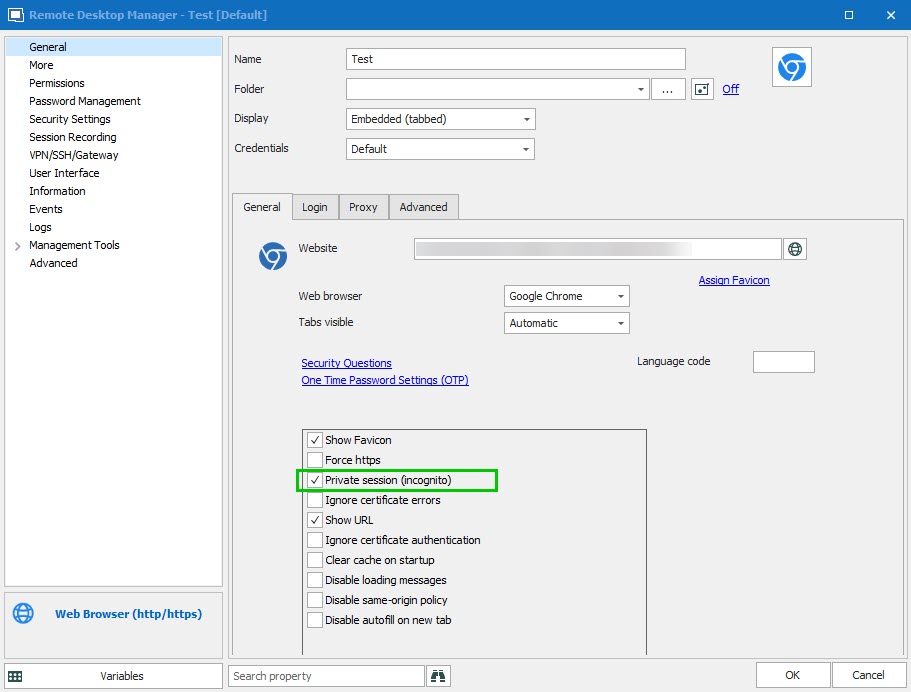
That being said, to achieve what you are trying to do, you would need to create multiple "Web Browser" entries, each using different credentials. You would also need to make sure to check the "Private Session (Incognito)" option in order to be able to connect with multiple credentials on the same web page in embedded mode.
Best regards,
James Lafleur
Private.jpg
Hi James.
Thank you for the reply.
I ofcourse did that.
When I tested it on my home computer it didn't work - I had credentials nested under different Company folders.
When I tested it on my work computer where I have credentials nested under regular folders it worked. Seems to be related to structuring somehow. Or maybe something's off with myconfigurations at home. idk, idc :)
None the less I thank you as I got the resolution I wanted.
Also, thanks for your time Jeff & James.
Br,
Rein