Open VPN can't import config file - error

Hi,
Im getting this error while importing a working config in RDM OpenVPN connection?
What can be the issue?
Regards,
Niksa
17-10-2019 15-29-40.png
17-10-2019 15-29-32.png
All Comments (13)
Hello,
What version of RDM are you running?
Do you have something relevant in Help -> Application Logs?
Best regards,
Jeff Dagenais
Hi,
everything worked normally and we didn't upgrade nor OpenVPN(v 11.10) for couple of months or RDM(1.41.0) in the last month or so.
I only get this in log
Options error: --auth-retry method must be 'interact', 'nointeract', or 'none'
Use --help for more information.
But that setting is set like it says here
When I try to import another config , then I get the error message which says to contact you guys.
Hello,
I opened a ticket to our IT team to make sure that we are running the same version of OpenVPN as you so that we can try to reproduce your issue.
I'll keep you post.
Best regards,
Jeff Dagenais
Hello,
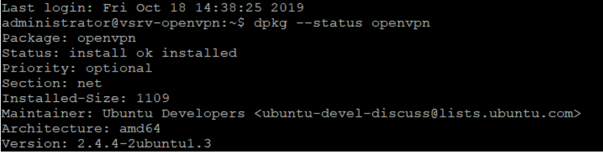
Our IT team is not able to find OpenVPN 11.10. Here's the version that we have
Do you know where we can find this version?
Best regards,
Jeff Dagenais
2019-10-18_15-06-29.png
It's 2.4.6 and the GUI is 11.10.0.0
21-10-2019 08-54-07.png
Hello,
I had a chat with our engineering department and they have found the culprit of the issue.
The fix should be available in RDM 2019.2.10 or 2019.2.11.0 depending of what is included in each release.
Best regards,
Jeff Dagenais
So we should wait for the RDM update ? When will it be released ?
??
Hello,
We expect to release RDM 2019.2.x as an official release in 2 weeks approximately.
best regards,
Jeff Dagenais
Hi Guys,
the same goes for me :/
I'm using RDM 1.39 (and 1.41 in a VM)
I import a config file (openVPN GUI v11.13.0.0), everything is OK
Then when I try to connect, I get this error
Thu Oct 31 13:00:26 2019 IService> Interactive Service disconnected
in the logs I can see:
Options error: --auth-retry method must be 'interact', 'nointeract', or 'none'
This is happening since this version 1.39
If I use an older one, 1.36, everything is working well.
This is very annoying :/
Can you help ?
Hello,
The fix should be available in the latest beta version, RDM 2019.2.11.0, if you would like to try it out. We are also planning to release the stable version of RDM 2019.2 before the end of the week.
Regards,
Hubert Mireault
Hi Hubert,
glad to hear that ! :)
Hi All,
I confirm this bug seems to be fixed :)
Thanks again for your wonderful product