Unable to import an RDG file

I can't imagine this hasn't been covered before and if it has I apologize up front.
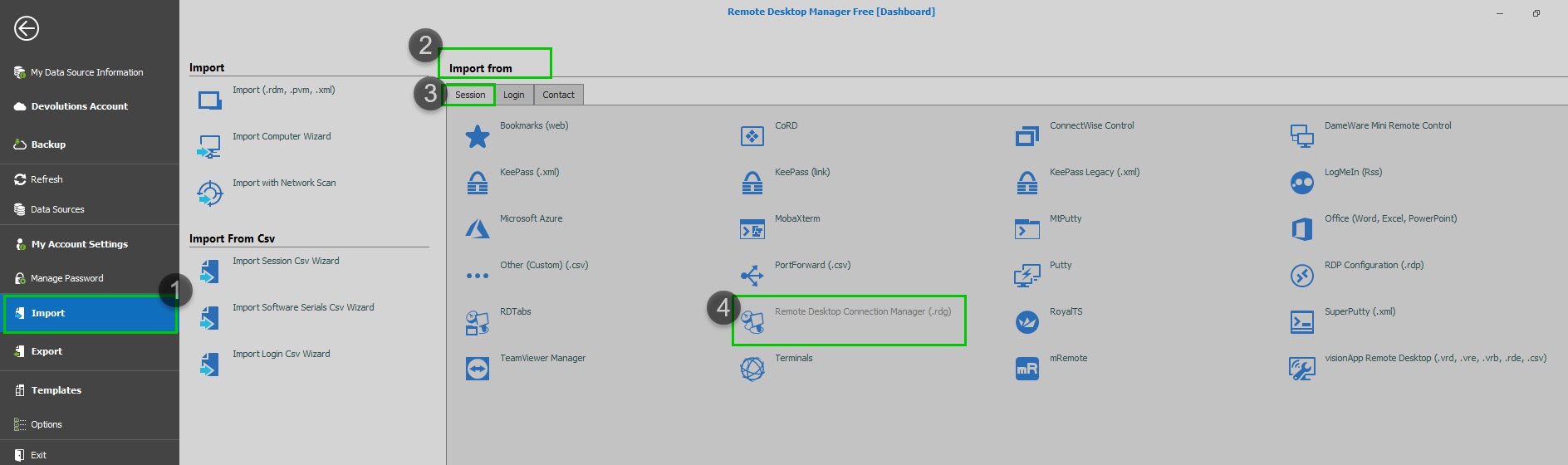
When using the Import/Import Sessions From/Remote Desktop Connection Manager (.rdg)..., nothing happens (i.e. the folder remains empty). I found somewhere (I don't remember where) there is a need to "enable import permission". I cannot find that setting anywhere.
Is this something only available in the Enterprise version? What am I doing wrong or missing importing the .rdg? Where are there detailed steps (if they exist) on how to do this?
Running Remote Desktop Manager on Windows 10 Enterprise
Remote Desktop Manager Free Version 2019.1.41.0 64-bit
.NET Runtime: v4.0.30319
.NET Version: Version 4.7.2 or better
Current user: Administrator/SysAdmin/DbOwner
Thx in advance.
Steve
All Comments (1)
Hello,
Since you are using the Free edition of the product, this solution won't apply to you. In the Enterprise edition of RDM, the "Import Permissions" can be managed under Administration -> System Permissions -> Vault.
That being said, the steps to import your .rdg file into RDM Free are as you mentioned above. You need to open RDM and go under File -> Import -> Import From -> Remote Desktop Connection Manager (.rdg)
Would it be possible for you to provide us a test sample that gives you the same error? We could then test this on our end and see what might cause this.
This sample can be sent to us using the sharefile link that I just sent you via private message.
Best regards,
James Lafleur
ImportFrom.jpg