Can't access saved files

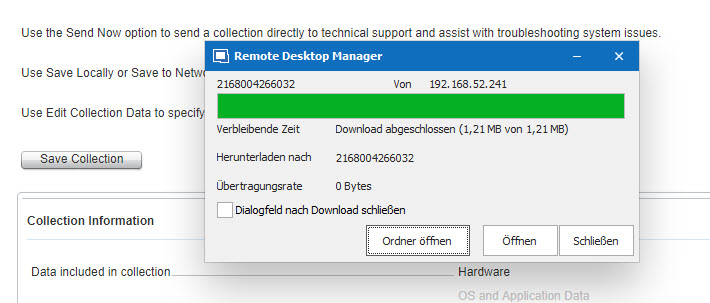
For example, when I am on a DELL IDRAC Controller and create a support Log file. When I hit save, I get the dialog where I want to save the file. I select it, and it displays a progress bar.
When it's finished, there is now way to open the folder where the file is located, or the file itself. Also when I take a look into the folder where I said it should save it, it's empty.
We can't save any files via RDM, also not in VMARE and so on. It's like that since many versions. Hope there is a fix or a setting for that.
Here is a screenshot of how it looks in the end:
Save-File.jpg
All Comments (4)
Hello,
What version are you currently using? The third party we are using for our chrome-based browsers (which iDrac uses) had an issue when doing a "save as". This has been fixed in our betas. Could you try out RDM 2019.2.8.0?
Regards,
Hubert Mireault
Hello Hubert
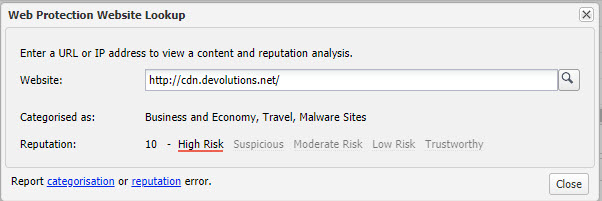
I can't download it within RDM, and when I go via the website, the barracuda webfilter blocks your download server: http://cdn.devolutions.net/
High Risk:
malware.jpg
I could download it via a PC without webfilter, but it was no installer, so I just replaced the directory with it, and now it is working.
Thank you for the update, I'm glad it works for you.
For the issue with being flagged by Barracuda webfilter, I'll forward it to our web team to see if we can do anything about it.
Regards,
Hubert Mireault