A Useful Tab should open when you click on a Node
0 vote

Each time you open the program, when you click on a node, one of the tabs is displayed. In some cases, I find that the tab displayed is not useful, and you ALWAYS have to take a further action and click on a different tab.
Defaults that are not useful:
Thanks! -Sandra
All Comments (7)
Hello,
Do you think that it could be a good idea to remember the last selected tab instead per entry type?
Regards
David Hervieux
Hi,
Hmm, not really. Between many nodes of the same type, some might have content in a particular tab and some might not. Just because you clicked on Referenced by on some node before you closed the app, doesn't mean Referenced by will be populated on another node of the same type that you click next time you run the app.
It would be better than current maybe, but ideally you'd never default-open a tab that has nothing of value in it.
Thanks!
-Sandra
Hello,
I have verified and the application already keep the last selected tab. Would you like to always select the first tab on selection change?
Regards
David Hervieux
The app only keeps the last selected tab while it's running. I'm talking about Each time you open the program. After you close and re-open it does not remember the last tab you were on for each node, or even each node type. It goes back to defaults like Referenced By. This is why I'm putting a feature request for an improved default behaviour.
Hello,
Is it possible for you to send us a small video of the behavior?
Best regards,
Jeff Dagenais
I zipped the 2 videos for size.
1 - before closing RDM, clicking Credential notes shows Documentation tab - my last chosen tab for that node type
2 - after opening RDM again, it forgets, and goes back to opening the empty Referenced By tab for Credential nodes
So yes, remembering would be a step up from forgetting.
But even if it didn't forget, notice that some Credential nodes don't have useful docs, while some do. I'm just saying that node types should have some intelligence when displaying tabs. If a tab has nothing (default docs template, or blank referenced by), NEVER open to that tab. It provides no value.
I listed some suggested tabs to try opening for Credential and Folder nodes in my original post.
Thanks,
Sandra
Captures.zip
Hello,
Thank you for these recordings.
That said, as mentioned by my colleague, RDM is already remembering the last tab that has been selected in the Dashboard even after restarting the application. According to your videos, this behavior is different for you. For this reason, would it be possible for you to create a portable version of RDM and see if this issue persist?
To do so, you will need to download the .zip file below, extract it's content in a newly created folder, enter your current serial and run the executable: https://remotedesktopmanager.com/home/thankyou/rdmbinbeta
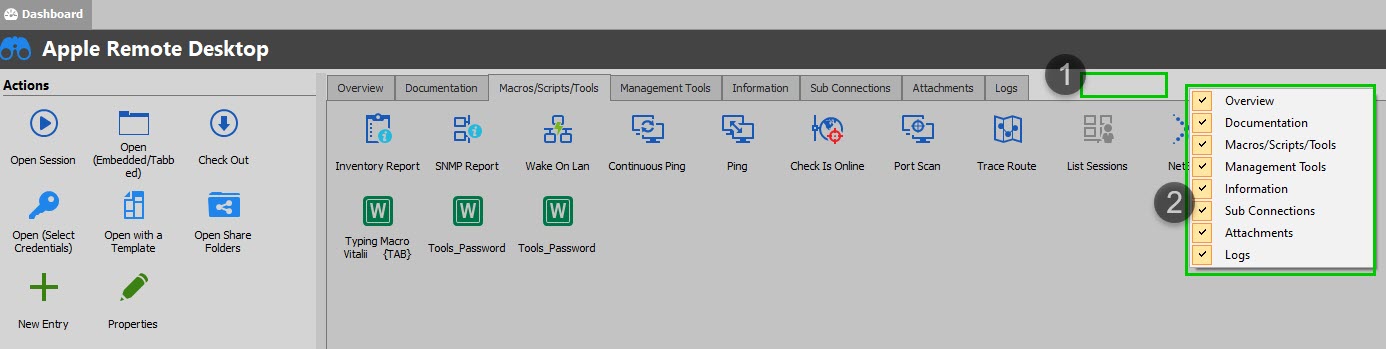
As for the tabs you are not finding useful, please note that they can be disabled by "right-clicking" on the zone next to the Dashboard tabs:
Best regards,
James Lafleur
Disable.jpg