I want to Sync Active Directory servers to Remote Desktop Manager
I want to Sync Active Directory servers to Remote Desktop Manager

I have tried to use the Synchronizer with Active Directory. It is pulling in the servers, but I want to structure it with the OU's that the Servers are in, but it is not doing that. How do I set it up to pull the OU and put each system in the OU/Folder that they are in? Also, it is pulling the system with their Name, but it does not put the Domain in the Host name and it is not then able to open the RDP Session.
All Comments (7)
Hello,
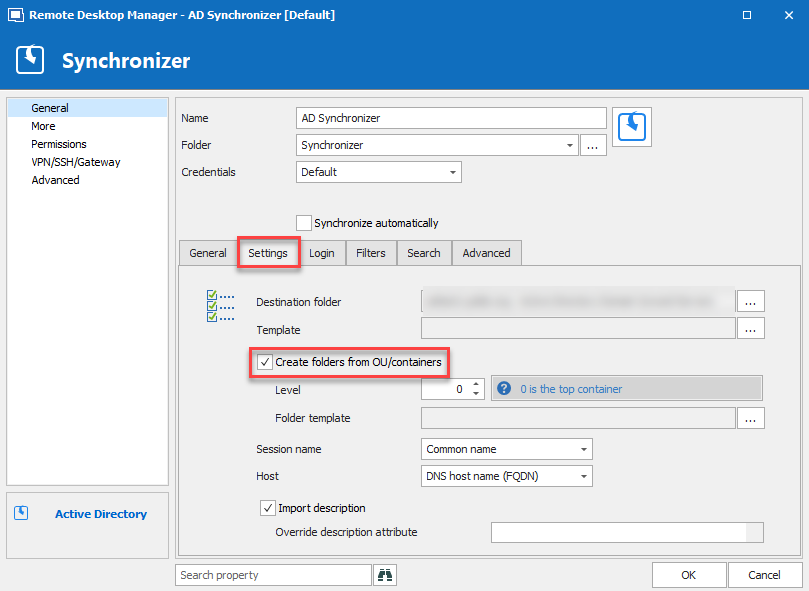
Do you have that option checked in your AD Sync's settings? :
Best Regards,
Etienne Lord
adsync.png
Yes, I have checked the box and changed the level to 4, but it does not create the OU's, it just puts them in the root folder.
Keith
Hello,
I will have to perform some tests, what is your Remote Desktop Manager version?
Best Regards,
Etienne Lord
version: 2019.1.41.0 64-BIT
Enterprise Edition.
Keith
I encountered the same issue when I configured the Active Directory Synchronizer. The Level is apparently the number of levels from the root OU/Container DN at which folders will start to be created. It might be clearer if the value was relabeled, e.g. to "Starting Level" or similar. If this value is set too high, no folders will be created and only a flat list of computer leaf nodes will be synced. To create the full folder hierarchy of computers and folders, I deleted the computers that had already synced, set the Level value to 0, and then re-synced.
To include the domain in the hostname, I set the value of Host in the Synchronizer to "DNS host name (FQDN)."
The screenshot that Etienne Lord posted earlier in the thread shows both settings with these values.
Best,
Roscoe
Hello,
After discussing with my colleague, and like @roscoe said, would you be able to give it a try on level 0 or level 3?
Best Regards,
Etienne Lord
I have tried it with the setting at '0' and it does create the folders.
thank you,
Keith