WinSCP - Shell
Hi,
In WinSCP it's possible to change the default shell to e.g. /bin/bash, while the user bash is /bin/csh.
If I use WinSCP with RDM I'm not able to set the shell in RDM, but WinSCP just can handle /bin/bash.
Do you have an idea, how I can set the shell in RDM, or do I need to ask for a feature request?
Thank you!
BR,
Tobi
All Comments (28)
Hello,
Do you know if this setting can be send to the winscp command line?
Regards
David Hervieux
Hi David,
I used the following:
Best regards,
Tobi
Hello,
Thank you for the example, we'll open a ticket for this request. As a workaround, I think you can already put in the "Other parameters" section the 'rawsettings' parameter in your example.
Regards,
Hubert Mireault
Hi,
Thank you for the information, using it with "Other parameters" works!
So maybe just the user manual should be a bit more explaining about what's possible. ;)
Just one more question, otherwise I can also start a new thread:
- If I start a session that opens WinSCP in embedded mode and a second session (duplicated settings), that second session is not starting embedded, but external.
Is it a bug, or maybe some setting I missed?
Thank you!
Best regards,
Tobi
Hello,
I'm glad it works for you.
For the issue opening two WinSCPs embedded, I feel like this is an issue with how we try to find the window to embed. RDM probably keeps finding the first WinSCP window, and since it's already embedded, it does nothing. I'll open a ticket for this issue but it might not be easy to fix, since embedding external applications is always a little finnicky.
Regards,
Hubert Mireault
Hello Hubert,
Thank you for the information.
If there will be a fix, great. If not, ok, it's working anyway ;-)
BR
Tobi
Hello,
Thank you for your answer, I was also looking for this setting.
Hoping this feature will be implemented.
(Congratulations to the team Dévolutions for this great tool)

Hello,
This option is in winscp here see attached screenshot, it will be great do use it in embedded scp, because i don't want to install everywhere winscp.
So i'm curious where do you have this parameter in RDM, can i have a example in screenshot please .
Regards
Olivier
Screen Shot 10-14-19 at 01.56 PM.PNG
Hi,
@oschott Right now, the embedded SCP of RDM has no options to specify the shell to use. It opens the default shell and auto detects if it is either a windows command line or a unix command line (assumed to be bash).
I will take this opportunity to suggest you try SFTP instead. Chances are (and they are really high) that servers you access using SCP also support SFTP, since these are both SSH protocols, they will accept the same credentials and access the same accounts and directories. But SFTP is a much more complete and robust protocol. File transfers should also be faster with SFTP.
It is possible to add a new feature to SCP to specify the shell to use if you prefer though, but I have already a lot to do and it might take some time.
Regards.
Denis Vincent
Hello Tobi,
A fix has been made to allow for multiple WinSCP sessions to be embedded. It should be available in the next beta version 2019.2.12.0.
Regards
Jonathan Del Signore
Dear all,
This post was helpful for allowing me to connect to a NetScaler device, using the following additional settings;
Other parameters: -rawsettings Shell=shell
Kind regards
Hello
i am usin fee 2020.1.20.6 remote
i have the same problem with my firewall
i have try sftp scp wincsp with or not with
Other parameters:
-rawsettings Shell=/bin/sh
Shell=bin/sh
it is the same it canot finish to list after connect with sucess
ini file of my winscp
[Sessions\admin@x.x.x.x]
HostName=x.x.x.x
UserName=admin
LocalDirectory=C:/fw
RemoteDirectory=/log
Shell=/bin/sh
Merci
@michelboudat,
Is it working outside RDM with an application like Filezilla as example?
Best regards,
Jeff Dagenais
Hello
you can give me more explanation, because I didn't get it.
may be an example would be easier to understand and implement
Have a nice day.
@michelboudat,
If you close RDM and wanted to connect on that server, which application are you using?
Best regards,
Jeff Dagenais
Hello
like this problem ofn oschott on Posts: 69
but me it is not Shell=/bin/bash but Shell=/bin/sh
ii need will connect to stormshield firewall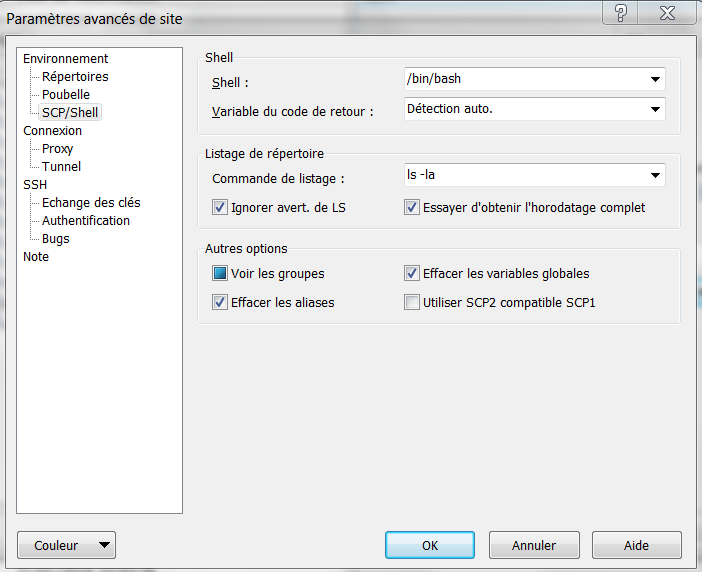
Screen Shot 10-14-19 at 01.56 PM.PNG
@michelboudat,
Je crois que vous parlez francais selon votre imprime écran, donc, je vais continuer en francais.
Est-ce que vous pouvez créer une session de type SCP dans RDM et voir si cela fonctionne avec ce type de session. Voici un exemple.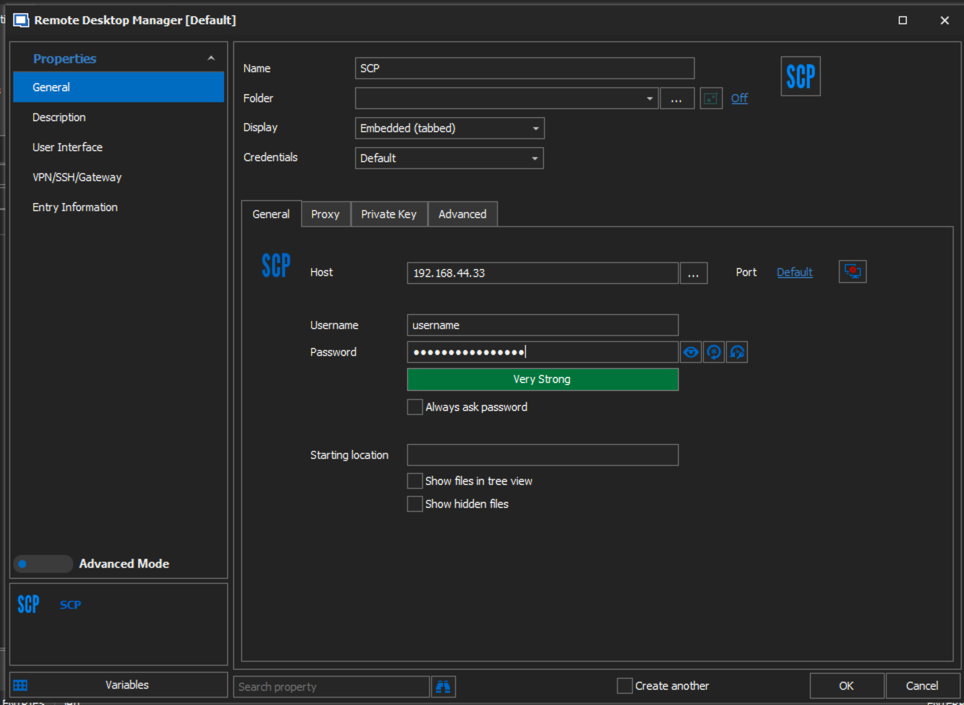
Cordialement,
Jeff Dagenais
2020-05-20_07-40-28.png
bonjour
c'est beaucoup mieux, mais j'ai encore un problème
peut être un 2 autres post :
ps : il y aune notion de verrouillage automatique de la session remote deskop manager free
ps : il y a des tutos en francais de remote deskop manager free
rebonsoir
ps : il y aune notion de verrouillage automatique de la session remote deskop manager free
j'ai trouvé !
il est géant ce logiciel
merci
Bonjour,
Merci pour votre retour. Si vous avez d'autres questions, je vous conseille de créer de nouveau(x) post(s) pour éviter toute confusion.
Cordialement,
Jeff Dagenais
bonjour
oui dans le
michelboudatPosts: 5
vous n'avez pas répondu à ma question:je peux maintenant lister mais pas tranférer le logiciel dit :
Bonjour,
J'ai essayer de reproduire le même scénario avec RDM Free 2020.1.20.0 sans succès. Je déplaçais manuellement un fichier du serveur vers un dossier local et le transfert se faisait bien. Qu'elles sont les étapes fait pour reproduire ce problème?
Est-ce que cela arrive sur plusieurs serveur ou juste lui?
De plus, pouvez-vous activer Logs et Verbose et nous envoyer une copie de ceux-ci?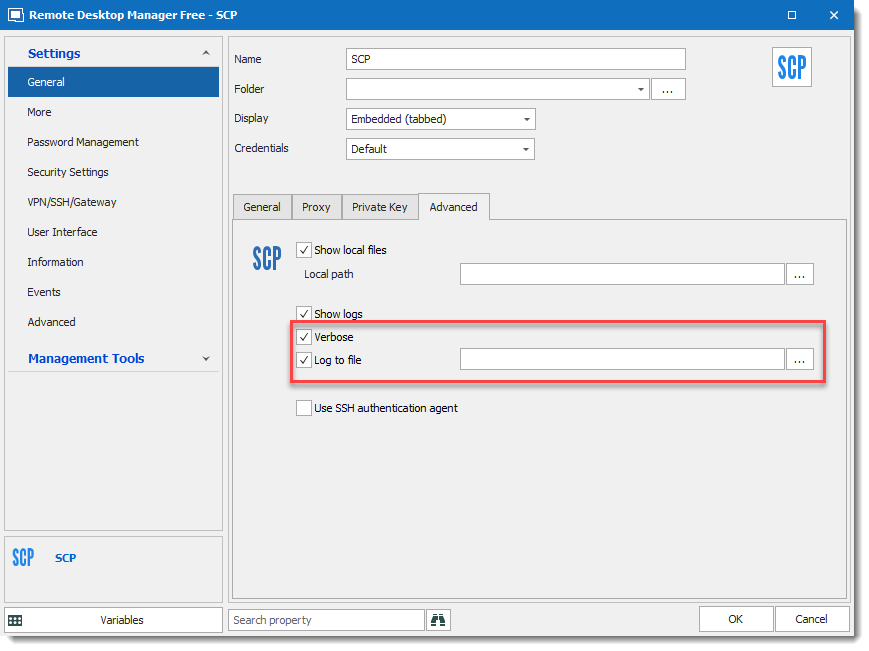
Cordialement,
David Grandolfo
SCP_verbose.png
SCP_logs.png
Bonjour
J'ai juste un serveur et j'ai choisi le mauvais repertoire (il doit avoir des droits accrus)
Sur un autre répertoire ça fonctionne
On va dire que c'est bon pour l'instant
merci
Bonne nouvelle, merci de nous avoir informés
David Grandolfo
Hello,
I have customers who use Stormshield VPN SSL.
I discover Remote Desktop Manager and I want to launch Stormshield VPN SSL as I do for OpenVPN with your ADD-ON but it does not seem to exist for Stormshield.
I came across this 4 year old forum and would like to know if you have been able to investigate a solution?
I have a minimum of 3 customers who use Stormshield so I have an address book.
Since I could not find an ADD-ON, I tried the COMMAND LINE solution as I did for FortiClient but it does not open the address book.
Sincerely
Ögan LEBLANC
Hello Ögan,
Thank you for contacting us on that matter!
Since you have posted your question in two different threads, we will take the liberty to only get back to you in one of them, so you can expect a reply shortly in the Stormshield VPN topic (https://forum.devolutions.net/topics/24622/addon-request-stormshield-vpn-ssl#165065)
Best regards,
Gabriel Degrandpré
Hi guys!
I need to "reopen" that thread, because with the 2023 version of RDM I have a problem with the rawsettings and a sudo.
We made a jump from 2021 to 2023, so I don't know what's maybe happend between.
In 2021 we used the rawsettings like in WinSCP and it worked, with 2023 the sudo will be ignored.
RDM: -rawsettings Shell=/bin/bash -c 'sudo su - admin'
WinSCP: /bin/bash -c 'sudo su - admin'
Same session in WinSCP will login with normal user and sudo su to admin user.
Is anyone using a user switch in WinSCP with RDM at the moment or have an idea how it should work?
Thank you!
Best Regards,
Tobi
Hello,
Thank you for the details, we will look into it!
Best regards,
Etienne Lord