Navigation Groups should be collapsable
0 vote

Would be great if we could collapse the Groups in the Navigation section.
All Comments (10)
Hello,
What would you like to collapse exactly?
Could you post a screenshot so that we can try to help?
Best regards,
Jeff Dagenais
Hello Team,
Trying to post a Picture. Not sure if it works.
Didn't work... (used Google Drive)
Trying to describe in more Detail.
In the Navigation Pane You have a large list of Servers / Clients.
To Keep an overview, you Group them with groupnames.
The list can still be quite Long. It would be nice when I can "Collapse" these Groups (right click - collapse)in such a way that you can only see the groupnames and not the Contents. When I want to see the Contents again, right click on group - expand, and the Servers / Clients are visible again.
Like in Office Outlook. In your Mailbox tree you can create Folders which you can open and Close to see the structure (subfolders or E-Mail items) below.
Hello,
Would you like to have something like this?
Best regards,
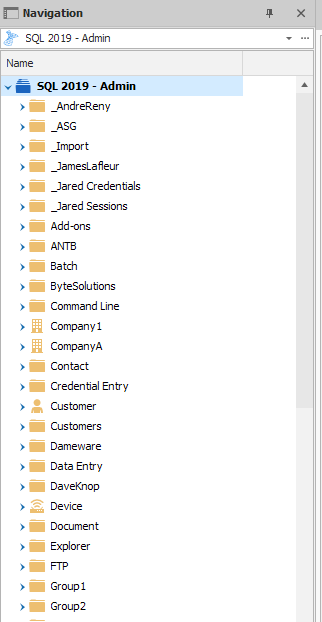
Jeff Dagenais
2019-09-18_09-58-42.png
Something like that yes :)
Don't tell me..it is a view setting? :)
Hello,
If you want the same view as me, go in View -> Vaults and select Tree View.
Best regards,
Jeff Dagenais
Hi,
Tried that. The list is showing on my dashboard, but the navigation section shows empty for some reason.
Hello,
I would need to see what you see, but could you try to do a Window -> Reset Layout in case that this help?
Best regards,
Jeff Dagenais
Reset Layout did the trick! Thanks!
Worked for me, too!