Populating the Information-General Tab

Good day,
I am fairly new to using the program but quite like it, one thing though I am struggling with is populating information on the Information and sub-sections which don't seem to be editable, are these automatically populated?
I have attached a screenshot to show what I am referring to.
Thanks,
Steve
Devolutions.png
All Comments (9)
Hello Steve,
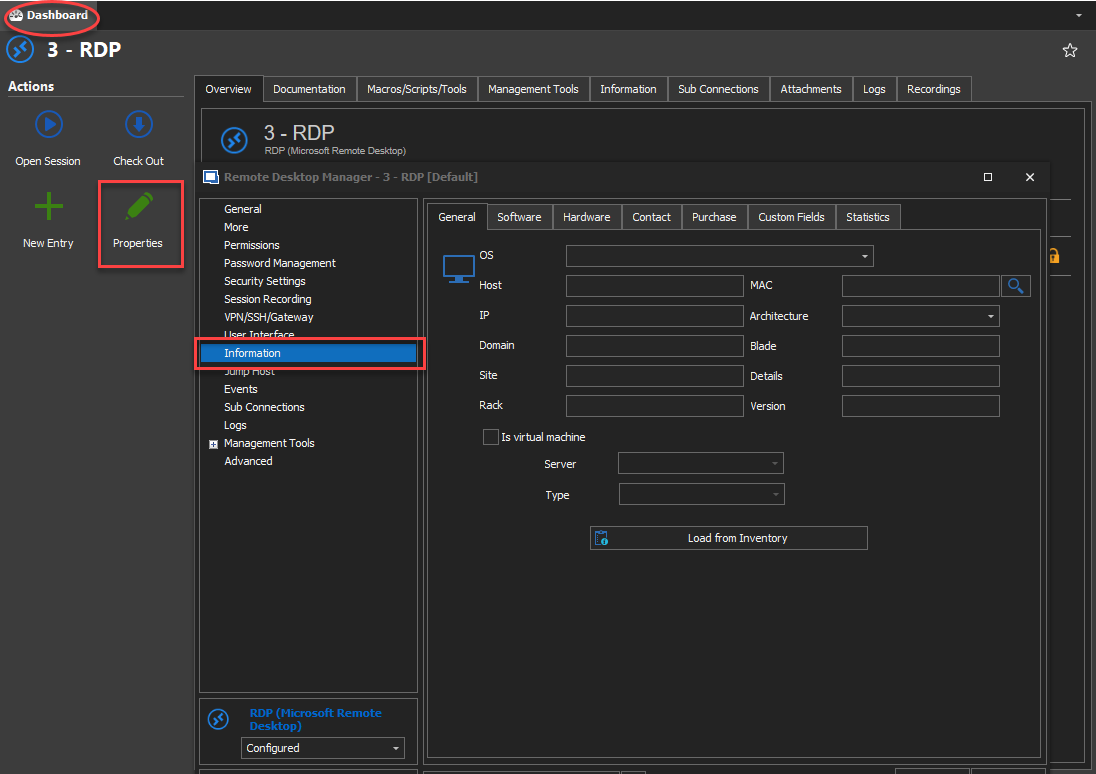
You seem to be trying to edit your entry from the dashboard. The dashboard is generally used for browsing purposes. If you want to edit your "information" section you will need to access the properties of your entry as demonstrated below.
You can also access the properties of an entry by the right clicking it in the tree view and selecting "Properties" in the context menu. Another way is to select your session in the tree view and use the shortcut "Ctrl + E".
Hopefully this helps.
Regards,
Michaël Beaudin
Accessing properties.png
That's exactly what the issue was, thanks for the info!
I actually also found a way to automate this off the Inventory Report section, so even better!
Another question regarding the Information Section....
We have an installation where none of the regular users get access to the information section for some reason (2019.1.41.0) - works fine for me as an admin of course....
I have set up a set of roles which the users are assigned to, but can't really find the option to let users (or roles for that matter) view the information section.... Going into User Management - there is no "Privileges" section and not really sure where to look next...
What am I missing?
-Marius
@marius03,
Is it possible to post a screenshot of the tab/section that you would like to provide access to your users please?
Best regards,
Jeff Dagenais
I've attached the "get-rdmuser" powershell command for a user that does not have the correct permissions - and how the properties looks on a session for a user who does..
The regular users just dont have the "Information" section available in properties at all
user_with_view_information.PNG
get-rdmuser_no_view_information.PNG
I can just edit it directly in the database of course - change false to true, and that should probably be it, but where in the GUI is the option to turn it off or on? Does it even exist?
-Marius
UPDATE UserSecurity
SET
CustomSecurity=REPLACE(CAST(CustomSecurity AS VARCHAR(8000)),'<CanViewInformations>false</CanViewInformations>','<CanViewInformations>true</CanViewInformations>')
Hello,
You should find this setting in the Privileges tab of the user account properties dialog.
It's strange that you cannot find that Privileges tab when you edit the user account.
What data source type are you using?
Best regards,
Érica Poirier