Error connecting to Ubuntu server via RDM SSH - "A socket error was encountered. Disconnecting."
Error connecting to Ubuntu server via RDM SSH - "A socket error was encountered. Disconnecting."

Hello, recently I started getting an error trying to connect to an ubuntu (16.04.1) VM using RDM. When I go to access it, I get the error "A socket error was encountered. Disconnecting."
I can access the server without issue using Putty. I'm on RDM version 2019.1.41.0. Is there a way to get more information about this error and how to fix it?
All Comments (7)
Hello,
I suspect that this issue might be caused by the fact that in RDM 2019, we changed the SSH engine we used in the past, Putty, for our own solution.
For this reason, would it be possible for you to test the following workaround:
Please go under File -> Options -> Terminal -> Under the "Advanced" section and check "Use Legacy Terminal".
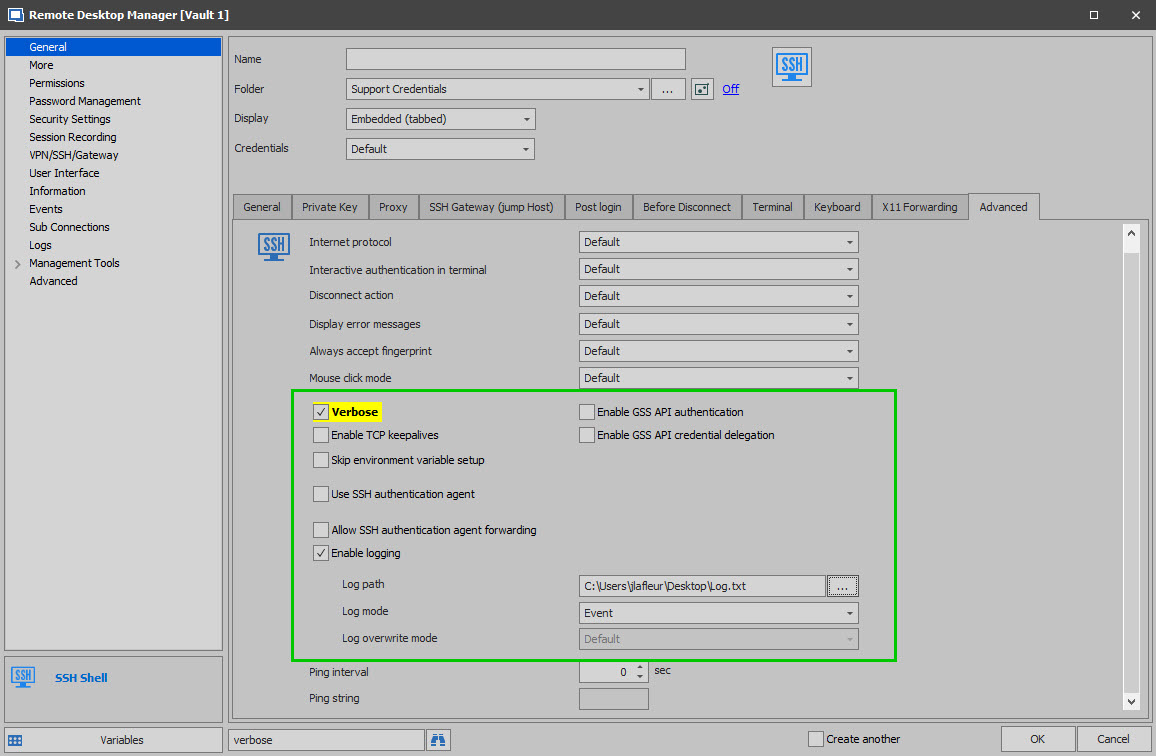
It is important to note that using this workaround will prevent you from using the new features that will soon be available with the SSH Shell entry type.Now for the troubleshooting of this issue, our engineering department will need the following (make sure to disable the option mentioned above before creating your log).From your RDM instance would it be possible for you to go in the Properties of your SSH Shell entry under the "Advanced" tab and check the following options:
1- Check "Verbose"2- Check "Enable Logging"
3- Use the ellipsis to select a path to create your log
4- Make sure that your "Log Mode" is set to "Event"
Once this configuration has been made, try to launch your SSH Shell entry once more and send us the log which will be created. I will then be able to assign this case to our engineering department in order to find the possible cause of this issue. This log can be sent to us using this link: https://devolutions.sharefile.com/filedrop
Best regards,
James Lafleur
James,
Thank you for your reply. I turned on the legacy terminal mode and now instead of getting the socket error message, RDM opens a new tab for a split second then it goes away. In the logs tab for the server in question it says I opened a session with a 0 second duration. I put the log file I created in the filedrop link, but in case it doesn't go through it just has a bunch of lines that look like:
[8/21/2019 4:24:57 PM] Looking up host "HOSTNAME.DOMAIN.COM"
- David
Hello,
Thank you for this log and you are correct, it does not provide us a lot of information on that matter.
That being said, would it be possible for you to provide us screenshots of the configuration of your entry?
I will need to see every tabs not using their default values.
These screenshots can also be sent to us using the sharefile link below:
https://devolutions.sharefile.com/filedrop
Furthermore, what type of Data source are you currently using?
Best regards,
James Lafleur
Thanks James, I've uploaded a screenshot of the entry configuration general tab and a screenshot of the data source config page. The server entry doesn't have any non-default values besides the host name and credentials. The data source we're using is our own RDM server, database version 1.523.
I don't know if it sheds any light on things, but we cloned the VM in VSphere, gave the clone a different host name, and created a new RDM entry for the clone. The only difference in the RDM entry is the host name. I can connect to the cloned VM through RDM without issue.
Hello,
Thank you for your collaboration on this.
That being said, Have you made sure to uncheck the "Use Legacy Terminal" setting before launching your SSH Shell entry to create the verbose log? If that is not the case, could you please uncheck it and provide us a new log ?
Also, does the same issue occur if you use an IP address instead?
Best regards,
James Lafleur
verbose.jpg
James,
My apologies, I missed that step in your instructions. I turned legacy mode off and got the original error. I then changed the entry to use the IP address which worked. I then changed the host name to use just HOSTNAME, omitting the domain name after it, and connected successfully.
The A record for the server was missing in our DNS, my apologies for wasting your time and thank you very much for your help troubleshooting this.
- David
Hello,
Thank you for your quick reply!
I am glad to see that making this change has solved this issue!
Do not hesitate to contact us again if you require further assistance.
Best regards,
James Lafleur
