Using PuTTy as SSH Shell

I want to be able to use PuTTy as my go to SSH shell., but am running into issues.
I've looked at: https://help.remotedesktopmanager.com/index.html?troubleshooting_ssh.htm but it seems that there isn't an "Show advanced options" button under the "Advanced" tab. I've also looked around your forum and one of the suggestion was to check if "PuTTy" was enabled under "Options" > "Types" > "Session"... and it is.
So, how am I able to choose PuTTy from the "Add New Entry" > "Session" list?
(Running version 2019.1.39.0 64-bit, .NET Runtime v4.0.30319, .NET Version 4.7.2+. Loaded add-ons: nothing.)
All Comments (1)
Hello,
Putty is still available in RDM but is deprecated since RDM 14.x. The reason is that the SSH Shell integration of RDM offers few more features as supporting multiple private keys, not only the PPK format.
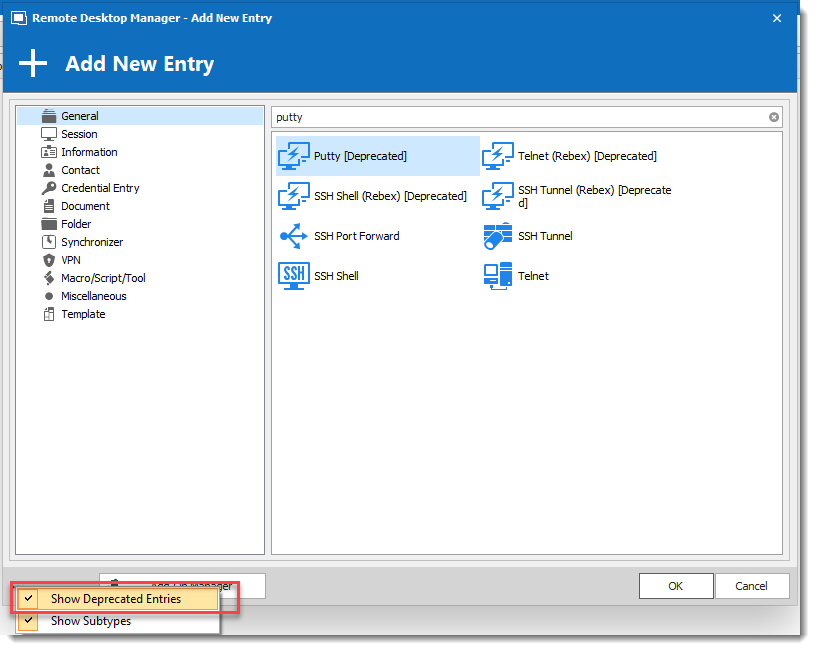
That said, you could still use it by enabling the Show deprecated Entries in the New entry window. Then you will be able to add the Putty entry.
Best regards,
David Grandolfo
Putty_deprecated.png