Embedded not working with MobaXterm

Hello,
I currently use MobaXterm and installed the add-on. When I create a new session in RDM and choose Embeded (tabbed) it still opens it up in an external MobaXterm window. Is there a way around this?
I like the versatility of RDM but I think the look and feel of the MobaXterm is far superior. Any suggestions on how to get closer to that feel with RDM's default ssh client would be appreciated.
Thanks,
Dave
All Comments (11)
Hello,
Which version of RDM are you testing with?
And which version of MobaXterm is installed?
We understand that some customers love MobaXterm features. That said, we improved a lot out SSH Shell integration in RDM 2019 versions.
Which MobaXterm feature you would like to see in RDM SSH Shell?
Best regards,
David Grandolfo
Hi,
I'm using:
MobaXterm v12.1 Build 4156
RDM v2019.1.41.0 64-bit
By far my favorite features in MobaXterm is actually the font and the color themes. I know, small things make me happy :) Just makes it easier to look at all day long. ie. The font in the RDM SSH Shell is quite blocky and I have noticed that the shell colors are far easier to read in MobaXterm than RDM. Blue is an excellent example, I can barely read any files that show up in blue in RDM but it's quite pleasant to look at in MobaXterm.
Hi,
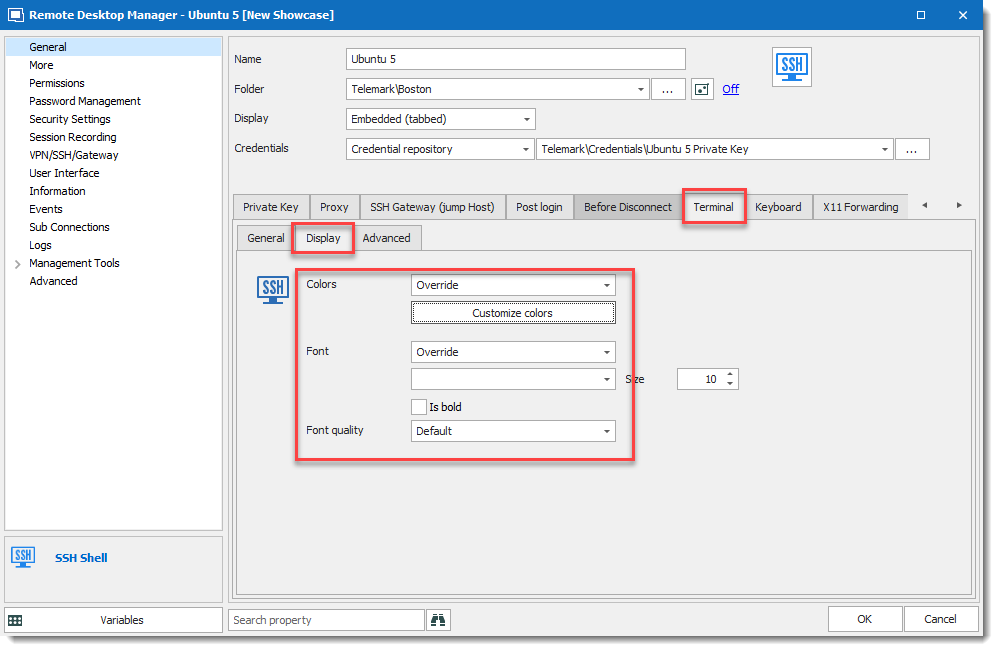
I probably have good news for you, in the SSH Shell entry under Terminal then Display you can override per session the Colors and Font.
If you prefer doing it globally not per session, the same feature is available under File > Options > Types > Terminal > Colors.
Please let me know if it's the feature you are looking for.
Best regards,
David Grandolfo
SSH_Shell_terminal.png
Hi,
Thank you for this, I was able to go and change the font and colors. The colors and font both look great now but no matter what font I try the spacing/formatting is now all off, any suggestions would be appreciated.
2019-08-16_11-14-31.png
Hi,
This formatting is an issue, I report it to the engineering department. The workaround is to enable Use legacy terminal under File > Options > Types > Terminal > Advanced.
Best regards,
David Grandolfo
That looks better, font spacing is still a little funky between letters but looks better than it did.
I noticed there's some lag with legacy mode as well
Hi,
Thanks for this information, I will add the information to the ticket. However, I'm not sure we can improve the legacy mode.
But of course, we will solve the fonts issue on the SSH Shell integration.
Regards,
David Grandolfo
Hello,
We've made some changes internally that should fix the issue for the SSH Shell. This will be available starting from RDM 2019.2.9.0.
Regards,
Hubert Mireault
We are still experiencing the issue, MobaXTerm launched in a separate window instead of an embedded tab. Is this something that you guys can fix or it's a MobaXTerm issue?
Jonathan Pitre
ITI
Hello,
We investigated yesterday and unfortunately I'm not sure it's possible right now. MobaXTerm changed how they handle their windows a while back and we haven't figured out a way to embed it properly in RDM. It's not the first time this has been reported by a user.
Regards,
Hubert Mireault