uptime function in Dashboard
0 vote

Can you please add an "uptime" function in the Dashboard ? This would be a real timesaver.
I can provide more detail via email.
Thanks
All Comments (19)
Hello,
How RDM is supposed to get the uptime?
Regards
David Hervieux
Hi David. I left you a PM.
Hello,
Sorry I missed the notification. Thank you. I will add this to our todo list. Maybe some dynamic information. I have to figure how I could support uptime.exe directly in the application.
Regards
David Hervieux
Not sure I'm following the part about supporting uptime.exe. That's a command line utility that Microsoft stopped maintaining years ago and is a little buggy when used against newer Windows operating systems but the functionality is great and the response is quick. It uses event log entries, etc to determine system uptime and key events.
Hello,
We can't package uptime.exe in RDM. We have no right to do that. We need to find a way to do the same thing without the executable.
Regards
David Hervieux
Powershell can get the uptime of system, querying WMI. Here's a sample script of how to do it:
<#
.SYNOPSIS
Demonstrates uptime using WMI
.DESCRIPTION
This script used Win32_ComputerSystem to determine how long your system
has been running. This is a rewrite/improvement of sample 3 at
http://msdn.microsoft.com/en-us/library/aa394591(VS.85).aspx.
.NOTES
File Name : Get-UpTime.ps1
Author : Thomas Lee - tfl@psp.co.uk
Requires : PowerShell V2 CTP3
.LINK
Script Posted to:
http://www.pshscripts.blogspot.com
Original sample posted at:
http://msdn.microsoft.com/en-us/library/aa394591(VS.85).aspx
.EXAMPLE
PS c:\foo> .\Get-UpTime.Ps1
System Up for: 1 days, 8 hours, 40.781 minutes
#>
##
# Start of script
##
# Helper Function - convert WMI date to TimeDate object
function WMIDateStringToDate($Bootup) {
[System.Management.ManagementDateTimeconverter]::ToDateTime($Bootup)
}
# Main script
$Computer = "." # adjust as needed
$computers = Get-WMIObject -class Win32_OperatingSystem -computer $computer
foreach ($system in $computers) {
$Bootup = $system.LastBootUpTime
$LastBootUpTime = WMIDateStringToDate($Bootup)
$now = Get-Date
$Uptime = $now - $lastBootUpTime
$d = $Uptime.Days
$h = $Uptime.Hours
$m = $uptime.Minutes
$ms= $uptime.Milliseconds
"System Up for: {0} days, {1} hours, {2}.{3} minutes" -f $d,$h,$m,$ms
}
# End script
Great. That's what I mean by a dynamic information.
Regards
David Hervieux
Any update on adding an uptime function to RDM ?
Thanks
Not yet.
Regards
David Hervieux
Still no uptime function after requesting it over a year ago ? :-(
Seems like it would be very easy to add here .......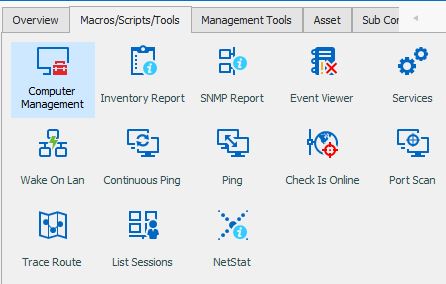
uptime.JPG
Hello,
Sorry for jumping in...
I just made a quick hack based on your script...
Just create somewhere a Macro/Script/Tool-> Powershell (local) Entry. Copy the below code as embedded script, put $HOST$ $NAME$ in the Arguments Field, and set "Load RDM Cmdlet" in Advanced Section.
The entry is then available at every dashboard. It uses the session credentials which is actually not completely right cause Tools could have other credentials but Powershell/Tools Support has a lot of space for improvement in RDM (I have here quite some ideas :D )
For your convenience i also attached the tool ready to import...
param
(
	[Parameter(Mandatory = $true,
			   Position = 1)]
	[string]$ComputerName,
	[Parameter(Position = 2)]
	[string]$Session
)

function WMIDateStringToDate($Bootup) {

	[System.Management.ManagementDateTimeconverter]::ToDateTime($Bootup)

}

if ($Session) {
	$s = Get-RDMSession -Name $Session
	$usr = Get-RDMSessionUserName -Session $s
	$dom = Get-RDMSessionDomain -Session $s
	$pw = Get-RDMSessionPassword -Session $s
    [pscredential]$cred = New-Object System.Management.Automation.PSCredential ("$dom\$usr", $pw)
	$system = Get-WMIObject -class Win32_OperatingSystem -computer $computerName -Credential $cred
} else {
	$system = Get-WMIObject -class Win32_OperatingSystem -computer $computerName
}
	$Bootup = $system.LastBootUpTime
	$LastBootUpTime = WMIDateStringToDate($Bootup)
	$now = Get-Date
	$Uptime = $now - $lastBootUpTime
	$d = $Uptime.Days
	$h = $Uptime.Hours
	$m = $uptime.Minutes
	$ms= $uptime.Milliseconds
	"System Up for: {0} days, {1} hours, {2}.{3} minutes" -f $d,$h,$m,$ms
I know its not very nice and also not very fast... but maybe you can use it...
@David: About Powershell ideas... should i just post them to feature request or do you have also a "Idea" section (maybe with voting possibilities"
Best regards,
Heinrich
Uptime.rdm
Hello,
Thank you very much for the session. This is really a good workaround for the uptime. You can post you idea/suggestion directly in another post on the the forum (feature request section).
Regards
David Hervieux
Still no uptime function after requesting it over a year ago ? :-(
Seems like it would be very easy to add here .......
Have you tried the workaround from Heinrich?
David Hervieux
Hello,
Good news, we've added a new "check host uptime" button in the macro/script/tools tab. It will be available starting from RDM 2020.3.15.0.
It's based off of the Powershell code that was provided earlier in the thread. Also, take note that it will only work for machines where WMI is enabled.
Regards,
Hubert Mireault
I just tried this "uptime" tool .. does not seem to work ...
I also presume that, from what I understand from the feedback above, this will only work for windows devices; this will not work on SSH/Linux machines
kr
Wim
Hello,
Indeed, this is currently only available for Windows devices, as in the backend we use WMI to check the host uptime.
Regards,
Hubert Mireault
Hubert,
merci, for your feedback, but also with windows servers it does not seem to work, do I need to do something special on the servers ?
kr
Wim
Hello Wim,
Thank you for your quick reply!
Would it be possible for you to run the following command from your local computer and provide us the result?
wmic /NODE:"ComputerName" bios get serialnumber
Below, an example with other credentials;
wmic /NODE:"ComputerName" /user:"username" /password:"password" bios get serialnumber
The WMIC command will allow us to see if you have access to the machine through WMI. For more information, please consult this link:
https://kb.devolutions.net/rdm_wmi_troubleshooting.html
Best regards,
James Lafleur