Host/Username/Password/Domain Consistency
0 vote

I'm using RDM Free 2019.1.39.0 64-bit. I've got a lot of saved connections, and still use the Quick Connect a lot as well. When I open a saved connection, some of my entries use the format of Host/Username/Password, each on a separate line, with no Domain line, making me use the DOMAIN\Username convention. Others(I think newer entries), use the Host/Username/Password/Domain format, each on a separate line. I've used RDM for a while, so I think it's an older connect/newer connection thing.
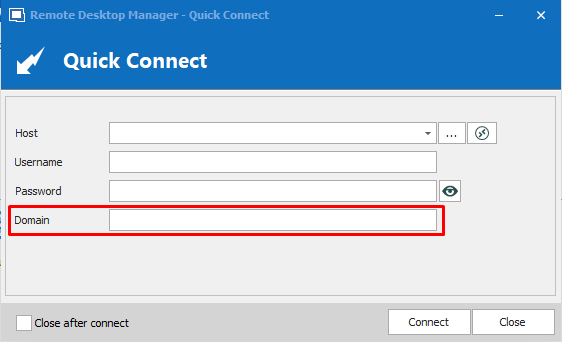
When I go to use the Quick Connect, I only see the Host/Username/Password format, forcing me to use the DOMAIN\Username convention to connect. It would be neat if would could have the same format in each area.
Host
Username
Password
Domain
All Comments (4)
Hello,
Just to be sure I follow you, could you post a print scree?
Regards
David Hervieux
Attached are 2 images, 1 of a Quick Connect screen, another of a Saved Connection. I should mention I am using an RDP connection.
QuickConnect2.PNG
SavedConnection.PNG
I see what you mean. This should not be hard to improve
Regards
David Hervieux
Hello matt11,
We have added the "Domain" field in the Quick Connect screen.
All changes will be effective in the next update (2019.1.42.0)
Regards,
Gabriel Dubois
domainTextField.png