Scrollback Buffer for SSH/Telnet windows

Disabled
I'm looking for the setting to increase the scrollback buffer on the SSH/Telnet windows. We have some large stacks, and the amount of information is bigger than the buffer. I can't seem to locate the setting to increase the buffer size.
Anyone know how to do this?
Thanks!
All Comments (11)
Hello,
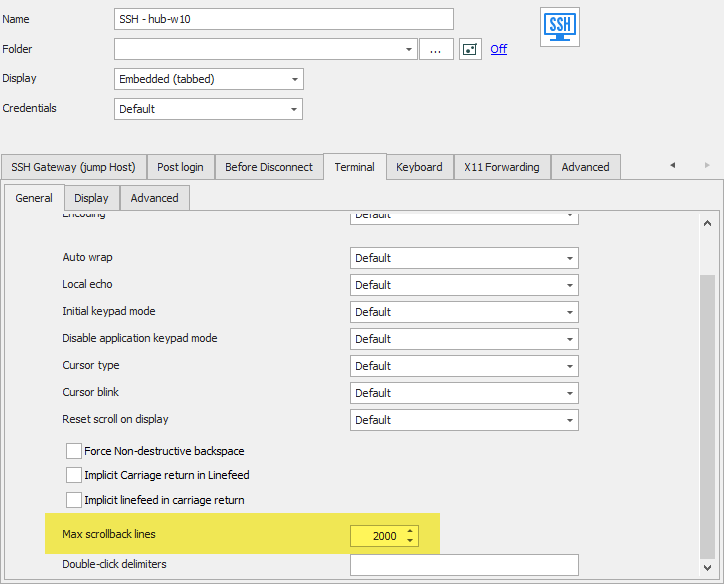
In the SSH entry you can change the "max scrollback lines" property to affect this.
There should be a similar option in Telnet as well. Let us know if there is any issue with the setting.
Regards,
Hubert Mireault
2019-07-25_9-45-16.png
Oh! It is in the template setup. Ok, thank you!
I can find this option for SSH templates but not for Telnet. Is this something that does not work with Telnet?
Sorry for the mistake the Max scroll line option is not available for Telnet terminal.
I open a ticket to add it.
Best regards,
David Grandolfo
Thanks David!
Hello mailandrewg,
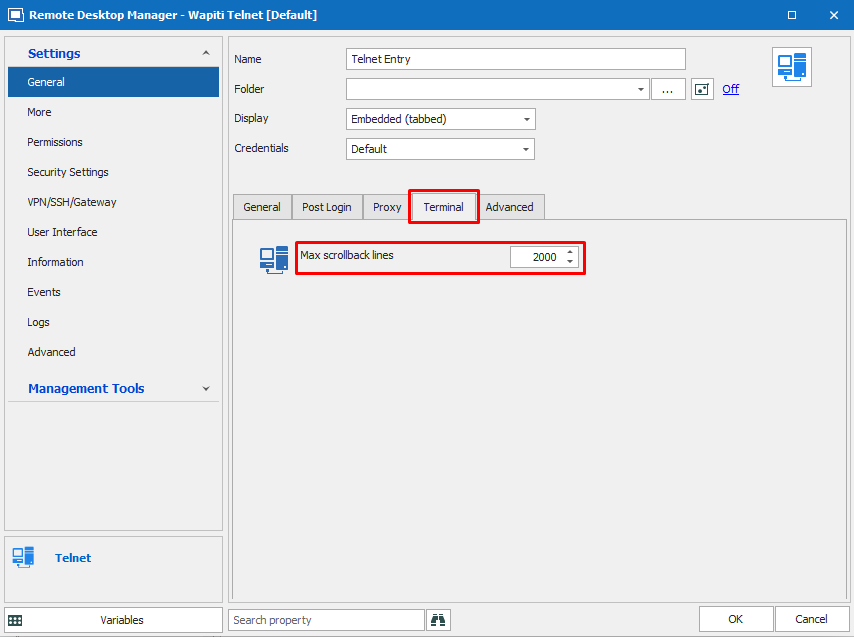
We have added a "Max scrollback lines" setting for Telnet terminal.
All changes will be effective in the next update (2020.1.0.0)
Regards,
Gabriel Dubois
TerminalMSL.png
Thank you very much!
Hi everyone;
I have multiple ssh/telnet connections. Is there a menu where I can change all of them at the same time?
Hello,
Thank you for contacting us on that matter!
To edit multiple entries at once, I would recommend the use of the batch edit feature. In order to use this tool, please refer to this link: https://help.remotedesktopmanager.com/commands_batchedit.html
Best regards,
James Lafleur
Hello all,
I did find this option very useful, but could you show me where I can configure globally so all created sessions (and the existent ones) will have this feature activated?
Thanks
Hello,
You can use the Batch Edit feature to edit a selection of entry at the same time. You can find out more information about the process here: https://docs.devolutions.net/rdm/commands/edit/batch-edit/
If you'd like for your users to have this value set automatically when creating new entries, you could implement templates and require using them when creating entries. You can find out more about this here: https://docs.devolutions.net/rdm/commands/file/templates/
Regards,
Hubert Mireault