DPS - hide/disable "default" vault
hi!
is there a way to disable/hide the "default" vault?
KR
G.
All Comments (19)
Hello,
You can revoke the access to the Default vault for all roles and user accounts except administrators.
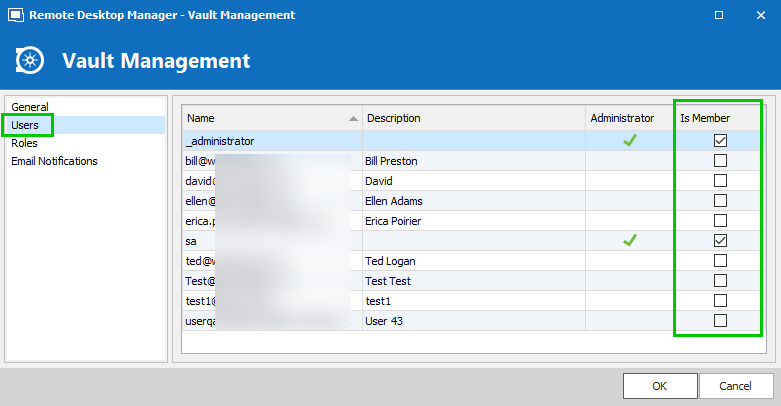
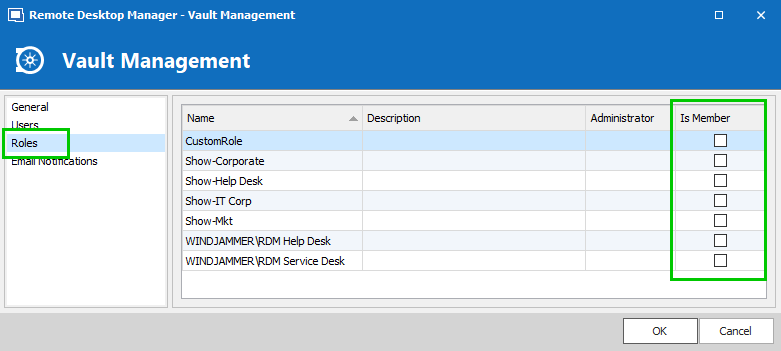
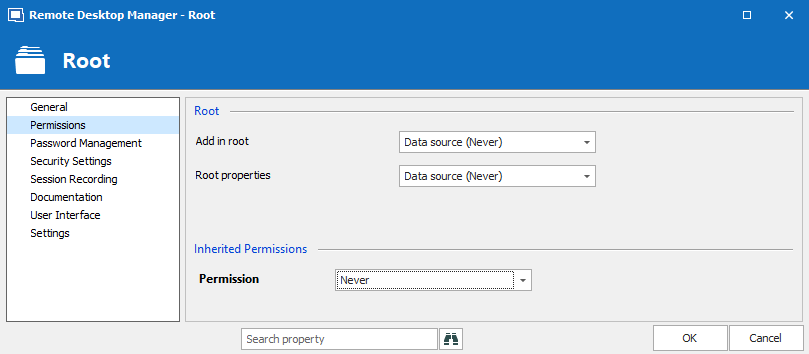
You can also set the Defaut vault Root permissions to Never so only administrator accounts can view the content of the vault.
Best regards,
Érica Poirier

Hi Erica,
I just try your steps but the user still view the default vault even in the web page or RDM.
He cannot see the content but there's a way to hide the vault? Like with RDM without DPS the user don't see the default vault.
Regards
Hi,
I know I can remove the default vault user by user but the goal is to set this options by default without manual step to remove default vault.
Regards
Hi,
I was wrong with RDM when I create a user I uncheck default vault each time also. So I don't know if it's possible to remove the default vault by default :) in RDM and DPS...
Regards
Hello,
In the Automatic User Creation section in the Domain tab of your DPS settings, which Default Vault is selected? Is it set to Default, None or something else?

Best regards,
Érica Poirier
Hello,
When you manually create an account, you have to uncheck the Default vault access as it's a default behaviour in the application.

Best regards,
Érica Poirier
Hi,
Default was selected so I just select none then delete my user and reconnect to DPS web page and now the user don't see anymore default vault!!
Thanks you!
Hello,
Perfect! Glad that it works on your end :)
Best regards,
Érica Poirier
We are running version 2020.3.29.0 and having the same issue and I can not find the Password Server Settings screen.
Can you help me find it?
Hello,
Since version 2020.3.x of Devolutions Server, you need to change it using the web interface, under Administration > Server Settings > Authentication > Domain.

Best regards,
Richard Boisvert
Hello Richard,
Thanks for the fast reply,
We are not using the default vault.
Do I need to change the permissions for the default vault, so that it is not visible for the end user?
When a new AD user logs in, the vault opens where the user has permissions on?
Hello,
My pleasure!
Under Administration > Vault, you can click on the membership of the Default Vault and ensure it is deselected for your users and groups. Note that administrators will have access anyway (grayed out):

If accessible, the default vault will open when a user first logs in, afterward it will be the last vault they accesed.
Best regards,
Richard Boisvert
Thanks again!
Hello,
This method doesn't work anymore?
Also, we are not using AD authentication but Azure. Where can I turn off the default vault or delete it?
Hello,
It is possible to hide the Default vault using the permissions.
In the Default vault root properties, set all Permissions parameters to Never. Only administrators will have access to the Default vault.

Let me know if that helps.
Best regards,
Érica Poirier
Hi,
we configured the permissions as shown in the screenshot above.
Nevertheless, the Vault is currently still assigned to every new user.
Only when we correct this at Vault level will it no longer be visible.
Can this automatic assignment be avoided?
Best regards