Remote Desktop Manager Free 2019.1.38.0 does not pass the user and domain name on to RDP
Remote Desktop Manager Free 2019.1.38.0 does not pass the user and domain name on to RDP

Hi,
I have just started working at new company and when setting up an RDP entry in RemoteDesktopManagerFree.2019.1.38.0, the user and domain names are not passed on to the server (MS 2012). I have used Remote Desktop Manager for years and have not experienced this problem. Instead of transferring my admin logon it keeps using my local logged on user name which does not have access. MSTSC RDP works fine with the other credentials. I am not transferring the password but just the user and domain.
At my previous location I had been using RDM Free since 2017 and have updated along the way to the latest but never had this issue then.
If I tick the always prompt password box I get the RDM logon box which works but sometimes asks me to log onto the server a second time. Is there anything that I am missing.
Thanks,
MikeD
MikeD
All Comments (3)
Hello Mike,
Is the display mode of your session is set to External? If so, could you look in Windows Credential Manager if any username/password exists for the server?
Best regards,
David Grandolfo
Hi David,
Thanks for the reply.
My usual setup is using the Embedded Display option but I have even tried to use as external and it still keeps using my locally logged in user name and not my other admin account from the RDM settings. The settings are set with the admin account but it is still not passing it through.
I have also ad a look at credential manager and there is no setting to for that particular server. I have even backed up and cleared everything but am having the same result.
I have even tried to go back a couple of versions but it is still not passing through. As I have been using this program for about 11 years, I am not ready to give up on it yet as I find it a necessity to get my job done.
Thanks for your help,
Mike
MikeD
Hi Mike,
To be sure you say that you look in Windows Credentials and none entry is related to this server?
Further information to find Windows credentials manager https://support.microsoft.com/en-ca/help/4026814/windows-accessing-credential-manager
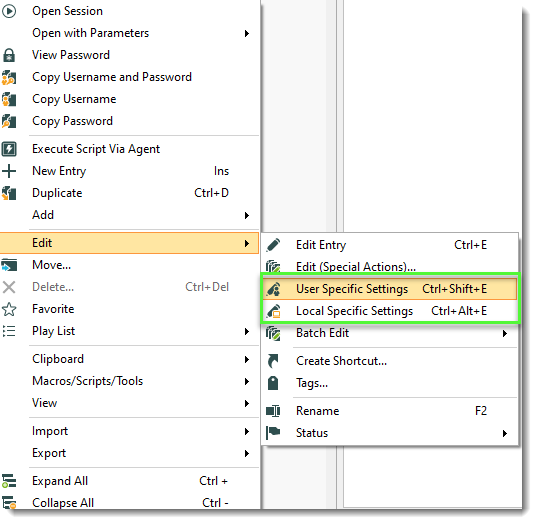
That being said, if you create a new entry with only the server/IP and the credentials. Does it work? If so, credentials probably exist in User Specific Settings or Local Specific Settings, located under Edit.
Best regards,
David Grandolfo
USS-LSS.png