Certificate for stream.tellmer.com couldn't be verified

Disabled
I just started getting the above message when starting up Remote Desktop Manager. The certificate looks good. Any idea what's going on?
All Comments (15)
Could you post a print screen to get the context related to the certificate?
Regards
David Hervieux
Hey,
sorry for jump in - we receive exact the same at RDM start - The message mention stream.tellmer.com but in the certificate details *.keen.io is shown
(I guess in our case it's related with https inspection):
Regards,
Min
@Min
This is really strange. Do you get this all the time or it's new?
David Hervieux
We got it the first time as we upgraded RDM from 2019.1.25.0 to 2019.1.36.0 on a customer side.
Regards,
Min
Could it be related to the certificate revocation list?
https://help.remotedesktopmanager.com/kb_security_certificatevalidation.htm
David Hervieux
This could be - I'm on monday again on customer side - we'll check the Ignore application certificate errors and give you feedback.
At the moment we've configured a SSL-exception for *.keen.io on the proxy
Regards,
Min
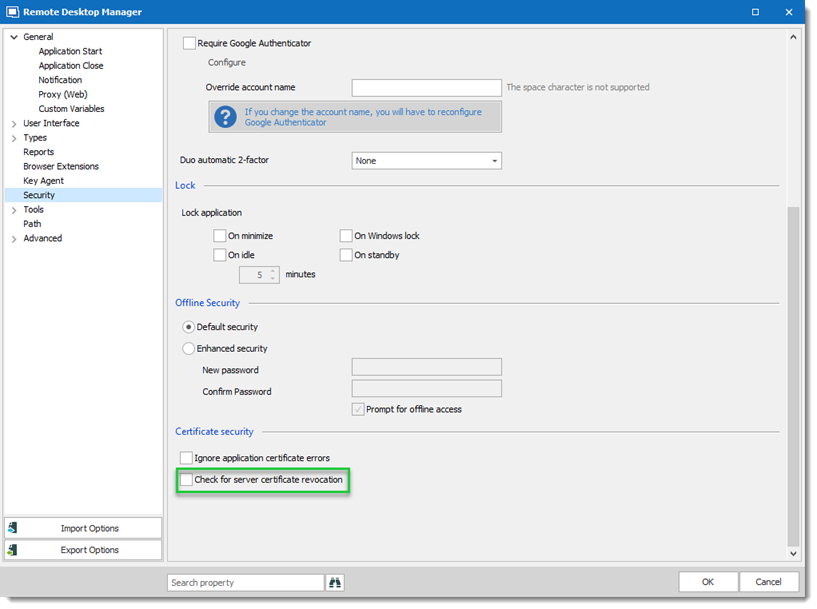
We investigated the issue and disable the option Check for server certificate revocation should be the workaround for this issue.
Option under File > Options > Security
I open a ticket with the engineering department to continue the investigation.
Please let me know if the option doesn't solve the issue.
Best regards,
David Grandolfo
RDM_revocation.png
I am having the same situation. I did a view on the certificate (see the attachment). The part in green is from our firewall (it is doing SSL inspection by creating and injecting its own intermediate cert (man in the middle). I am sure that's whats causing the error. I could request an SSL proxy exception just like Mins was able to do, but I have to be able to justify it to our security department.
Unchecking the Check for server certificate revocation isn't exactly a solution.. it's just hiding/ignoring the problem. So, what is the keen.io domain used for? (I know that's what I'll be asked).
edit: I just went to keen.io's main web page, and it looks like it is used for tracking customer usage/telemetry data. Is that correct? That could be a hard item to sell to our security department.
thank you all :-)
David F.
2019-07-23_05-28-20.png
Hello,
It's the equivalent of Google Analytics. Everything is anonymous. It's equivalent to browsing our web site. You can disable this if you want with the No Internet Connection setting in File->Options | Advanced.
You might have more issues with the Man in the Middle firewall since we validate the certificates to avoid Main in the Middle interception for the encrypted traffic (which is worse than an anonymous analytic service to me).
Regards
David Hervieux
Ok, that's fair.. I know Citrix gateway's don't allow for this kind of man-in-the-middle proxying.
Thank you. :-)
David F.
Hi David,
This certificate pop-ups worry our users and concern our ciso.
We have no deep-inspection in place, so it can't be because of our firewall.
Which information is collected through telemetry?
Do you use only keen.io for telemetry or anything else too?
I'm asking because users using RDM 2020.3.29.0 didn't get any popup, but users using previous RDM versions complain about it.
So I guess you might have changed behaviour in RDM or telemetry-service provider?
Kind Regards
Markus
======================
Hi Markus,
Can you export the certificate chain from a browser (https://telemetry.devolutions.net or https://api.keen.io), or use the one I have just fetched that is attached to this post, and then run the following command to validate it on one of the affected systems:certutil.exe -f -urlfetch -verify .\api-keen-io.cer
I suspect it may still be an issue with CRL revocation checks, but I would like to confirm it. Modern browsers use OCSP by default and will likely validate the certificate, but certutil.exe (and .NET) still use CRLs by default. This should help us figure out the best way to prevent certificate validation failures in the future.
Best regards,
Marc-André Moreau
api-keen-io.cer
Hello Markus,
To add to what Marc-André said, I would also like to specify that it's possible to disable telemetry in RDM through GPO (so you could disable it all at once for your domain users), or on a local basis by checking "disable telemetry" in File>Options.
As for what data is collected, we collect anonymized data about the device that uses RDM (OS version for example), information about which type of datasource or entries are used, and other usage statistics. We only use Keen.io for telemetry information.
Regards,
Hubert Mireault
Hi,
thank you for clarification.
I need to wait till next one pops up because last one got updates to the computer and now its gone.
Thank you,
Kind Regards
Markus
======================
Hi Markus,
This Mathieu Morrissette from the Devolutions Security Team.
I just wanted to let you know that we have made changes to the certificate validation mechanism in RDM 2021.2.9.0 and above that should solve issues some users were experiencing.
Let us know if you still have the certificate warning message.
Best regards,
Mathieu Morrissette