Password prompt upon starting RDP connection

We have some concerns about security on RDM.
Since we store multiple passwords for different servers and these allow us to connect without any credentials given manually, convenient but not very safe if one of our workstations are somehow accessed by unauthorized users (hackers).
Would it be possible to display a password prompt with a global password that has to be entered everytime you try to connect to a server?
If not, how else does everyone else using RDM go about their security?
All Comments (9)
Hello Daniel,
Do you use RDM Enterprise with the role based security or even better with Devolutions Password Server?
Regards
David Hervieux
We use RDM Enterprise (or teams?) but no roles defined - everyone is administrator.
We don't have Password Server.
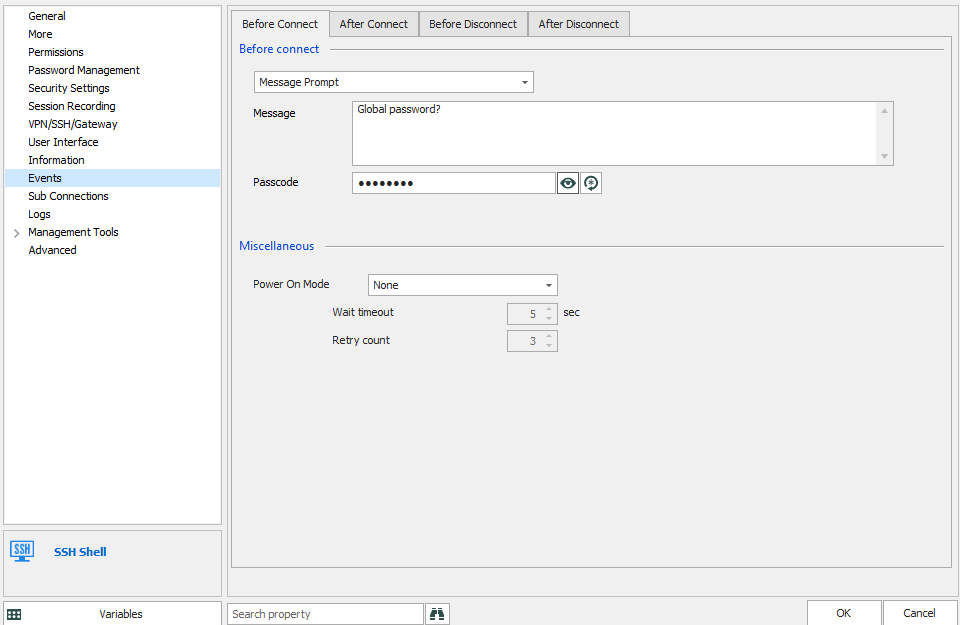
To accomplish what you're trying to do, maybe you can use the "before connect" settings in "message prompt" mode, with a passcode. On opening the entry, it will show the message you put in, and you'll only be able to open the entry if you enter the correct passcode.
Regards,
Hubert Mireault
2019-07-03_8-03-50.png
I don't see how this is going to stop anyone from right-clicking an entry selecting properties and viewing any and all information.
Basically if we could just get the same functionality as what happens when your computer goes idle and you are prompted for password upon returning.
It's also possible to go in File > Options > Security, and set RDM to lock when idle. If you're on a datasource that allows locking, like SQL server, it will then prompt for your credentials when unlocking the application. It's also possible for your users to set a custom application password, or two factor authentication.
Here's more information on our locking features: https://help.remotedesktopmanager.com/file_options_security.htm
If this still doesn't work for you, please let us know.
Regards,
Hubert Mireault
Thank you!
That might just be what we are looking for, but is there any way to define this setting as a global setting so that it is enforced on all users?
Hello,
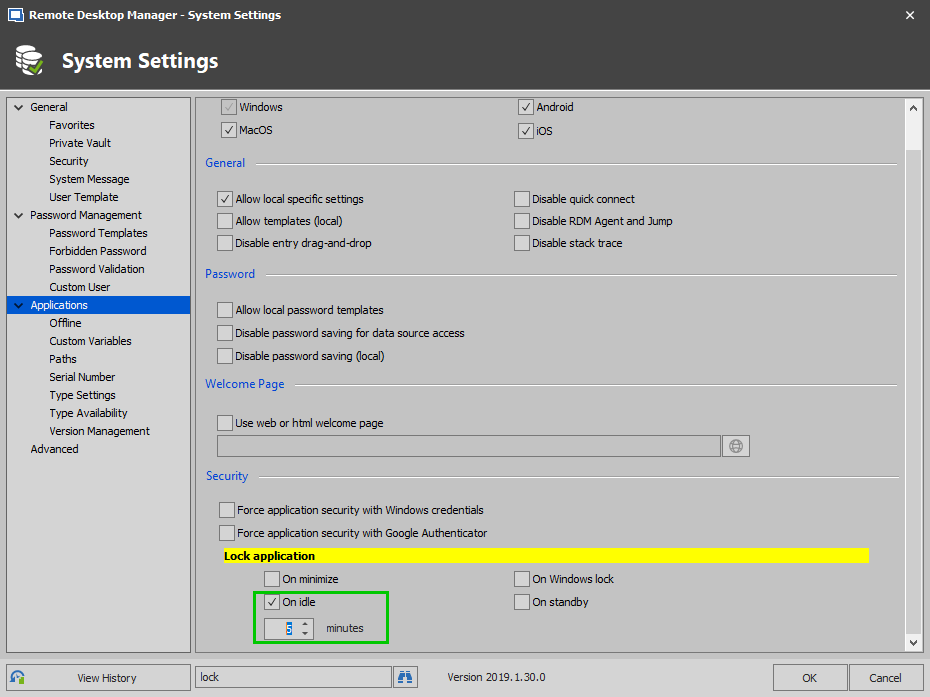
Sorry to jump in! Indeed it is possible for you to define this setting as a global setting if you are using an Advanced Data Source.
You would need to open RDM and go under Administration -> System Settings -> Applications -> Security -> Lock Application -> Check "On Iddle" and select after how many minutes you wish to lock the application.
Best regards,
James Lafleur
LockIddle.png
Thanks
The thing is, I have had this enabled on my local application for a day now. Just came back this morning and logged on my machine, but I didn't get any password prompt from RDM when I restored it from the notification area.
Could anyone explain why? It seems a bit uncertain and insecure if the lock is not consistent.
Hello,
Would it be possible for you to also check "Force application security with Windows Credentials" ? Checking this option should force RDM to prompt you for your Windows Credentials once unlocked.
As for your question, I suspect that this might have occurred because you locked your computer before the RDM "lock on iddle" option took effect.
For this reason, could you please check "On Windows Lock" and see if this behavior persist?.
Best regards,
James Lafleur