RDM freezes after screen lock

Hello,
I have an issue when after I unlock my screen, RDM is completely frozen and you cannot click on anything except the current connection. If I try and click out of the remote session, nothing happens. The only way to get back in is to end the task. Anyone have any similar issue and is there a fix for this?
Thanks,
Gavin
All Comments (14)
Hello,
Which version of RDM are you using?
and have you any log error in the Application Log under the Help section of RDM?
Best regards,
David Grandolfo
Seen other odd issues with screen locks because of Microsoft patching. Nothing related to RDM.
What endpoint security product do you use. McAfee appears to have a ton of problems recently.
I am running V2019.1.25.0 ... There are no errors in the application logs. We are using Sophos AV.
Hi,
VTScott bring a good question about, which Windows version are you running? (You can type Winver in command line.)
Also, could you send us your data source information under Files which will give us further information on RDM installation.
Best regards,
David Grandolfo
Hello,
The data source is local and I am running Windows 10 Enterprise 1803
Thanks,
Gavin
Hi,
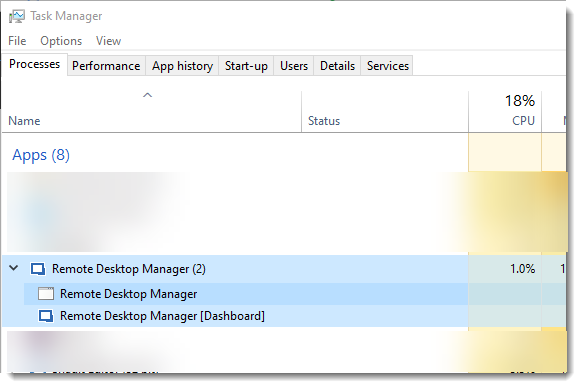
We think that the issue might be related to a hidden Windows. When you unlock your screen, could you verify in Task Manager if you have multiple processes for RDM as below?
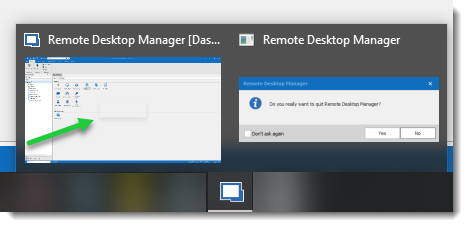
Moreover a mouse over RDM icon in the Taskbar could also show you two windows or a shadow box over the RDM window as my green arrow point.
If there is nothing in the task manager or the taskbar, could you look at the Windows Events if any logs occur.
Regards,
David Grandolfo
RDM_Ghost.png
RDM_Task_Manager.png
The next time it happens, I will check for that.
Thanks,
Gavin
Ok, it just happened again, this time I did not lock the screen, just moved to the App and its locked. I can still access the RDP Server that I was connected to but the entire app is frozen. No additional windows.
Capture.PNG
Hello,
For information the hidden window issue, which is not your issue, has been fixe in RDM 2019.1.31.0 or above.
That being said, for your issue, could you look in Windows Event Viewer if you have any logs?
Regards,
David Grandolfo
Just happened again, no errors in the event logs.
Hello @gross,
Since you seem to be able to reproduce this issue on your side, would it be possible for you to record this behavior and send it to us using the following sharefile link: https://devolutions.sharefile.com/filedrop
Also, could you please confirm which version of RDM and what type of Data Source you are currently using?
Best regards,
James Lafleur
I have uploaded the video. RDM is using local DB and version is 2019.1.25.0
Thanks,
Gavin
Hello,
Thank you for sending us this video! I took the liberty of opening a ticket on your behalf in our ticketing system.
I will contact you through Devo-4529, if more information are required and to provide you updates on this issue.
@everyone , I will update this forum thread as well as soon as a fix is found for this issue.
Best regards,
James Lafleur
Hello,
I am glad to see that this issue did not occur on that latest version of RDM.
Do not hesitate to contact us again if you require further assistance.
Best regards,
James Lafleur