SecureCRT Session tab name
0 vote

Hi,
Could you please create an option in the SecureCRT session to adopt the session name from Remote Desktop manager to the tab name of SecureCRT.
With the option "/N "name"" is used after the "/T" option you can set the tab name.
If there are any further questions please don't hesitate to contact me.
Kind regards,
Wesley
All Comments (15)
Hello,
I will assign this to one of our dev.
Regards
David Hervieux
Hello Wesley,
Can you try putting "/N $NAME$" in the other parameter field and see if it works? The $NAME$ variable resolves to the session name.
Regards,
Hubert Mireault
Hi Hubert,
Sorry for my late response.
When I use -n "$NAME$" this parameter it seems to be workings, unfortunately secureCRT also use this name to make a connection(DNS resolving).
Error message "Hostname lookup failed: host not found"
Can you see what the command sequence is?
If there are any questions please don't hesitate to contact me.
Kind regards,
Wesley Pronk
Hello,
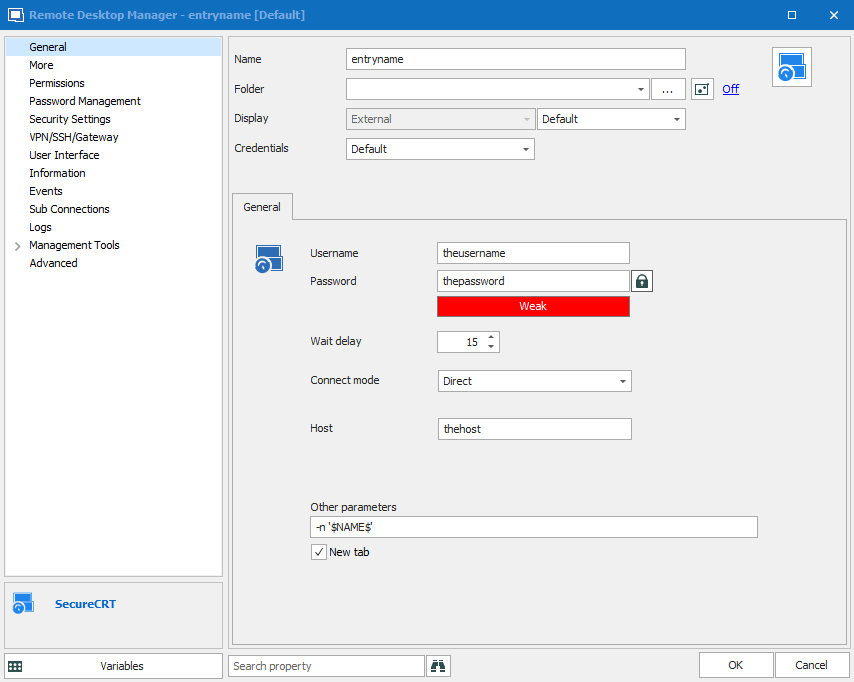
If you would like to see the order of the parameters, you could use a tool we made called CommandLineRegurgitator (I attached it to this post). It simply outputs whatever it receives through command line. You would need to rename it to the same name as the SecureCRT executable and configure RDM to use that executable instead of the real SecureCRT one.
With the following settings:
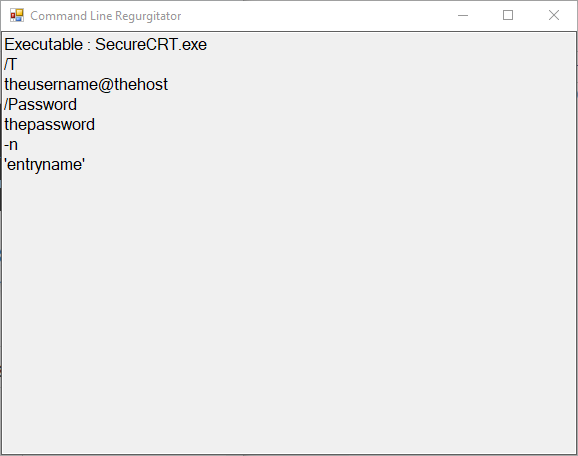
It would output the following:
Which means that we send /T, then the user+host, then the /Password, then the "other parameters".
Regards,
Hubert Mireault
2019-10-01_10-08-56.png
2019-10-01_10-08-50.png
CommandLineRegurgitator.zip
Hi Hubert,
Is it possible for you to insert the "-n 'entryname" after the /T parameter?
Kind regards,
Hello,
Yes, if that's the reason why it doesn't work, there's no problem. We'll open a ticket to add a field for the session tab name that will be sent after the /T parameter.
Regards,
Hubert Mireault
Hi Hubert,
I've test some parameters and think the below order is correct.
.\SecureCRT.exe /N "test" /T admin@192.168.220.254 /Password abc123
I've used this website to test some commands.
http://www.mathewjbray.com/securecrt/securecrt-command-line-options/
If there are any further questions please don't hesitate to contact me.
Kind regards,
Wesley Pronk
Hello!
Thanks for bringing this issue to our attention. We've added the Session tab name field where you can enter the desired information. As per showcased in your latest reply, this will be placed before the /T.
We hope this will fix your situation!
Regards,
Jafran Majeau
Good evening Jafran,
Thank you very much for the quick fix.
When can we update our "add-on".
Kind regards,
Wesley Pronk
Hello,
As add-ons are now integrated within RDM releases, the fix will be available starting with RDM version 2019.2.10.0.
Regards,
Hubert Mireault
Hi Hubert,
I've also created a ticket but unfortunately I didn't receive any response.(Ticket e-mail wpronk@efteling.com)
When I use the new option there comes an error "invalid command line option /T".
The current RDM version send:
securecert.exe /N "test" /T admin@192.168.2.254 /Password abc123
For some reason SecureCRT wants the option /T first in the command string.
securecrt.exe /T /N "test" admin@192.168.2.254 /Password abc123
Is it possible to change this addon?
Kind regards,
Wesley Pronk
Hello,
No problem, we will change this.
Regards,
Hubert Mireault
Hello w03,
As per your last request, I've moved the parameter -n "test" after the /T. Hopefully you will now get the expected behavior. This should take hold for the next patch!
Regards,
Jafran Majeau
Hi Jafran,
Could you please tell me if the parameter is changed is the latest version of RDM?
Kind regards,
Wesley Pronk
Hi w03,
The changes made from my last post should already be in effect.
If your query is whether or not additional changes have been made since, then no. The parameters have not been modified after the last changes you requested.
Kind regards,
Jafran Majeau