Cannot open RDM free after update
Hi. Just received a notification telling new versiona available.
Launched the update and now, when trying to open the RDM it freezes (see attached img).
Tried to repair, uninstall and reinstall but nothing changes.
Someone know how ti fix this?
Thanks
Immagine.png
All Comments (42)
Same here.
well...mine is'nt evenshowing the script error you have..
just downgraded to Setup.RemoteDesktopManagerFree.2019.1.9.0 and it's workin.
hope this helps
Hello,
This update uses our new Devolutions Account which support 2FA. Is it possible that your firewall is blocking login.devolutions.com?
Regards
David Hervieux

Almost identical problem. Hanging on connecting to Devolutions Cloud ... I never setup 2FA and our firewall is not blocking login.devolutions.com
Capture.JPG
Exactly the same issue here. No firewall in place blocking access to anything.
Same here :( No firewall blocking, just perpetual 'Connecting to Devolutions Cloud' popup.
Trying an older version as it certainly used to work!
Just to be sure, Do you all have Internet Explorer 11 installed?
Regards
David Hervieux
Yes, IE11.
Could you retry this morning? We have made few fixes to the login page.
Regards
David Hervieux
Same issue after upgrade. Windows 10 b1803. Launched application at 10:47 ET.
RDM Free Error.jpg
@Bruce_harris
Could you post a print screen of Help->Diagnostic?
Regards
David Hervieux
I am able to close the blank authentication screen. However, I cannot click on anything on the main application screen and need to end task to close it. So I am unable to provide that information.
As Bruce, same for me.
I jus joined captures!
help, diagnostic.JPG
Capture.JPG
so ??
We are still working on some other possible fixes. We are unable to reproduce it here. I hope to deploy another login screen in RDM. Some people might ask why it's happening with this version and not the other. The reason is simple, we now support 2FA with this release which is not the case with the previous version. This means that the authentication must be done by the web browser (embedded in our case).
@Boubou, just to be sure, are you using RDM Free 2019.1.29?
David Hervieux
@David: I always use the latest version! ;)
I cant connect to Devolutions Cloud to restore online backup too...
Same issue happens... Blank screen and I cant click anything.
Capture.JPG
Hello,
We have been able to reproduce it with Windows 7. We are still working on this problem and it's our priority #1.
Regards
David Hervieux
Got same problem.
tried to change default Web Browser to IE11 (Chrome is my default).... NOK
Tried to disable antivirus/firewall.... NOK
Tried to bypass our Proxy (i'm network admin and can choose to go directly to Internet) : OK!!!
Hope this can Help
Regards,
Eric
Hello,
This will be fixed in the next version of RDM, which should be in Beta in the evening or tomorrow.
The problem with Windows 7 was that RDM used an old version of TLS (1.0) to authenticate. The next build will now gives the correct version of TLS (1.2).
If you don't want to wait for the next version, you can add these registry keys into your Regedit:
[HKEY_LOCAL_MACHINE\SOFTWARE\Microsoft\.NETFramework\v4.0.30319]
"SchUseStrongCrypto"=dword:00000001
[HKEY_LOCAL_MACHINE\SOFTWARE\Wow6432Node\Microsoft\.NETFramework\v4.0.30319]
"SchUseStrongCrypto"=dword:00000001
Antoine Mauger
I am still having an issue. The screen to log in using the Devolutions Cloud Account does not have any fields to fill in. Windows 10 here.
Launch_Login_Hang.jpg
@Bruce_harris,
Could you cancel and use the Register Later? After that try to open a quick connection (web) with https://login.devolutions.com
Regards
David Hervieux
I can get into the application. I created a web connection to that site and have a logon page.
Same for me!
Devolutions Account Login is blank!
Are you able to right click and click Refresh in the menu?
David Hervieux
@boubou
Do you know if TLS 1.2 is enabled for you Windows 2008?
https://support.quovadisglobal.com/kb/a433/how-to-enable-tls-1_2-on-windows-server-2008-r2.aspx
David Hervieux
Thanks A LOT David.
That link fix my problem!
All work perfectly now (from what I see.).
:D
Great news! I still have to find why it does not work for @bruce_harris
David Hervieux
@Bruce_harris
Are you able to post a print screen of Help->Diagnostic, I can't find it on the forum
David Hervieux
Since I can launch the app, but not sign I can provide the screenshot.
RDM_Diag.jpg
And what about the Right click?
Regards
David Hervieux
Could you also check if TLS 1.2 is enabled in the Internet Properties?
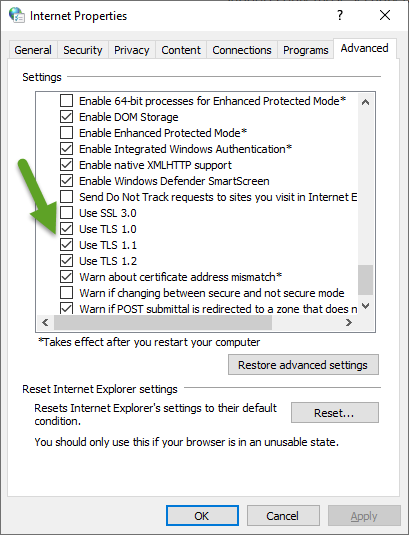
David Hervieux
TLS13.png
RDMFree 2019.1.32.0 should have the potential fix and is available to download at the moment.
https://cdn.devolutions.net/download/Setup.RemoteDesktopManagerFree.2019.1.32.0.exe
Best regards,
Alexandre Roy
Still getting blank screen when trying to log in using account. See attached.
Error.jpg
Diag.jpg
Could you click on the Diagnostic button in the header? We have added some logging.
Regards
David Hervieux
Hello,
Found 2 way that affect this prompt and result in a blank screen.
1. make sure your computer doesn't go through some sort of proxy, or even the application.
2. Active scripting in Internet option > Security > Custom > Active Scripting <-- Make sure this is enabled.
Hope this solved your issue.
Best regards,
Alexandre Roy
My system goes through a proxy as most business systems do. Bypassing it is not an option. Also, the Internet Options are controlled by group policy and cannot be modified. I would recommend a more corporate friendly solution for your new logon feature or a work around. I think you will handicap a lot of users with thee restrictions as companies lock down end users machines.
@Bruce_harris,
We are still investigating what the problem could be. We still don't know why it does not work for you. Could you send me the content of the diagnostic please (button in header of the login page)?
Regards
David Hervieux
Screen is blank, see attached.
Diag 2.jpg
Thank you. We will try to add more details.
Regards
David Hervieux
Still not working:
AggregateException - One or more errors occurred.
at Devolutions.RemoteDesktopManager.RDMOProxy.RDMOWebApiClient.Login(String datasourceID, Boolean forcePromptLucid, String source)
at Devolutions.RemoteDesktopManager.Managers.RDMOManager.c4695ce5e71700cb310a512355b140e18()
at Devolutions.RemoteDesktopManager.Managers.RDMOManager.Login()
at Devolutions.RemoteDesktopManager.Managers.MainFormManager.AfterFirstLoad(Boolean processAutoOpen)
at Devolutions.RemoteDesktopManager.Forms.FrmMainRibbonBase.AfterFirstLoad()
at System.Windows.Forms.Timer.OnTick(EventArgs e)
at System.Windows.Forms.Timer.TimerNativeWindow.WndProc(Message& m)
at System.Windows.Forms.NativeWindow.Callback(IntPtr hWnd, Int32 msg, IntPtr wparam, IntPtr lparam)
------------------- INNER -----------------------
InvalidOperationException - Error loading discovery document: Error connecting to https://login.devolutions.com/.well-known/openid-configuration: Forbidden
at IdentityModel.OidcClient.OidcClient.<EnsureProviderInformationAsync>d__17.MoveNext()
--- End of stack trace from previous location where exception was thrown ---
at System.Runtime.ExceptionServices.ExceptionDispatchInfo.Throw()
at System.Runtime.CompilerServices.TaskAwaiter.HandleNonSuccessAndDebuggerNotification(Task task)
at IdentityModel.OidcClient.OidcClient.<EnsureConfigurationAsync>d__16.MoveNext()
--- End of stack trace from previous location where exception was thrown ---
at System.Runtime.ExceptionServices.ExceptionDispatchInfo.Throw()
at System.Runtime.CompilerServices.TaskAwaiter.HandleNonSuccessAndDebuggerNotification(Task task)
at IdentityModel.OidcClient.OidcClient.<LoginAsync>d__9.MoveNext()
--- End of stack trace from previous location where exception was thrown ---
at System.Runtime.ExceptionServices.ExceptionDispatchInfo.Throw()
at System.Runtime.CompilerServices.TaskAwaiter.HandleNonSuccessAndDebuggerNotification(Task task)
at Devolutions.IdentityModel.DevolutionsAuthenticationContext.<AcquireTokenAsync>d__24.MoveNext()
--- End of stack trace from previous location where exception was thrown ---
at System.Runtime.ExceptionServices.ExceptionDispatchInfo.Throw()
at System.Runtime.CompilerServices.TaskAwaiter.HandleNonSuccessAndDebuggerNotification(Task task)
at Devolutions.Cloud.ApiWrapper.CloudWebClient.c3fab3a446f93687a968871e86b879292.cdd9413733e061325b4d6c2f49c67128f.MoveNext()
------------------- AGGREGATE -----------------------
InvalidOperationException - Error loading discovery document: Error connecting to https://login.devolutions.com/.well-known/openid-configuration: Forbidden
at IdentityModel.OidcClient.OidcClient.<EnsureProviderInformationAsync>d__17.MoveNext()
--- End of stack trace from previous location where exception was thrown ---
at System.Runtime.ExceptionServices.ExceptionDispatchInfo.Throw()
at System.Runtime.CompilerServices.TaskAwaiter.HandleNonSuccessAndDebuggerNotification(Task task)
at IdentityModel.OidcClient.OidcClient.<EnsureConfigurationAsync>d__16.MoveNext()
--- End of stack trace from previous location where exception was thrown ---
at System.Runtime.ExceptionServices.ExceptionDispatchInfo.Throw()
at System.Runtime.CompilerServices.TaskAwaiter.HandleNonSuccessAndDebuggerNotification(Task task)
at IdentityModel.OidcClient.OidcClient.<LoginAsync>d__9.MoveNext()
--- End of stack trace from previous location where exception was thrown ---
at System.Runtime.ExceptionServices.ExceptionDispatchInfo.Throw()
at System.Runtime.CompilerServices.TaskAwaiter.HandleNonSuccessAndDebuggerNotification(Task task)
at Devolutions.IdentityModel.DevolutionsAuthenticationContext.<AcquireTokenAsync>d__24.MoveNext()
--- End of stack trace from previous location where exception was thrown ---
at System.Runtime.ExceptionServices.ExceptionDispatchInfo.Throw()
at System.Runtime.CompilerServices.TaskAwaiter.HandleNonSuccessAndDebuggerNotification(Task task)
at Devolutions.Cloud.ApiWrapper.CloudWebClient.c3fab3a446f93687a968871e86b879292.cdd9413733e061325b4d6c2f49c67128f.MoveNext()
Checking TLS 1.2 in the Internet Proprieties solved the problem.
Thank you