iDrac entry for generic host entry not working with iDrac 8

Hi guys,
I'm testing iDrac with a generic host entry and I noticed the way builtin mechanism does not work with iDrac 8 (Dell R630, fairly recent server). I created a template based on iDrac default entry. The problems I've noticed so far:
My R630 iDrac 8 firmware version is 2.61.60.60 released in 12/2018
All Comments (9)
I tested a bit further and managed to get the remote management option n the generic entry working with the following details:
So I guess things can be fine tuned, but I think there is margin for improvement here as there are lots of things I had to do manually to make it work. RDM does an amazing job of putting all this chaos of credentials and connection details together, but we can improve a few things here with iDrac at least :)
Also I noticed that if you don't have the window focused, the password will be filled in but the submit/enter key stroke will not be send. It is just a keystroke that I can see being used wherever my focus is.
Hello,
Is it working fine with a Web Browser session type?
https://help.remotedesktopmanager.com/sessions_webbrowser.htm
Are you launching your session in embedded or external mode?
Best regards,
Jeff Dagenais
Have you launched the session in embedded mode?
HappyBirthday
Hi Jeff, I can use the web browser session and after some tweaks I can make it work. I always use everything embedded in RDM
Hi,
We probably test the Dell iDRAC with version 7. It looks like Dell change many parts of their login page. Is it possible to send us your working Web Browser entry and the source of the Dell iDRAC login page?
With this information I'll open a ticket with the engineering department to improve / update our Dell iDRAC entry.
That being said, I open a ticket with the engineering department to add "ms" near use auto-fill timers (RDMW-2894).
Furthermore, to use Dell iDRAC as a template, you need to enter the full URL, as you tested, "https://$HOST$/login.html . For iDRAC not on the same server as the entry, you can use custom field variable. Details at https://help.remotedesktopmanager.com/settings_variables.htm
Personally I prefer using the Data source variables, it's a list of variables stored in the data source and manage by the administrator. Information at https://help.remotedesktopmanager.com/datasourcesettings_variables.htm
Best regards,
David Grandolfo
Hi David,
Thanks for the tips, I've sent a PM so we can arrange access to an iDrac8 card.
Hi,
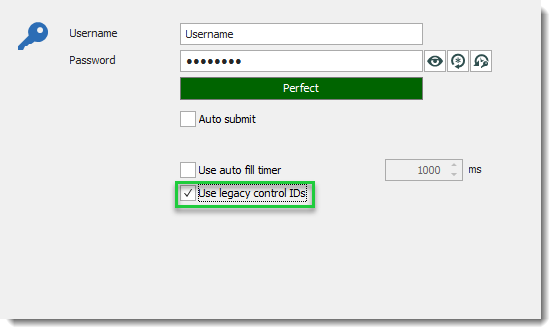
Thanks again for the access to your iDrac web page. After further tests if you enable Use legacy control IDs the web page will be fill-up.
Also, as you can see in the print screen below ms has already been added to our iDrac entry with Remote Desktop Manager 2019.1.27.0.
Regards,
David Grandolfo
ms_idrac.png
Thanks for that!