Discrete and Robust Command Lines
0 vote

Disabled
Hey all,
Obviously, certain command line arguments are already possible. However, I was wondering if I could request that the command arguments be made a bit more robust, and discrete.
For example, if one types `/Session:{session ID}` and sends the command, it opens up the full GUI, then launches the session in a tab. Which is fine, it's technically better than clicking the desktop shortcut, but it is still a little obtrusive.
I was wondering, if it could be put in the pipeline for later, to expand the capability of the command line, so that sessions can be connected to discretely. Maybe being able to specify screen settings, connection options, and so on.
Thanks for all your help!
All Comments (7)
Hello,
I am wondering if our PowerShell module could be interesting. The Open-RDMsession cmdlet can open any session using its ID but you need to do a bit more scripting to modify the session's properties before launching it. Instead, the Open-RDMQuickConnect cmdlet can also start a session using Templates. With those templates, you can launch the same session using predefined configurations saved in your RDM data source.
By the way, what data source type are you using?
Let me know if this solution is suitable.
Best regards,
Érica Poirier
Disabled

I know nothing about powershell, but this looks identical to what I'm trying to accomplish, assuming it's all discrete, rather than opening up the full GUI.
I'll read the general documentation for powershell, then go over that help article with a fine-toothed comb, thanks so much!
EDIT: btw, I'm just using a local data source
Disabled
Okay, I've had some success using Open-RDMQuickConnect and Open-RDMSession, but there are still a few hiccups.
When I use QuickConnect, I'm able to connect using a template, but it still opens the full GUI to connect. After the GUI finishes loading, it automatically connects, which is nice.
I also tried Open-RDMSession, which was more discrete, it didn't open the GUI at all, and I still saw the little prompt 'Attempting to connect to VPN, hit Close Now after VPN connects', and it timed out twice like it always does when I initiate the session through the GUI, but then after the SSH prompt, it tries to connect the RDP, then times out because the SSH isn't properly connected.
Does the GUI have to be open in order to successfully connect an SSH tunnel? Also, is there any way to disable or shorten that VPN timeout prompt? It slows things down pretty heavily.
Hello,
Both cmdlets (Open-RDMQuickConnect and Open-RDMSession) will finally open the GUI to open the entry, no matter which entry type you want to open.
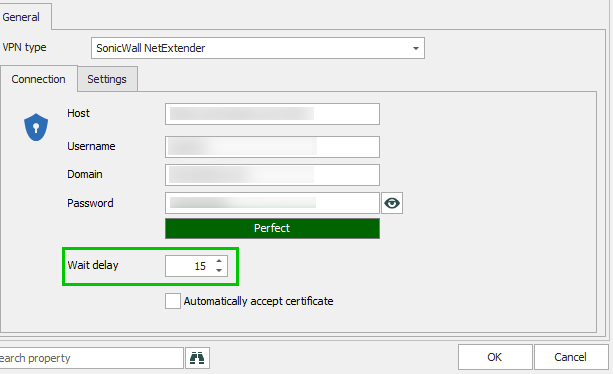
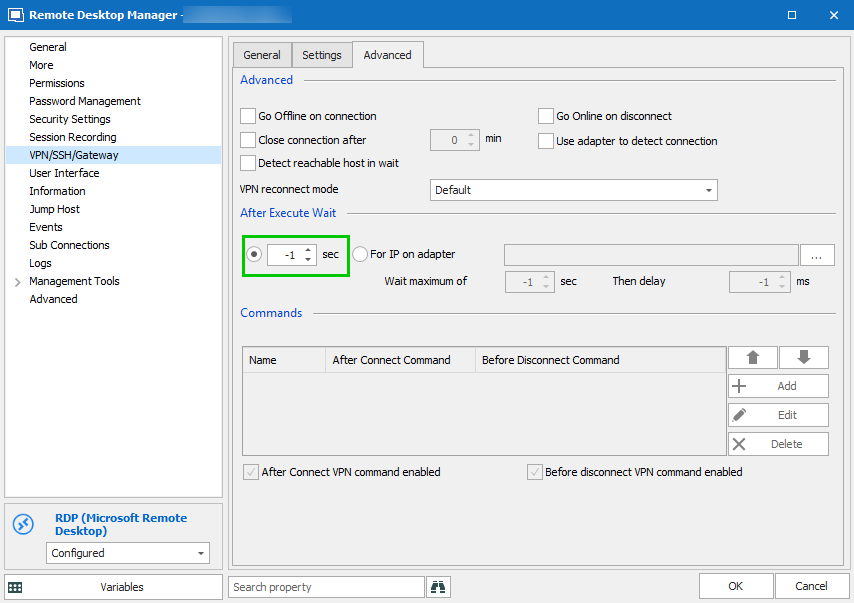
About the VPN timeout prompt, it is possible to modify it in three different places depending of the VPN configuration you are using.
The first one is in File - Options - Types - VPN.
If you are using VPN entries, an other one is located in the properties.
Finally it could be set in the Advanced tab of the VPN/SSH/Gateway section of a session.
Best regards,
Érica Poirier
2019-05-24_16-41-36.png
2019-05-24_16-33-32.png
Disabled
Hunh, that's pretty strange.
So, in these instances, where I'm trying to connect using Open-RDMSession, it opens the VPN timeout prompt, then the RDP prompt:
It fails to initiate, and gives an error. It only does this with RDMSession-- when I initiate it using QuickConnect, it opens the full RDM GUI, but it successfully connects.
Hello,
Is it possible that the RDP session you are trying to open that Display property is set to External?
Best regards,
Érica Poirier
Disabled
A little strange, but yes, after I switched the profile from 'External' to 'Tabbed', it was able to open from powershell, HOWEVER it still opened the full GUI, rather than running discretely.
So, my suggestion about being able to make things more 'hidden,' I guess is still something I'd like to request.