Bug: RDM randomly minimizes

Disabled
Hi,
When working/clicking in open RDP sessions I randomly experience a bug where it minimizes RDM. I seems like I'm clicking on the program or desktop that's "behind" the opened RDM and it therefore minimizes RDM in the front.
Some other colleagues have the same issue.
- Riccardo
All Comments (64)
Hello,
Are you using RDM in a Citrix or Terminal Services environment?
Best regards,
Jeff Dagenais
Disabled
Yes, we're using Citrix with Terminal Servers.
Hello,
Sorry to jump in. We already had some reports of this kind of issue in Citrix environment. Unfortunately, our current environment does not allow us to test this properly.
That being said, we have been able to gather various solutions/tests which worked for some of these cases. For this reason, I would recommend testing these solutions in a test infrastructure:
1- Go under File -> Data Sources -> Settings –> set Auto Refresh to 0
2- Install RDM 2019.1.20 and check "Disable tree list DirectX optimization" under File –> Options –> User Interface -> Advanced.
For this step don't forget to export the configuration and transfer it back to the default.cfg file as explained in our online documentation about the Installation of RDM on Terminal Servers https://help.remotedesktopmanager.com/installation_terminalservices.htm
3- Under File –> Options –> User Interface try the different theme in order to see if this issue still occurs.
I hope that one of these solutions/tests will work for you!
Best regards,
James Lafleur
Disabled
Hi James,
Thanks for the suggestions.
I don't have an "Auto Refresh" Setting in my Data Source options.
I've checked the "Disable tree list DirectX optimization" and will see if there are any improvements.
Best regards,
Riccardo
Disabled
Hi James,
The problem still occurs from time to time.
I've checked the "Disable tree list DirectX opzimization" and set the Auto Refresh to 0 seconds.
My colleague is using the default theme and I'm using the Office 2016 (Dark) theme.
We're planning on updating soon but we have to update our DPS database first.
Do you have any other ideas?
Best regards,
Riccardo
Hello,
Unfortunately, we do not have other tests that you could try at the moment. That being said, since the issue only occurs from time to time now, I suspect that the update might help solving this behavior.
In the meantime, I will see if I can find anything else for you to try.
Best regards,
James Lafleur
Disabled
Hi James,
The issue still occurs from time to time.
Did you find a solution to the problem yet?
Currently version 2019.1.41.0 is installed.
Best regards,
Riccardo
Hello,
Sadly, we still do not have other tests that you could try at the moment. It is unfortunate to see that updating RDM did not solve this issue.
That being said, could you please provide me your Terminal Server version? I will see if I can find anything with this information.
Best regards,
James Lafleur
Disabled
Hi,
We're using Windows Server 2016 Version 1607 (Build 14393.3274).
Best regards,
Riccardo
Hello,
Sorry for the delay on this, to gather more information on that matter.
That being said, could you please tell us which version of the Citrix Server and Citrix Receiver are you currently on?
Best regards,
James Lafleur
Disabled
Hi,
We're currently using Citrix Version 1906.1 and have the latest Citrix Workspace App installed.
The problem also occurs on the local device.
Therefore I don't think Citrix is the problem here.
Best regards,
Riccardo
Hello Riccardo,
Thank you for your quick reply!
Do you happen to know how many time per week this issue occur on your local workstation? Also, does this issue still occur for many users or just you?
In order for us to be able to test this on our end, would it be possible for you to export you configuration file and send it to us? I will send you a link via private message in order for you to be able to send it to us.
For more information on how to export your configuration, please refer to this link:
https://help.remotedesktopmanager.com/howto_configurationfile.htm
Best regards,
James Lafleur
Disabled
Hi James,
I've uploaded the config files.
It depends on how much I'm using tool for working on remote servers.
On a busy day I usually get the bug 3-4 times a day.
We have multiple employees with the same problem.
Best regards,
Riccardo
Hello Riccardo,
Thank you for this file. We will perform a few tests on our end and then get back to you with the results.
Best regards,
James Lafleur
Hello,
I just wanted to inform you that a ticket has now been assigned to our QA department in order to see if this issue can be reproduced on our end using your configuration file. We will be in touch as soon as possible.
For further reference, the ticket number is QA-1160.
Best regards,
James Lafleur
Hello Riccardo,
Are you by any chances running RDM in fullscreen in Citrix?
Based on old topic from Citrix: https://discussions.citrix.com/topic/347772-why-does-citrix-receiver-minimize-full-screen-applications/ , closing the "Self Service Plugin" would be a workaround for this kind of issue. Would it be possible for you to close it and see if this issue persist? This test would allow us to gather more information on that matter.
Best regards,
James Lafleur
Disabled
Hi James,
Like I said, the problem also occurs on the local device.
I'm using a lot of other applications in fullscreen in Citrix and don't have the problem with them.
Best regards,
Riccardo
Hi,
We've been aware of this issue that apeared the last 2 years here and there on the forums. I've on my part tried to solve it at first without success.
After asking questions left and right all the customer had all that citrix factor in common, this is why our first question that came for your post was to ask if you had that environment.
Knowing this and seeing that all your users are experiencing like you say and on your local computer, this lead to believe It's a problem really specific to a certain environment, or else we would have this forum filled with the same topics. It is a very uncommon issue.
I've spoken with citrix support yesterday and we discussed what could possibly be causing this issue, could be Citrix UI setup, could be RDM component triggering this issue when used, we just don't know. We only know It's a specific environment issue.
I couldn't proceed further with them as they support is paid support, but they told me if the user experiencing this issue that has a paid support license could submit a ticket to review this specific case.
We've been really trying on our side to figure out what the issue is but we just do not have the environment to reproduce this specific bug. We're not giving up either, we're still going to theorise and do what we can to find a fix or a workaround for this annoying bug.
Best regards,
Alexandre Roy
Disabled
Hi,
Any news in this case?
I'm experiencing the same issue on both Windows 2012R2 and now Windows 2019(only a couple of times in my test RDS 2019 farm). Not using Citrix but plain RDS solution from Microsoft.
I've got 25 users running RDM and all users are experiencing the issue. Some 10-20 times a day and some only 2 times a day. It even differs from day to day. Where one day it might be very annoying and the next day it only happens twice.
The issue occurs usually when switching between tabs in RDM or when changing to a different program in Remote Desktop.
Microsoft had an error with a fix for Windows 2012R2 a while ago that in the description are equal to my issue. https://support.microsoft.com/en-gb/help/3103000/remoteapp-windows-disappear-and-screen-flickers-when-you-switch-betwee The fix does not have any effect on my W2012R2 RDS farm. I also experience the issue on W2019. The weird thing is that it is only with RDM experiancing the issue. All the other applications in my RDS farm are working. RDM also used to work until a year and a half ago.
It seems to be irrelevant what Remote Desktop client version the user have installed.
Does it help that I have the same issue with plain RDS? Could it be something with window handling and states of the process when not being active?
Best Regards
Stein-Are
Hi @Stein-Are,
Could you tell me how many screen do you have connected to your computer and what thier resolution is?
Also my colleague would like to know if your authentication to your datasource is SQL azure AD and if there's an auto refresh set on it.
Best regards,
Alexandre Roy
I have the same issue on a local windows 10. 4 screens.
2 * 1920*1080
2 * 2560*1080.
Issue happened on 2560*1080
Data source is Devolutions online drive
Is there any news on that?
Sometimes it is really dangerous when RDM is minimized and the click that is meant for the server in RDM is executed somewhere, for example in vCenter or on ESX Hosts
Hello,
We have found workaround for a black boarder issue recently for Citrix but we did not encounter a minimize yet. Been using the last version of Citrix workplace as a trial. I'll have to see if I get the issue from a TS with the published app, as I am not getting it from a windows 10 OS machine.
Regards,
Alexandre Roy
confirmed issue still there with this new update
To be more precise when the issue happen, is the RDM opened at the front ? and when you click, the click goes through and click the actual app behind, or does RDM minimizes ?
I just wanna make sure if RDM actually minimize or an app come on top of RDM on that click scenario.
Regards,
Alexandre Roy
Disabled
RDM is open in the front. I'm working for example via RDP on a few servers.
Every now and then when I click, RDM minimizes and the click "goes through" my RDM session and clicks on the window behind.
So it actually does minimize and I have to re-open it via the taskbar.
Same here
Thank you,
That's what I expected. Ill do more test see what I can fetch. A timing occurence would nice, never know if some task goes through and lead to this.
And you both have Citrix publishing the RDM app right ?
Regards,
Alexandre Roy
Disabled
Hi,
The issue appears on local devices and on the Citrix environment.
Unfortunately there is no timing to it.
On some days I get it multiple times a days and on others never.
im on local RDM do RDP
I'm still confused
We have to be very clear on this, when you're saying Local RDM, to me it means RDM is installed Locally on your computer. I just wanna make sure what the scenario is here. I wanna be sure Citrix is not remotely publishing RDM to you local computer, because that's a different thing.
I want to know if citrix is in this equation.
1- Terminal Service, Citrix is publishing RDM to that TS session.
2- and you're using RDP embeded in that RDM.
is this the correct scenario?
Regards,
Alexandre Roy
From what I reading here RDM is minimized and then click goes through RDP sessions? Does that mean your RDP session are launched Externally and are not embedded in the application? Or are they undocked ?
Because I would have a hard time imagining you clicking on a window inside the application if It's minimized haha.
Regards,
Alexandre Roy
Disabled
Hi Alexandre,
I work both with my local Windows 10 machine and with my Citrix connection on a terminalserver.
- On my computer RDM is locally installed and not connected to Citrix in any way.
- When working with Citrix, RDM is installed on a terminalserver
In both cases I have the same issue.
--
Sorry if my description of the problem wasn't clear.
RDM minimizes because of the click that goes through and clicks on the window/desktop behind.
Same thing happens for example if I have a small Explorer windows open and click on something in the browser behind it.
In my case though RDM is fully displayed on my whole screen so that I shouldn't be able to click on something behind.
The RDP sessions are embedded in RDM and not externally launched or anything.
@riccardo
Thanks for the clarification.
Usually is it the same app that end up getting the focus when the click goes through ?
Could it be chrome ?
regards,
Alexandre Roy
Disabled
Hi,
Nice that there are work in progress in this case.
I've experienced this with RDM installed on a Windows 2012R2 server published to my users using RemoteApp to the clients. In my last post I said it was the same issue on a Windows 2019 installation. But that is not correct. After doing a clean install of Windows 2019 and all the applications I do not have this issue anymore.
Disabled
Hi Alexandre,
I'm not exactly sure if it's just Chrome.
Me and my co-worker with the same issue are usually both working with Chrome.
We will pay more attention to it in the following days and check if it always happens with Chrome or some other programs too.
@Stein,
Could be possible that 2012R2 has this problem, I remember having a couple customer having focus issue with windows 7 and if I recall it was all linked to the active X version of RDP, when we told customer to use FreeRDP lastest engine those issues were gone.
I'm also testing on 2012R2 but havn't yet encountered it.
Thanks for the heads up.
Regards,
Alexandre Roy
Disabled
Update: It just happened again to me in Citrix. Chrome wasn't opened at all.
@riccardo,
What application grabbed the focus now ?
And in this scenario, is RDM published through citrix or is it the Windows server that is working through citrix?
Regards,
Alexandre Roy
Disabled
SAP Business One.
RDM is not published through Citrix.
I'm working via Citrix on a Windows Server 2016.
@Riccardo02
A coworker finally made me understand that citrix doesn't only publish app but entire desktop too, with ICA. This changes everything and now I have to try this new setup and see what I find.
My lack of citrix knowledge was holding me back.
And for the quote below are you saying that this happens not only in RDM but with windows explorer too ?
Regards,
Alexandre Roy
Disabled
No, it only happens in RDM.
After getting the setup completed with Citrix IDA, on a virutal desktop I was able to reproduce the issue, see video linked below.
If this is exactly the behavior you are getting, please say so. Keep in mind the way I'm reproducing is a way I found to provoke the issue, I don't think this is related on how people work. It might just happen because of fast focus switching withing embeded window.
here's the setup:
Citrix\IDA > Windows Server 2012R2 > that has RDM installed on it, which has 2 session embedded running and a google chrome full screen window behind the RDM app.
I hope this is it.
Regards,
Alexandre Roy
Citrix IDA - RDM - Focus.flv
Disabled
Hi Alexandre,
The behavior is exactly like in the video.
Our issue appears on Windows Server 2016 though and not only with Chrome.
I had it multiple times happen without even having Chrome open.
So far it happened also with SAP Business One and the Windows Explorer.
@riccardo
The issue is not related to chrome, I just want to point that out. Could be any window, as long as it is the last window that had the focus before switching to RDM in order, then RDM would switch back.
Glad we found it, now the challenge is to find who's reponsible because so far I cannot reproduce it on a local computer, this looks like to be a ICA only issue so far.
we'll give you some news when we find out what the culprit is.
Best regards,
Alexandre Roy
Futher investigation showed me that this is not reproducible with RDCMan 2.7 from microsoft. So It didin't look good for RDM, even if Im unable to reproduce outside Citrix ICA VM. I went a little deeper and found out that when I use FreeRDP engine in my entry properties, this is not reproducible either.
So with this lead I found a temporary workaround and also might have the culprit, which would be the ActiveX version possibly.
Will come back with further news.
Best regards,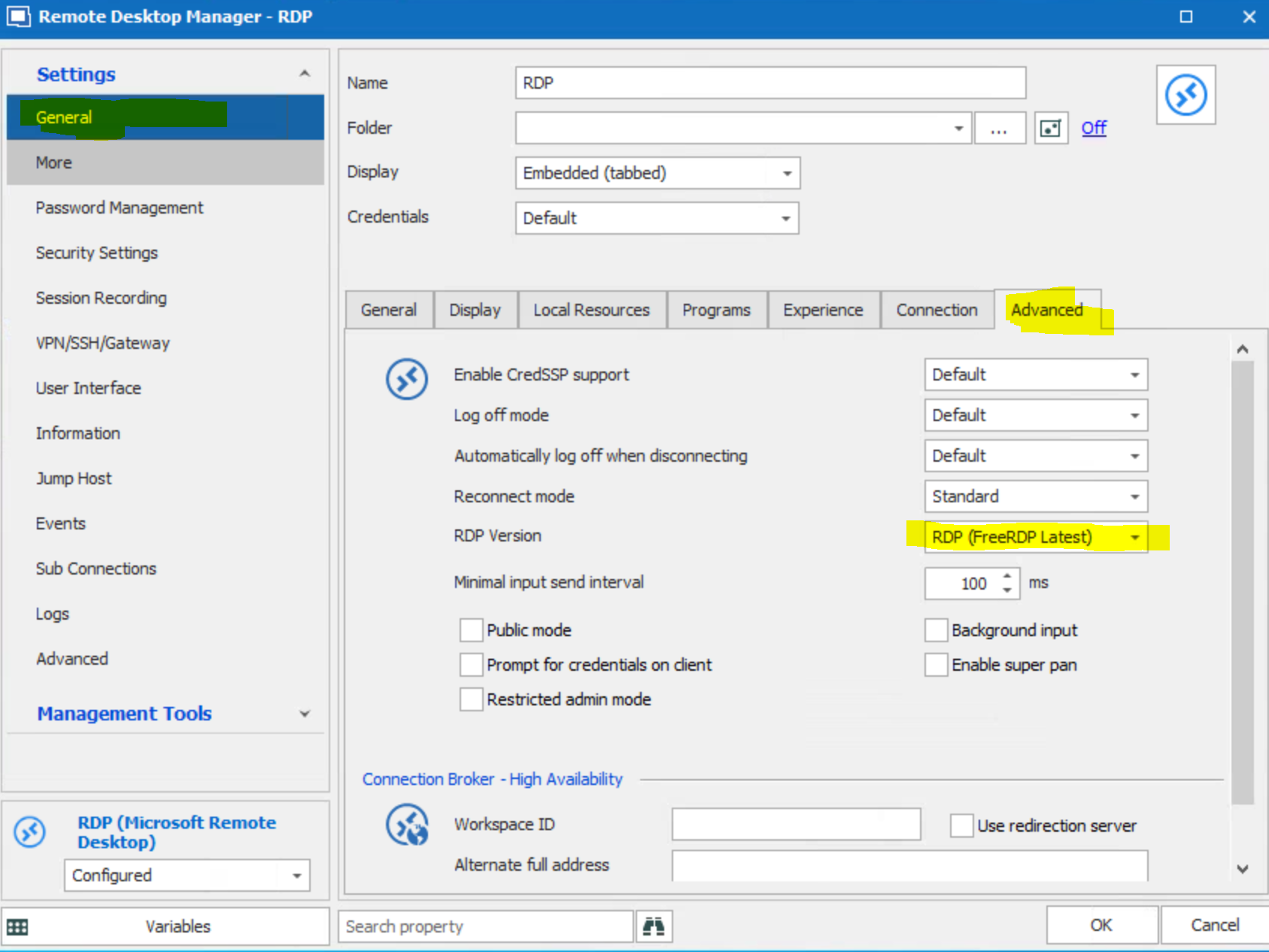
Alexandre Roy
RDPFree.PNG
Hi Alexandre
Is there any news on this case?
The workaround with FreeRDP is unfortunately no solution for us.
We don't want to adjust several hundred servers and for most of them the connection won't work anymore.
On a test server, the connection with FreeRDP is extremely slow and resembles a slide show
I guess that NLA (Network Level Authentication) is not supported with FreeRDP (no idea if this is true) and this is a prerequisite for us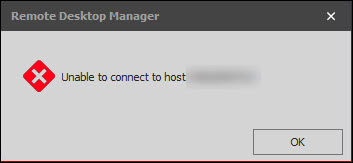
Best regards
Simon
RDM.jpg
Hello,
We might have found something for the minimize and we will add the potentiel fix in RDM 2020.2. It's related to the top most windows.
Regards
David Hervieux
Hello,
I am sorry but it appears it still does not work for me, I am using this version:
I get random minimize windows when using it on my VM Ware workstation 15 (with Windows 10).
Regards,
Dariusz
Disabled
Yep, same on our environment.
Unfortunately the problem wasn't fixed with the update.
Disabled
Any update on this?
On some days the issue seems to happen very frequently, which is quite annoying.
Regards,
Riccardo
Hello,
Is it possible for you to try our latest Beta release? You can download RDM 2020.2.6.0 here
https://remotedesktopmanager.com/home/download#Beta
Best regards,
Jeff Dagenais
Hello,
Is it possible for you to try our latest Beta release? You can download RDM 2020.2.6.0 here
https://remotedesktopmanager.com/home/download#Beta
Best regards,
Is the database update compatible with DPS 2019.2.12.0 so that it continues to work correctly including the older RDM versions 2020.1.20 ?
@simon keller,
Since you are running DPS as your backend datasource, we recommend performing an upgrade of your server prior to upgrade RDM.
It's something that we can do together via a remote session with someone in my team.
Could you please contact us at ticket@devolutions.net so that we can schedule an appointment together to upgrade your DPS server.
Best regards,
Jeff Dagenais
Hi,
I tried new beta and it seems the frequency dropped a little, but it is still happening unfortunately.
Regards,
Dariusz
Hi,
We have updated our DPS Instance to the latest Version 2020.1.13.0 and the RDM to the latest Version 2020.2.13.0.
The problem is still present. Some days it's really bad, some days it happens less.
Best regards,
Simon
Hello,
This must be annoying indeed. Could you try to run RDM with the debug opened (Help->Profiler) and verify if you see anything right after a minimize?
Regards
David Hervieux
Hello,
This must be annoying indeed. Could you try to run RDM with the debug opened (Help->Profiler) and verify if you see anything right after a minimize?
Regards
Hi David
What is the recommended debug level for this?
Best regards
Simon
I'm pretty sure that 1 is good enough. I'm not sure if we will find anything but we might be lucky.
Regards
David Hervieux
Hi David
We will monitor this with the debug log
Best regards
Simon
Hi David
Unfortunately we have no luck.
When the software minimizes, nothing is written to the log. too bad
Best regards
Simon
Hello all,
I just wanted to mention that we are also affected by the described problem.
Our setup:
SQL Server <-> Devolutions Server <-> Terminal Server (2012R2) <-> Published App <-> Citrix
The last message in this thread was 7 months ago, is there anything new in the meantime?
Thanks to all!
Hello all,
I just wanted to mention that we are also affected by the described problem.
Our setup:
SQL Server <-> Devolutions Server <-> Terminal Server (2012R2) <-> Published App <-> Citrix
The last message in this thread was 7 months ago, is there anything new in the meantime?
Thanks to all!
In our environment we still have this problem from time to time.
It's not as bad as it was in the beginning
On good days, it doesn't happen at all. On bad days several times.
We have not made any special adjustments to our environment.
So I can't tell you how to solve or reduce the problem.
I'll add a me-too to the thread. This has been happening for over a year for me. I'm not certain when it started occurring. Sometimes it can go a week before it occurs, but other times it can be 2 or 3 times per day. It appears to have more often shortly after starting a new RDP session, but it can happen at any time. And sometimes it happens a couple times within a couple minute window.
It is annoying, for sure.
One possible lead. I haven't taken note, but it often happens when I'm sharing screens with other people (MSTeams, etc). So maybe another screen sharing package causes it to occur more. I'm not certain if it always does that though. I'll try to take more notes.
For me, I'm not using Citrix. This is just plain RDP, typically to Windows Server 2019 machines.
I'm on version 2020.1.20.0. It happened on Windows 10, and I just upgraded to Windows 11 and it occurred a few times already.
-- update --
Since it lets me edit this message, I have more information from today. This has happened 8 times for me since earlier this afternoon. I'm not sure why it's even worse than normal today. None of these 8 times were when screen sharing, so I guess that's not the cause. All 8 times it was Chrome that poked through, but I don't know if any application would have done the same. I'm not sure if it's that Chrome comes to the front, or that RDM goes the back. In any case, RDM just disappears and I'm left with Chrome on the screen.
I have a multi-monitor (3) setup. One more thing to note is that I use DisplayFusion for multi-monitor shortcuts (like moving windows between the screens). That may be a hint of something that would have access to the screens that is more than plain Windows.
-- end update --
Thanks,
Scott