Problem with paste text on ssh session
Hi,
I paste a text from one session to another - in another session i gave a text with enter
for example
1 session
-----BEGIN CERTIFICATE-----
MIIFkTCCA3mgAwIBAgIJANRL/bSUQSRhMA0GCSqGSIb3DQEBCwUAMF8xCzAJBgNV
BAYTAlBMMRQwEgYDVQQIDAtNYWxvcG9sc2tpZTEPMA0GA1UEBwwGS3Jha293MQ8w
DQYDVQQKDAZPbndlbG8xGDAWBgNVBAMMD2ppcmEub253ZWxvLmNvbTAeFw0xOTA1
2 session
-----BEGIN CERTIFICATE-----
MIIFkTCCA3mgAwIBAgIJANRL/bSUQSRhMA0GCSqGSIb3DQEBCwUAMF8xCzAJBgNV
BAYTAlBMMRQwEgYDVQQIDAtNYWxvcG9sc2tpZTEPMA0GA1UEBwwGS3Jha293MQ8w
DQYDVQQKDAZPbndlbG8xGDAWBgNVBAMMD2ppcmEub253ZWxvLmNvbTAeFw0xOTA1
Version 2019.1.3.0
All Comments (26)
Hello,
This is a known issue and we are currently working on it. It should be fixed on the next version of RDM.
Best regards,
David Grandolfo
Hello,
Sorry for the confusion it should be fixed this week, unfortunately we release a new version yesterday 2019.1.4 and the fix is not in there yet.
Regards,
David Grandolfo
Under File > Options > Types > Terminal > Advanced there's an option "Use legacy terminal" which solves this and other problems - scrolling with mouse or keyboard, Alt-key, grey text invisible - with the new terminal.
Hi,
Indeed this option is a good work around the time we solve the issue with the current issues.
Regards,
David Grandolfo
Hi again,
We are trying to reproduce the Alt-Key and Invisible gray text issues but without success. Could you details the issue or have you step by step how to reproduce them?
Regards,
David Grandolfo


We were able to reproduce the ALT-. issue and another issue with ALT+ASCII code, both are open with the engineering department (RDMW-2707 and 2708).
Unfortunately, with my basic Linux knowledge I'm unable to enable the dark mode for Textadept. Have you any way procedure or could you send me at support@devolutions.net the theme you are using with Textadept?
Regards,
David Grandolfo
David,
I'm using the default theme in Textadept. Anyway, another way to generate dark gray text is to execute
echo $'\e[1;30mXXX\e[m'
in a bash shell. That will print "XXX" in dark gray with a black background. With the new terminal it's black on black.

Hi,
Thanks for this command, I found that the behavior is related to our ANSI black mode, in the SSH Shell entry Terminal > Customize colors > change the ANSI black to 127,127,127. Now the text appears.
That being said, I will have to look with the engineering department about this. We're gonna compare how our previous integration was working for ANSI black RDMW-2721.
Best regards,
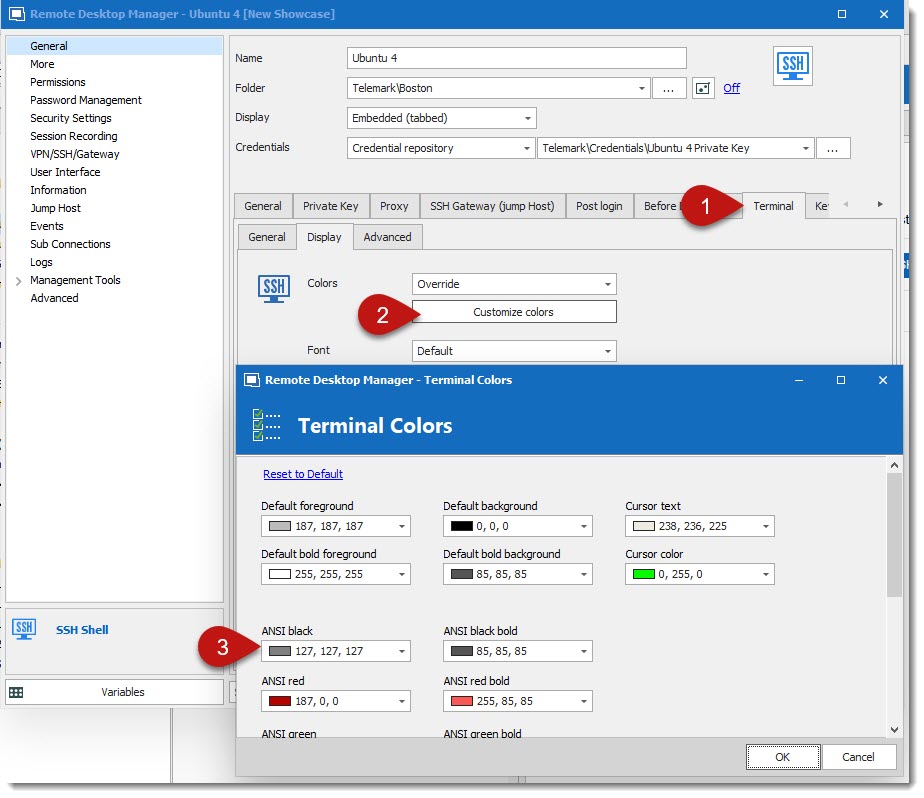
David Grandolfo
SSH_ANSI.jpg
Hello,
The issue when copying/pasting text in SSH is fixed in RDM 2019.1.21. You can download the latest version at https://remotedesktopmanager.com/home/download
Regards,
David Grandolfo
Good news again,
Alt plus dot issues and gray text should be fixed in the next RDM version, 2019.1.22. We might release it soon.
Regards,
David Grandolfo

Hi I'm using RDM 2019.1.21.0 and still having issue when I copy paste. A return line is insert between each line.
Regards
Hi,
Could you download RDM 2019.1.25.0 and test if the issue is still the same. You can download it at https://remotedesktopmanager.com/home/download
Regards,
David Grandolfo
Hi,
same problem! return line between each line.
Regards
David,
Hi,
I was able to reproduce the paste issue, the issue appears, in my case, when the source is a text from another SSH entry. That being said, the ticket has been reopened.
Thanks thorsten, I was easily able to reproduce the Alt-Tab issue. Another ticket has been open (RDMW-2826)
Regards,
David Grandolfo
Hi,
from my side, I got same problem even it's in the same SSH session or txt file from notepad.
Regards
Hi,
Good news, both of the SSH issues (pasting in SSH and Alt-Tab) has been fixed internally and will be included in RDM 2019.1.26.0.
Best regards,
David Grandolfo
Hello,
Since you have the fix - can you please include it in the FREE version as well ?
Maybe in the next release ?
Thank you.
Hello,
Indeed, issues are fixes for Enterprise and Free edition of RDM.
In the next version of RDM Free it will be fixe too.
Regards,
David Grandolfo
Hi,
issue is back using RDM 2019.1.39.
When you copy/paste from the same ssh terminal session that with add line return on each line. But if I copy from a text file from Notepad that will not add a line return on each line.
I've to use Use legacy terminal option check to temporary fix the problem.
Regards
Just test it from RDM 2019.1.41 and problem is present.
Regards
Hi,
I tried to copy text, logs, output with or without empty lines and when pasting them in Notepad or Notepad ++ there is no empty line that appears as before.
Can you describe how I can reproduce the issue? you can send us a video if you want on the forum or by email ticket@devolutions.net
Best regards,
David Grandolfo
Hi,
just send the video to ticket@devolutions.net
Let me know if you got it.
Regards
Hi,
Thanks for the video, I was able to reproduce the issue. I open the ticket with the engineering team.
Best regards,
David Grandolfo
Hello,
In the next version of RDM Beta 2019.2.9.0 a fixe will be present for this issue.
When it will be release you can download it from https://remotedesktopmanager.com/home/download#Beta
Best regards,
David Grandolfo