Permission to traverse folders
1 vote
We currently rolling out the RDM with around 10k entries in DB.
As we are enterprise we upload/sync all entries using PS and create group structures accordingly
One issue we bumped into is the complex way to delegate view permission to subfolders without seeing the content of the root and upper level folders. You provide guide on how to do it but in organisation with complex structures and numerous systems this is not really applicable
Example:
Root:
If we want to allow certain team to only see the folder B11 sessions, we have to
- add View permissions to Folder B , B1, B11
- deny View permissions in Folder B2, B3 and any new folder which gets automatically created, which kinda beats the purpose of Automation.
What would be great if you come up with feature allowing to traverse folders without seeing the content
example:
- add View on folder B11 would automatically assign traverse on all bellow folders
That would greatly simplify the permissions handling and usability in large environments
All Comments (12)
Hello,
I will have to think about it but for now I don't see how we could that with our current architecture. I will try to come back to you with an idea.
Regards
David Hervieux

1 up on this. With GDPR and other data security laws steadily showing up these days, hoping and preying that account administrators properly implement all the required denies each time an object added/edited is a big risk.
It would be great if you could implement a option of "Traverse". It would just allow the object to show up in a users tree. No assumption of underlying inheritance would exist. You would only be able to see sub objects to which you are also explicitly assigned permissions to.
We also highly need this Feature.
Our folders are structured logically and not according to authorization level.
So we need to delegate Permissions to someone in middle of the folder tree.
Currently we do not delegate Permissions and users have to manage the passwords as duplicate in ther personal Vault.
Hi.
Was this implemented by any chance, we are having the same issue, and the traverse would really help.
Thanks
Hello,
We haven't made any progress. This is not a simple task when we modify the permission behavior. I will try to raise the priority.
Regards
David Hervieux
Thanks for the quick response David.
I hope you guys manage to do this in the near future.
Another question that may help me circumvent the issue I currently have.
Is it possible to set the default permission for every "New Entry" to be "never"? It always goes to inherit. I already tried changing in:
(DVLS) Administration -> Vault Management -> Default Permissions -> Never
(RDM) Vault Settings ,.> Inherited Permissions -> Permission -> Never
Thank you
Hello Avi,
For now, you could make use of templates to achieve the desired result. You can go in File -> Templates -> Entry Templates and add templates for the entry types you use. Set the permissions of these new templates to "Never"
Then, if you wish to do so, you could go in your system settings and change the "Add entry mode" to "Template list only". This way, if one or more templates exists for a specific entry type, you and your coworkers will be forced to use one of those templates when creating the entry.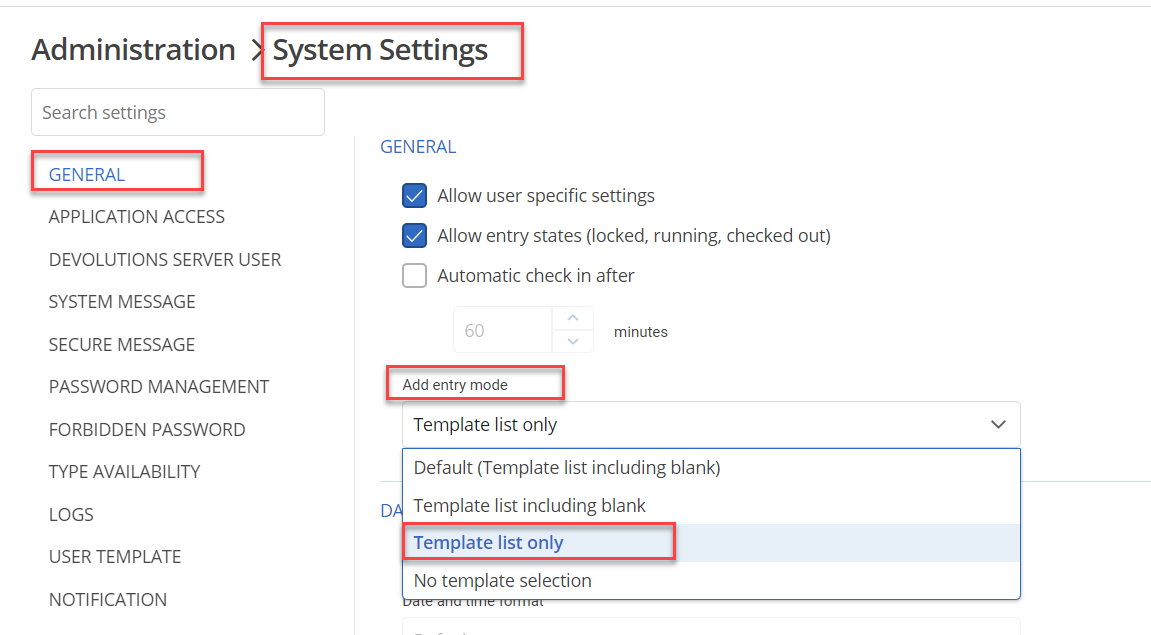
We will look into the "traverse" feature and hopefully provide you with a better way to handle the creation of sessions in a large environment in the future.
Best Regards,
Michaël Beaudin
30cad65d-72e9-4d8a-bb26-60d885d0e54d.png
Hi,
I did that but it did not change I am still able to create regular entries.
I tried also administration -> system setting -> Type availability and unchecked all and I still see many entry types.
Is there maybe another strategy of being able to share and entry in a deep nested subfolder with a specific user without giving him permissions to other entries in that folder or in the top folders?
Thanks
Hello Avi,
I have tested and the templates work on my end. Did you refresh your RDM after changing the system settings in your DVLS?
An important thing to note is that the system setting to force templates only will only work if the entry type has a template. If there are no templates, the entry will be created normally
As for the Type Availability, RDM supports a lot more entry types than DVLS so there will still be a lot of entry types available in RDM even if you disable everything in DVLS. However, if you add from DVLS web, that will not be the case.
As for sharing permissions with one user in a deep nested subfolder, you could simply use "custom" permissions instead of "Inherited", "Never" or "Everyone". With custom permissions, you can assign permissions by hand to specific users or user groups.
Best Regards,
Michaël Beaudin
Sorry about the late reply
You where right regarding the templates. I did not setup the custom templates before hand.
Regarding the "custom" permissions I will try to work with it, though if there was a permisson only to "list folders" or traverse it would be much more easier.
Anyhow thanks very much for the help!
Avi
Hello
Any updates on this topic?
Managing permissions in vaults for tens of thousands of objects, even with AI automation, is incredibly complicated.
A "list folders" or "traverse" mechanism is needed.
Hello,
I'll bring up this feature request internally in our roadmap meetings and we'll see if it's something we could tackle in the future. We've been working on breaking up administrative permissions for our next major release (and groundwork has been happening for the last two major releases), and I think the architecture of our products will be more malleable and allow for this kind of permission/feature more easily.
Regards,
Hubert Mireault