Sign into OWA (outlook.office.com)

I am trying to setup an auto login for Outlook online, but since it asks for the username on one page and the password on another it makes it difficult to figure out what settings one needs. I have tried IE and Chrome (Chrome is preferred but not necessary), but not much happens.
I have read these forum posts but they did not help:
https://forum.devolutions.net/topic11854-office--auto-fill-login.aspx
http://forum.devolutions.net/topic10706-ie-form-loginembedded-mode.aspx#post39672
outlook.office.com opens up to
https://login.microsoftonline.com/common/oauth2/authorize?client_id=00000002-0000-0ff1-ce00-000000000000&redirect_uri=https%3a%2f%2foutlook.office.com%2fowa%2f&resource=00000002-0000-0ff1-ce00-000000000000&response_mode=form_post&response_type=code+id_token&scope=openid&msafed=0&client-request-id=5bafe8de-a2dd-4361-a4ee-9f68224f8b93&protectedtoken=true&domain_hint=touchette.org&nonce=636915520419488667.49d1519c-dd13-43de-b6fc-f4871c743b57&state=DcvBDYAgDEBR0CGcArFSWjgYd3ADpBg9mRiM68vh_dvXSqm-6Ro9tSgmRxG8nyeEiCEQ8YhRwEPMRgScQSfF7HRkc2BgyIxu96zbO9j7S3ZNbz23ItdTcl3q85Yf&sso_reload=true
All Comments (10)
Hello,
What version of RDM are you running?
Are you launching your session in embedded mode or in external mode? It should be possible to accomplish this in external mode using our web browser extension in Google Chrome or Firefox even if the password field is not on the same page as the username field - https://devolutions.net/home/browserextensions
Best regards,
Jeff Dagenais
14.1.30.0 and I was trying to run embedded.
tried launching externally with Chrome and IE, however both failed to enter in the password for auto sign in.
Hello,
The auto-fill will only work with the Devolutions Web Extensions : https://devolutions.net/fr/home/browserextensions , make sure you have it downloaded on either Chrome or Firefox try to create an external (This only works in external mode) Web Browser session. Let me know if this works for you!
Best Regards,
Etienne Lord
Right. I am telling you it is not working with the extension. I stated in my first reply that i lunched them externally and they failed to auto login; I did leave out that I have the extensions for chrome. Not using Firefox.
Hello,
My apologies, I didn't see that proposition from my colleague, would you be able to send me your web browser session (You can leave out your credentials) I will check the configuration and do some tests on my side.
You can send it to support@devolutions.net
Best Regards,
Etienne Lord
Hello,
Thank you for your session, after checking it I've notice 2 things.
1. The link that was set (admin.microsoft.com I believe) redirect to login.microsoftonline.com as you mentionned initially, but even outlook.office.com seems to work with the redirect so I would either use login.microsoftonline.com or outlook.office.com as the website.
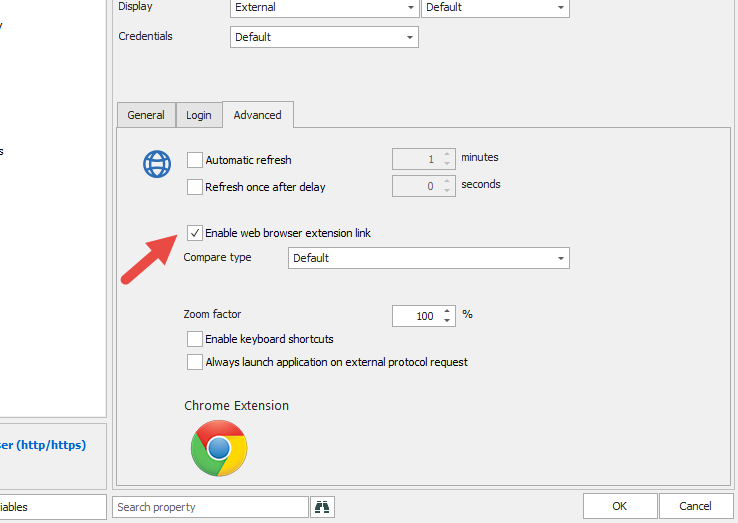
2. Enable web browser extension link wasn't enabled in the session you sent (Advanced tab) make sure you have it checked :
With both these options, I believe it will work for you!
Best Regards,
Etienne Lord
enablewebbrowser.png
All of these settings are in place but I am still being prompted for a password.
Hello,
Would you be able to send a video of the behavior to support@devolutions.net?
Best Regards,
Etienne Lord
I just sent the video
Hello,
I confirm that we received this video, it has been assigned to the agent in charge of your case.
We will contact you as soon as we will have an update on that matter.
Best regards,
James Lafleur