from local machine , to Linux server over Windows jump host

Disabled
Hello
I am struggling with following issue:
I am accessing from my workstation (windows 10) to windows bastion (jump server , win 2016) using public IP , username and password. From this windows jump server I am able to ssh to linux server using username and private key.
My problem is that if I am using private key to access linux server from windows jump server , I need to have private key stored on jump server. And that is not acceptable.
I read many topic regarding agent forwarding , but all guides seems to be focusing just on setup where jump server is also running on Linux...
Is there a way to this using RDM or anything else so I can get to linux instance without storing private key on jump server ?
PS: that jump server has to be running on Windows 2016
Many Thanks.
All Comments (4)
Hello,
How do you establish the connection to the Jump Server? Are you using the RDM Jump feature?
https://help.remotedesktopmanager.com/overview_whatisrdmjump.htm
Best regards,
Jeff Dagenais
Hello
Yes , I am trying to use rdm jump now , but the thing is that every time I open SSH shell session via Jump it will ask me for a username (i do not prefill it ) to my Linux session , and after that it show me banner info (MOTD) , and the session is closed right away.... In activity logs I can see only message : session opened.... I will attach some screens
banner.PNG
gw login.PNG
Hello,
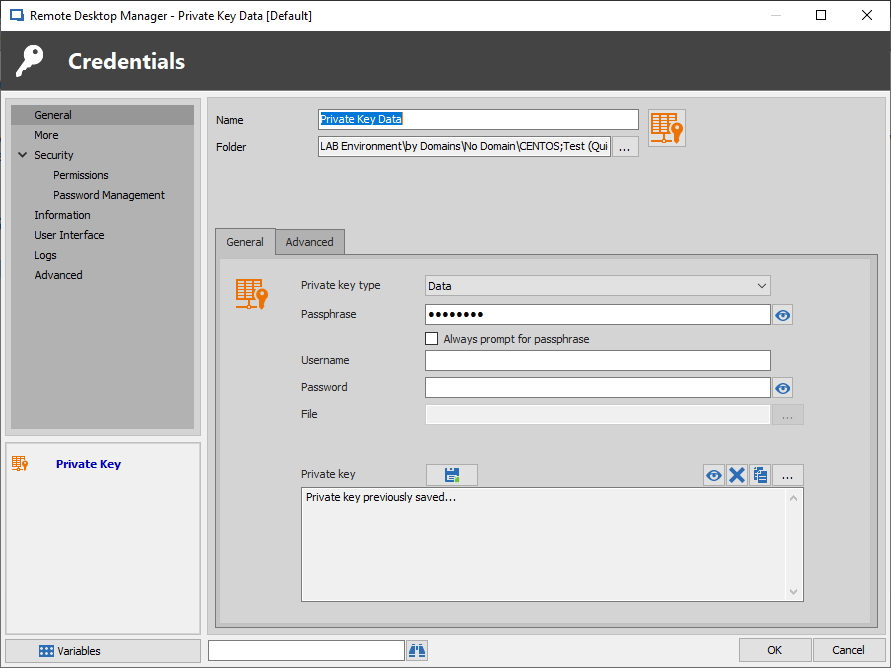
Would it be possible for you to create a Private Key entry in RDM on your Local Host and make sure to select the "Data" type. You will then be able to select the Ellipsis button to save your Private Key directly in your Data Source.
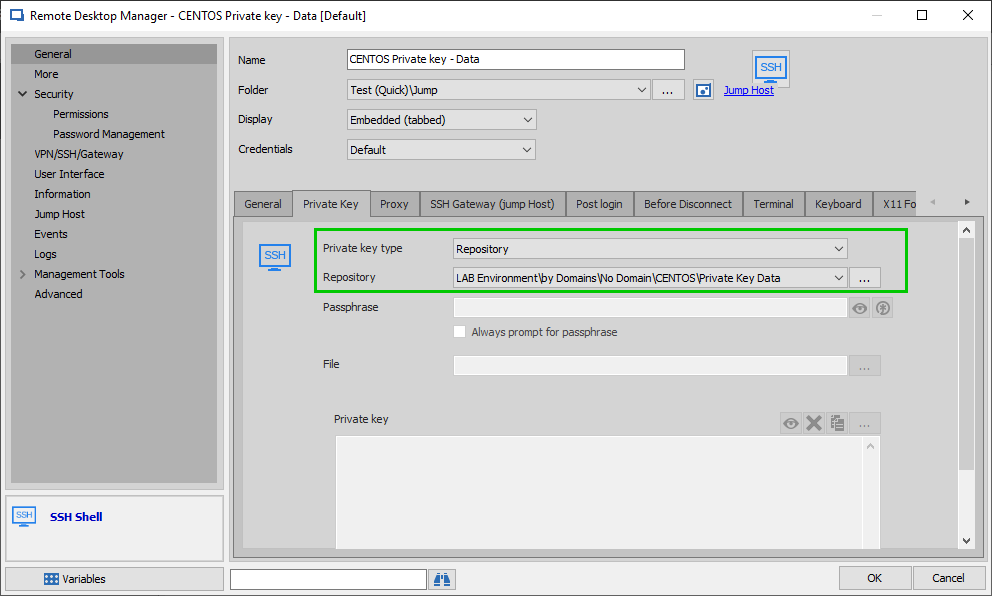
Once it is done, go in the Properties of your SSH Shell, under the "Private Key" tab, select "Repository" as your "Private Key type" and use the ellipsis button next to "Repository" to select your newly created "Private Key" entry
Doing so should allow you to establish your connection to your Linux server without having to store your Private Key on your Jump Host.
Best regards,
James Lafleur
SSHShell.png
PrivateKeyData.png
James,
Thank you very much, it's working the way you described. Appreciate that.
Best Regards.