Connect when avaliable
0 vote

I'm not sure why I never thought of this one, we need a connect when available feature.
Something that could ping non-invasive to current work being performed that perhaps has a taskbar popup or a special icon over the session name in the navigation bar when it's ready to connect (say via a ping or port scan). I often find myself waiting on VM's to reboot and them to become available for RDP so I end up seeing a waiting screen then getting bounced back with no real explanation (I know now from experience). It would also be nice to see the same thing apply for all connectable sessions.
Cheers
All Comments (4)
Hello,
The feature that I would recommand having a look at, is the ping is online feature. The non-available sessions would be displayed in red in the navigation pane.
For more informations, please consult https://help.remotedesktopmanager.com/background-services.htm
Best regards,
Jeff Dagenais
I do indeed utilize this for an at glance monitoring system. This is only applied via a status ping or port scan every 10 minutes for me though (and I realize I can adjust this down, but I've seen more issues).
The idea, if I have to go to the navigation, scroll down, double click on an entry and wait for it to spin and connect - I then look at any of my other five monitors and look back to see that not only has it not connected but there's no reason why. Did it have a firewall issue? Maybe I didn't double click it? Things like that can go through your head and waste time double checking things.
This would be the same idea, but just a right click special option, connect when available that monitors silently in the background. A great example of this would be server maintenance with VMware ESXi. I love to monitor my console via iDRAC during firmware updates but I also like to check that the hypervisor is good before placing it back into production which means that my SSH session will close automatically and then I'll have to keep clicking it and hoping it has booted fully. The monitoring would eliminate this and enable us to concentrate on other tasks while waiting on a connection to come up.
I hope this makes more sense.
Hello,
I have transferred your message to our engineering department so that they can have a look at your request.
Best regards,
Jeff Dagenais
Hello,
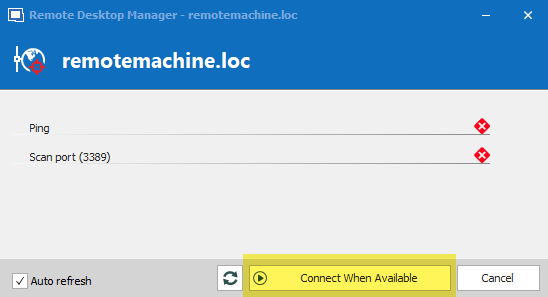
If you select your entry, in the dashboard in the Macro/Script/Tools tab there is a "check is online" button. When you click it, you have the following window:
If you press "connect when available", it will wait until the port is available to open the entry.
Is this what you want, or am I misunderstanding your scenario?
Regards,
Hubert Mireault
2019-04-12_8-50-02.png