RealVNC vs UltraVNC

I have an old Windows 7 machine that (for whatever reason) I can only connect to using RealVNC. If I try to connect to that same computer using UltraVNC, I get an error 'No supported authentication methods'. If I connect using RealVNC, it connects just fine.
With that in mind ... I was trying to add this connection to Remote Desktop Manager. When adding a VNC session, I can only choose between 'Default' or 'UltraVNC'. I assume that if I select 'Default' it will use my default VNC app (which is RealVNC). Selecting 'Default' from the drop-down changes the icon to the RealVNC icon. However when I try to connect using Remote Desktop Manager I get an error 'Unable to connect to host xxx!'. If I try switching the drop-down to UltraVNC, I get 'No supported authentication methods'.
I don't really care why I am unable to connect using UltraVNC. However, I do need RealVNC to work through Remote Desktop Manager. It works on its own, but when I initiate it through Remote Desktop Manager I get the 'Unable to connect to host' error. Any idea why?
All Comments (3)
Hello,
You would need to set the display setting to "External", from there you will be able to choose RealVNC.
Best Regards,
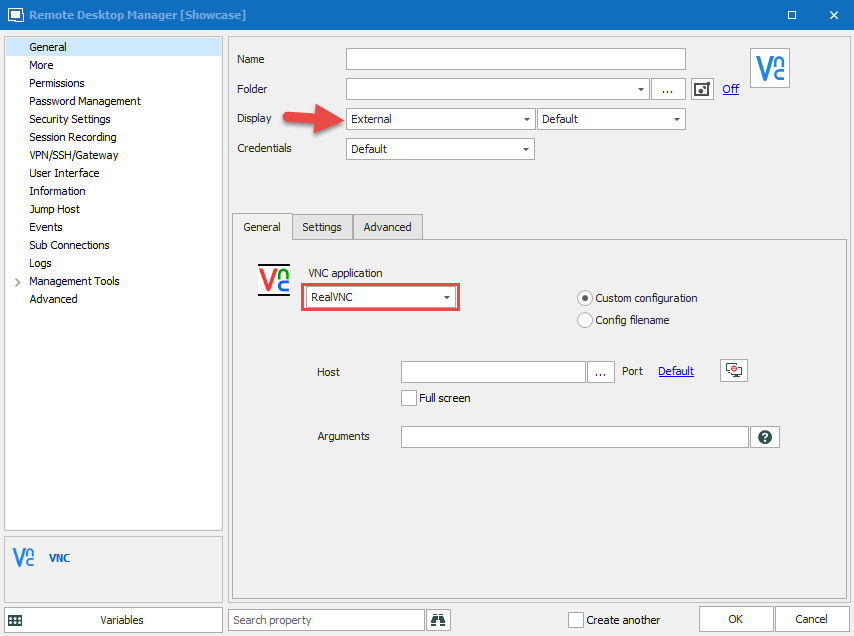
Etienne Lord
realvnc.png
Excellent, that worked!
Any way to get it to remember the password? RealVNC launches, but I have to enter the password every time it connects.
(Whereas if I just launched RealVNC and double-clicked on my shortcut, it would connect using the saved password)
Hello,
You can export you configuration file, then with the "Config Filename" option checked, you can specify that configuration file. That should enter your password.
Best Regards,
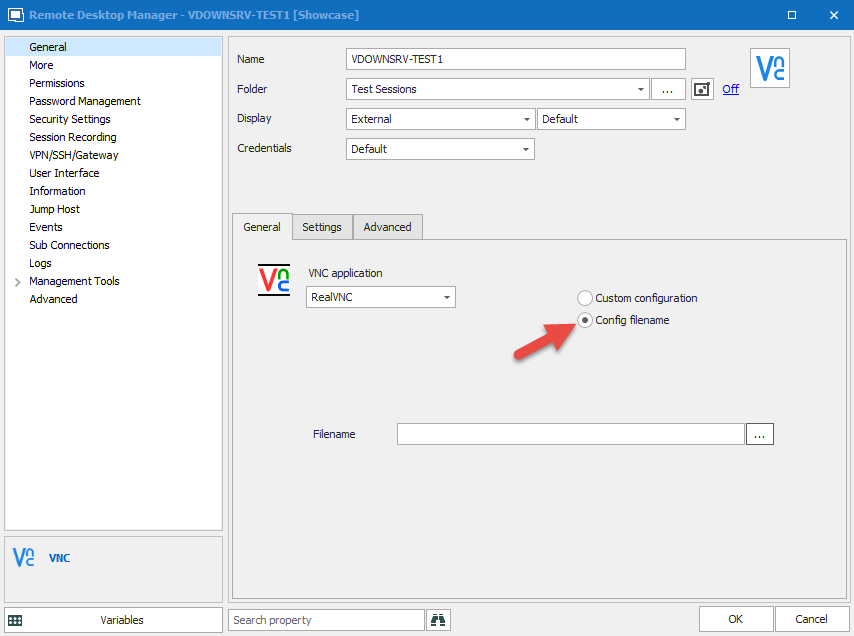
Etienne Lord
realvnc.png