Quick Connect to multiple servers
0 vote
Hi Team,
Sometimes I may want to RDP to multiple servers at once and it would be nice if I can simply copy and paste the names of the list of servers into the Quick Connect field and just have it RDP to each server one by one.
I do not want to save the RDP entries, as I do not normally connect to these servers. I already have a lot of entries saved and I want to keep it clean.
--------------------------------------------------------------------------------------------------------------------
I'm always using the latest beta RDM x64 version.
Local data source.
All Comments (22)
Hello,
We could use the ; as separator. What do you think?
Regards
David Hervieux
Hi David,
Yes, that will work fine.
--------------------------------------------------------------------------------------------------------------------
I'm always using the latest beta RDM x64 version.
Local data source.

Disabled
Hello,
The possibility to Quick Connect to multiple servers has been added.
It will be included in the next release of RDM.
Best regards,
Sorry, one more request to extend this a bit further.
Is it possible to do something like this in the Quick Connect field:
server01~server55
So it connects from server01 all the way to server55?
--------------------------------------------------------------------------------------------------------------------
I'm always using the latest beta RDM x64 version.
Local data source.
This will be a low priority for now.
Regards
David Hervieux
also, I've noticed that if you enter in a server name in capital letters, then Quick Connect will treat the whole string as a single hostname. For example:
server1;server2 ----> works
SERVER1;SERVER2 -----> Treated as "SERVER1;SERVER2" and this fails to connect.
--------------------------------------------------------------------------------------------------------------------
I'm always using the latest beta RDM x64 version.
Local data source.
Hello,
This isn't intended behavior, we'll take a look.
Regards,
Hubert Mireault
Sorry, just adding one more request to this.
Sometimes, I don't want to use a template and want to use e.g. Keepass to access the servers. The current implementation allows me to connect to multiple servers, but each server connection will prompt me to select a Keepass entry. If the servers I'm connected to are completely different servers in a different domain, then sure this is the behaviour I'd expect. But if I'm connecting to 5 servers on the same domain, I just want to select the Keepass entry just once and let all the servers use this.
Is it possible to add a tickbox for something like "use this credential for the rest of the server connections"?
--------------------------------------------------------------------------------------------------------------------
I'm always using the latest beta RDM x64 version.
Local data source.
Hello,
That's a good idea, we should be able to add an option like that, we'll add it to our todo.
As for the issue with capital letters, we haven't been able to reproduce. Is it possible for you to test on a different machine or with the portable version of RDM (the zip file)? I'm wondering if a setting we haven't noticed may be causing the issue.
Regards,
Hubert Mireault
Regarding the capital letters, I think you can ignore this for now. Currently, it works if I don't use capital letters. It might actually be beneficial for me to keep this behaviour as is, because who knows, maybe there may be a server with an actual name like "SERVER;1" and I will be able to connect to it using the capital letters.
--------------------------------------------------------------------------------------------------------------------
I'm always using the latest beta RDM x64 version.
Local data source.
Hmm, I can't seem to Quick Connect to multiple servers even when not using capital letters. Here's what I'm using:
xa19vda03;xa19vda09
I also tried this:
xa19vda03; xa19vda09
Tested on a brand new installation of RDM with no existing configs or settings.
--------------------------------------------------------------------------------------------------------------------
I'm always using the latest beta RDM x64 version.
Local data source.
Interesting, with your example host names I'm able to reproduce the issue. We'll take a look at what's causing it.
Regards,
Hubert Mireault
Disabled
Hello chaoscreater,
We found out the issue and we fixed it.
It will be included in the next release of RDM.
Regards,
In addition to the request above, could you please also allow quick connect to multiple servers using the following format:
xa01vda01 ~ xa01vda10
Which will basically connect from server 01~10.
--------------------------------------------------------------------------------------------------------------------
I'm always using the latest beta RDM x64 version.
Local data source.
Hello,
We'll add it to our feature request list but we can't give you an estimate on when we'll be implementing it at the moment.
Regards,
Hubert Mireault
Hi Hubert,
It has been 3 months since the last reply. Just wondering if this feature will be added soon? I.e connect to multiple servers in one go using the following format:
server01~server10
--------------------------------------------------------------------------------------------------------------------
I'm always using the latest beta RDM x64 version.
Local data source.
Hello,
This is still on our todo list, but we'll raise the priority.
Regards,
Hubert Mireault
Hello chaoscreater,
We have added an option to allow range open in "File > Options > User Interface > Quick Connect"
The format is: [host][begin_number]~[end_number]
Examples:
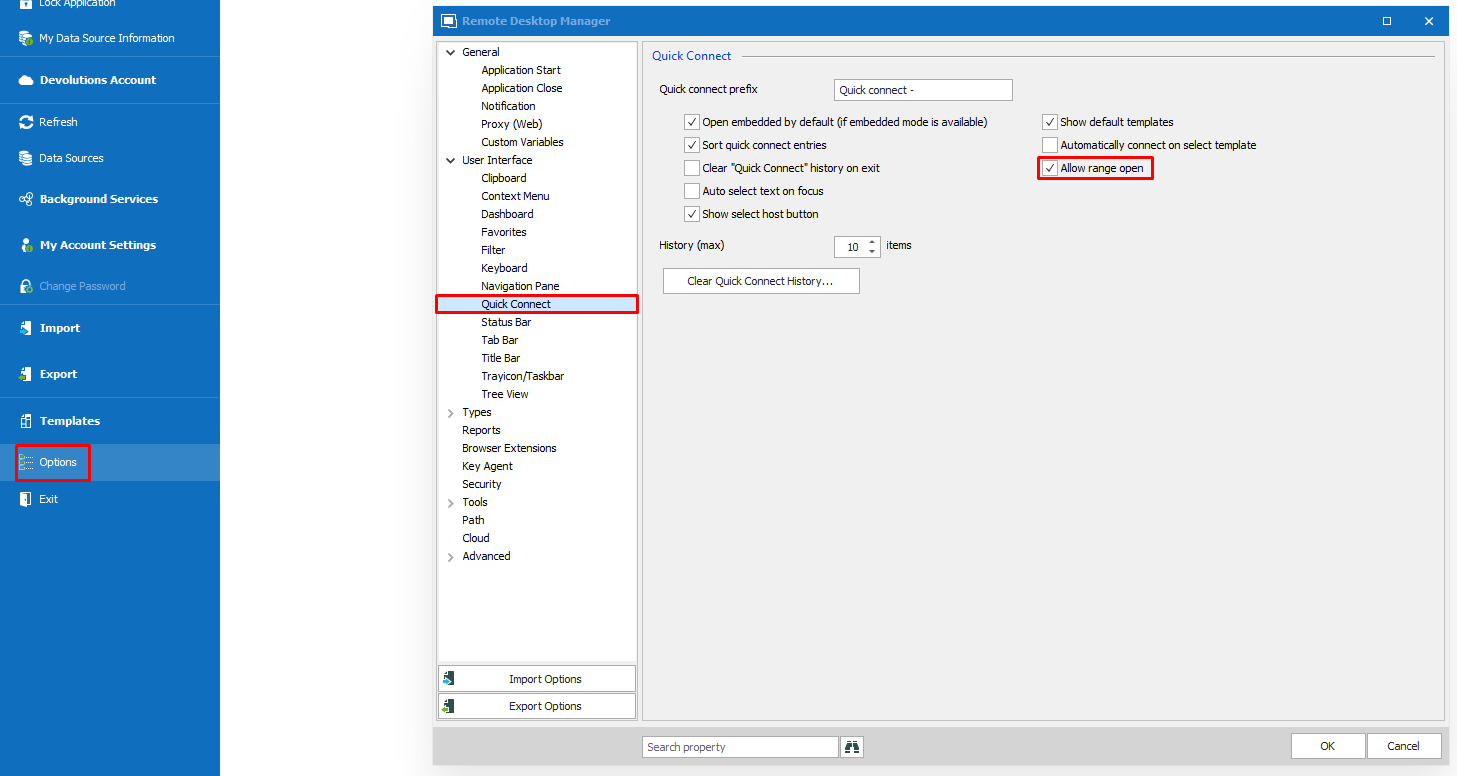
All changes will be effective in the next update (2019.1.41.0)
Regards,
Gabriel Dubois
AllowRangeOpen1.png
I tested this option of connecting using host1~10, but it prompted credentials for each one, is there a way so it would log in using the same credentials on all of them at once?
Hello,
It would be possible to launch your Quick Connect sessions with a template containing your credentials.
First, you will want to create your template, under File > Templates > Templates. Make sure the template is of the same type as the type of session you wish to use and enter your credentials in it.
Once that is done, you will be able to launch Quick Connect sessions with this new template by first clicking on the second button in the Quick Connect bar and selecting your template.
Let me know if you have any additional questions on this matter!
Best regards,
Gabriel Degrandpré
Hey there, thanks for your answer, I'll take a look, the other question would be, every month there's a list of servers that I need to connect to, they send me a .txt file with the hosts, is there a way to import this .txt so I can connect to these hosts at once? I've seen the playlist option but I would need to create each entry first and then make a playlist would be kind impractical since it will change, thanks!!
Hello,
It would be possible to launch your Quick Connect sessions with a template containing your credentials.
First, you will want to create your template, under File > Templates > Templates. Make sure the template is of the same type as the type of session you wish to use and enter your credentials in it.
Once that is done, you will be able to launch Quick Connect sessions with this new template by first clicking on the second button in the Quick Connect bar and selecting your template.
Let me know if you have any additional questions on this matter!
Best regards,
Hello Jairon,
Thank you for contacting us on that matter!
What I would recommend is to convert the .txt file that you receive into a CSV file. Once this is done, it can be easily imported in RDM by following the steps listed here: https://help.remotedesktopmanager.com/importcsv_strategies.html
Doing so will give you access to your connections and save allow you to save time.
Best regards,
James Lafleur